
Internet and Telecom
The Role of Digital Infrastructure in Driving Business GrowtH


Introduction
As the world becomes more digitally driven, businesses need to stay ahead of the curve by investing in robust digital infrastructure. Digital infrastructure is not just about having a website or an online presence; it’s much more than that. It encompasses every aspect of digital technology that supports business operations, from cloud computing to data analytics and cybersecurity. In this blog post, we’ll explore how digital infrastructure plays a critical role in driving business growth and why companies cannot afford to ignore its importance in today’s fast-paced environment. So buckle up and let’s dive into the world of digital infrastructure!
What is digital infrastructure?
Digital infrastructure refers to the hardware, software, and networks that enable the delivery of digital services. This includes everything from data centers and cloud services to broadband networks and mobile devices. It is the foundation upon which businesses can deliver digital products and services to their customers.
Digital infrastructure is critical for businesses looking to capitalize on the growing number of consumers who are moving online for their shopping, entertainment, and communication needs. A strong digital infrastructure enables businesses to reach these consumers with a fast, reliable, and secure experience. It also allows businesses to scale their operations quickly and efficiently to meet the demands of the market.
There are many factors to consider when building or improving digital infrastructure. Businesses must first assess their current infrastructure and identify any gaps or weaknesses. They then need to develop a plan for how to fill those gaps and improve upon their strengths. The type of business, its size, and its markets will all dictate the specific components that make up its digital infrastructure.
Once a plan is in place, businesses need to invest in the right hardware, software, and networks. They also need to ensure that their staff is properly trained on how to use these new tools and technologies. Finally, they need to monitor their digital infrastructure constantly to ensure that it is performing up to standards and making the most impact for their business growth.

The benefits of digital infrastructure
Digital infrastructure is critical for businesses to be able to operate and grow in today’s digital world. It provides the foundation for businesses to be able to connect with customers and partners, transact business, and drive growth.
There are many benefits of digital infrastructure for businesses. It can help businesses save time and money, increase efficiency, and improve customer satisfaction. Additionally, it can help businesses tap into new markets and reach new customers.
Digital infrastructure can help businesses save time and money by automating tasks and processes. Additionally, it can help businesses increase their efficiency by providing them with real-time data and insights. Additionally, digital infrastructure can improve customer satisfaction by providing them with a more convenient and personalized experience.
Digital infrastructure can also help businesses tap into new markets and reach new customers. By connecting businesses with new technologies, digital infrastructure can help businesses expand their reach and find new opportunities for growth.
The challenges of digital infrastructure
Digital infrastructure refers to the hardware and software components that enable a business to use digital technologies. It includes everything from computer servers and networking equipment to applications and data storage.
While digital infrastructure is critical for businesses to adopt and leverage digital technologies, it can also be a challenge to manage and maintain. Businesses need to ensure that their digital infrastructure is always up-to-date, secure, and scalable to meet their ever-changing needs.
There are many factors to consider when managing digital infrastructure, such as:
1. Cost: Digital infrastructure can be costly to implement and maintain. Businesses need to carefully consider their investment in order to get the most bang for their buck.
2. Security: With digital infrastructure comes increased security risks. Businesses need to have strong security measures in place to protect their data and systems from cyber attacks.
3. Maintenance: Digital infrastructure requires constant maintenance and updates in order to keep up with the latest technologies. This can be time-consuming and resource-intensive for businesses.
4. Flexibility: As businesses grow and change, so too must their digital infrastructure. It needs to be able to adapt and scale quickly to meet the changing needs of the business.
How to overcome the challenges of digital infrastructure
Digital infrastructure plays a critical role in enabling businesses to drive growth. However, there can be challenges associated with digitizing business processes and implementing digital infrastructure. Here are some tips on how to overcome these challenges:
1. Define the business case for digital transformation.
2. Assess your current digital capabilities.
3. Create a roadmap for digital transformation.
4. Implement change management processes.
5. Monitor and optimize your digital transformation journey.
Conclusion
As businesses continue to strive for greater success, digital infrastructure is a key component of that journey. By leveraging the power of the Internet, cloud computing and other technologies, companies can streamline their operations, reduce costs and make better use of resources. Additionally, by investing in modern IT systems and strategies such as analytics and automation, businesses can stay ahead of the curve in an increasingly competitive market. Ultimately, understanding how digital infrastructure supports business growth will help ensure future success for any organization wishing to remain competitive on the global stage.
Author


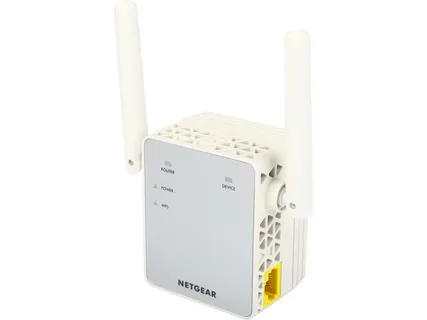
A Netgear Wi-Fi extender is an excellent device for improving wireless coverage in areas where your router’s signal is weak. Whether you are using a Netgear Nighthawk extender, AC series extender, or any other Netgear range extender, accessing the login page is essential for setup, configuration, troubleshooting, and firmware updates. If you are having trouble accessing your Netgear WiFi extender or need assistance with setup and login, you can contact technical support for guidance.
In this guide, we will explain how to log in to a Netgear WiFi extender, common login issues, and troubleshooting steps to ensure a smooth experience.
Need to Log In to Your Netgear Wi-Fi Extender
Logging in to your Netgear Wi-Fi extender allows you to:
- Configure wireless settings
- Change the extender’s network name (SSID)
- Update firmware
- Manage security settings
- Connect the extender to a new router
- Troubleshoot connectivity issues
- Monitor connected devices
Without accessing the extender’s dashboard, many advanced features and settings remain unavailable.
Requirements Before Logging In
Before attempting to log in to your Netgear Wi-Fi extender, make sure you have the following:
- A properly powered-on Netgear Wi-Fi extender
- A computer, laptop, smartphone, or tablet
- Access to the extender’s Wi-Fi network
- A compatible web browser such as Chrome, Firefox, Edge, or Safari
- The extender login credentials
If you encounter any difficulties during the login process, you may call for assistance.
Log In Through MyWiFiExt.net
The easiest and most common method is using the Netgear local web address.
Step 1: Connect to the Extender Network
Turn on your Netgear extender and wait for the power LED to become stable.
Connect your device to the extender’s Wi-Fi network. The network name typically appears as:
- NETGEAR_EXT
- NETGEAR_EXT_5G
- Custom SSID configured during setup
Step 2: Open a Web Browser
Launch your preferred web browser and enter the address in the URL bar.
Step 3: Access the Login Page
The Netgear extender login page should appear. Enter your administrator credentials.
Typically:
- Username: admin
- Password: password
If you changed the credentials during setup, use your customized login information.
Step 4: Access the Dashboard
You will be redirected to the Netgear extender dashboard, where you can manage all settings and configurations.
Log In Using the Extender IP Address
Sometimes, the MyWiFiExt.net page may not load. In such situations, use the extender’s IP address.
Common Netgear Extender IP Addresses
Depending on your model, the default IP address may be:
- 192.168.1.250
- 192.168.0.250
Login Steps
- Connect to the extender network.
- Open a web browser.
- Enter the extender’s IP address in the address bar.
- Press Enter.
- Enter your administrator username and password.
- Access the management dashboard.
How to Log In After Initial Setup
Once your extender has been configured, you can access it at any time.
Follow these steps:
- Connect your device to the extender network.
- Open a browser.
- Visit MyWiFiExt.net or the assigned IP address.
- Enter the admin credentials.
- Click Login.
You can now manage all extender settings.
What to Do If MyWiFiExt.net Is Not Working
Many users encounter issues when trying to access MyWiFiExt.net. Here are some effective solutions.
Verify Network Connection
Ensure your device is connected directly to the Netgear extender and not the primary router.
Restart the Extender
Power off the extender.
Once the LEDs stabilize, try logging in again.
Try Another Browser
Browser-related issues can sometimes prevent access.
Try:
- Google Chrome
- Mozilla Firefox
- Microsoft Edge
- Safari
Clear Browser Cache
Old browser cache and cookies may interfere with the login page.
Clear the browser data and reload the page.
Use the IP Address Instead
If MyWiFiExt.net fails, use the extender’s IP address to access the login page.
How to Reset Login Credentials
If you forgot your administrator password, you may need to reset the extender.
Reset Procedure
- Locate the Reset button on the extender.
- Press and hold it for approximately 10 seconds.
- Release the button when the LEDs begin blinking.
- Wait for the device to reboot.
The extender will return to factory default settings.
You can then log in using:
- Username: admin
- Password: password
After resetting, you must configure the extender again.
Updating Netgear Extender Firmware
Firmware updates help improve security, performance, and stability.
Update Steps
- Log in to the extender dashboard.
- Navigate to Settings.
- Select Firmware Update.
- Check for available updates.
- Install the latest firmware version.
- Wait for the update to complete.
Do not disconnect power during the update process.
Common Login Errors and Solutions
Login Page Not Opening
Possible causes:
- Incorrect network connection
- Browser issues
- Wrong IP address
Solution:
- Verify the connection.
- Try another browser.
- Use the extender IP address.
Incorrect Username or Password
Solution:
- Re-enter credentials carefully.
- Use password recovery options if available.
- Perform a factory reset if necessary.
Slow Dashboard Loading
Solution:
- Restart the extender.
- Improve Wi-Fi signal strength.
- Update firmware.
Extender Keeps Disconnecting
Solution:
- Relocate the extender closer to the router.
- Check for interference from electronic devices.
- Install firmware updates.
Best Practices for Secure Extender Access
To keep your network secure:
- Change the default administrator password.
- Use a strong Wi-Fi password.
- Keep firmware updated.
- Enable WPA2 or WPA3 security.
- Review connected devices regularly.
- Disable unauthorized access.
These steps help protect your network from potential security threats.
Conclusion
Logging in to a Netgear Wi-Fi extender is a straightforward process when you follow the correct steps. Whether you use MyWiFiExt.net or the extender’s IP address, accessing the management dashboard allows you to configure settings, update firmware, improve performance, and troubleshoot connectivity issues.
If you experience problems with login, setup, password recovery, firmware updates, or connectivity, professional assistance is available at +1-872-777-1190 or 1-833-800-3030. With proper configuration and maintenance, your Netgear Wi-Fi extender can provide reliable wireless coverage throughout your home or office.
Author

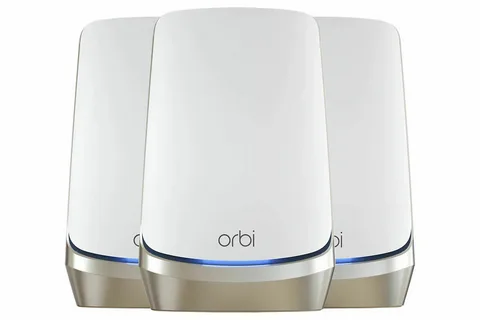
Netgear Orbi router are widely used for delivering fast, reliable, and seamless Wi-Fi coverage throughout homes and offices. Whether you want to change your Wi-Fi password, update firmware, manage connected devices, or adjust security settings, accessing the Orbi router login page is the first step.
This guide explains how to log in to your Netgear Orbi router, troubleshoot common login issues, and manage important router settings with ease.
What Is the Netgear Orbi Router Login?
The Netgear Orbi router login portal is a web-based interface that allows users to configure and manage their network settings. By logging in, you can:
- Change Wi-Fi names (SSIDs)
- Update wireless passwords
- Set up parental controls
- Configure guest networks
- Check connected devices
- Update router firmware
- Optimize security settings
Accessing the router dashboard only takes a few minutes when you follow the correct steps.
Requirements Before Logging In
Before attempting to log in to your Netgear Orbi router, make sure you have:
- An Orbi router connected to power.
- A device such as a computer, smartphone, or tablet.
- A connection to the Orbi network (wired or wireless).
- Your router login credentials.
The default login details are often:
- Username: admin
- Password: password
If you changed these credentials during setup, use your customized login information instead.
Instructions to Log In
Step 1: Connect to the Orbi Network
First, connect your device to the Orbi network.
You can connect using:
- Wi-Fi connection
- Ethernet cable
Ensure your device is connected directly to the Orbi network before proceeding.
Step 2: Open a Web Browser
Launch any modern web browser, including:
- Google Chrome
- Mozilla Firefox
- Microsoft Edge
- Safari
A supported browser helps ensure the login page loads correctly.
Step 3: Enter the Router Address
In the browser’s address bar, type:
- orbilogin.com
- orbilogin.net
You may also use the default IP address:
- 192.168.1.1
- 192.168.0.1
Press Enter to continue.
Step 4: Enter Login Credentials
When the login page appears:
- Enter your username.
- Enter your password.
- Click Log In.
After successful authentication, you will be directed to the Orbi administration dashboard.
Change Your Orbi Wi-Fi Password
Once logged in, changing your Wi-Fi password is straightforward.
- Navigate to Wireless Settings.
- Locate the Wi-Fi password field.
- Enter a new strong password.
- Save the changes.
- Reconnect all devices using the new password.
For better security, create a password that includes:
- Uppercase letters
- Lowercase letters
- Numbers
- Special characters
How to Update Orbi Firmware
Firmware updates help improve security, performance, and stability.
To update firmware:
- Log in to the Orbi dashboard.
- Select Advanced.
- Click Administration.
- Choose Firmware Update.
- Check for available updates.
- Install the latest firmware version.
Do not unplug the router during the update process.
How to View Connected Devices
The Orbi dashboard allows you to monitor devices connected to your network.
To check connected devices:
- Log in to the router.
- Open Attached Devices.
- Review the device list.
You can identify:
- Smartphones
- Computers
- Smart TVs
- Gaming consoles
- IoT devices
Monitoring connected devices helps improve network security and performance.

Orbi Login Problems and Solutions
Login Page Not Loading
If the login page does not open:
- Verify that the router is powered on.
- Confirm you are connected to the Orbi network.
- Try another browser.
- Clear browser cache and cookies.
- Use the router’s IP address instead of the web address.
Incorrect Username or Password
If login credentials are rejected:
- Check for typing errors.
- Ensure Caps Lock is off.
- Use the most recent credentials you created.
If you cannot remember the password, you may need to reset the router.
Router Connection Issues
If your device cannot connect to the Orbi network:
- Restart the router.
- Restart your device.
- Move closer to the router.
- Verify network settings.
A simple reboot often resolves temporary connection issues.
How to Reset a Netgear Orbi Router
If you are locked out of your router, a factory reset may be necessary.
Steps:
- Locate the Reset button on the router.
- Press and hold it for approximately 10 seconds.
- Wait for the router to restart.
- Reconfigure the router using default settings.
After a reset, all customized settings will be erased.
Security Tips for Orbi Users
To keep your network secure:
Change Default Credentials
Never leave the default administrator password unchanged.
Enable Automatic Firmware Updates
Automatic updates help protect against emerging security threats.
Use Strong Passwords
Avoid simple passwords such as:
- 12345678
- password
- admin123
Choose complex and unique credentials.
Enable Guest Networks
Provide visitors with guest network access rather than sharing your primary network credentials.
Regularly Review Connected Devices
Remove unknown devices immediately if they appear on your network.
Benefits of Managing Your Orbi Router
Regularly accessing your Orbi router dashboard provides several benefits:
- Improved network security
- Better Wi-Fi performance
- Faster troubleshooting
- Enhanced parental controls
- Optimized device management
Routine maintenance ensures your network remains stable and secure.
Need Help With Orbi Router Login?
Before contacting support, have the following information ready:
- Router model number
- Firmware version
- Description of the issue
- Login error messages (if any)
This information can help speed up troubleshooting and resolution.
Conclusion
Logging in to your Netgear Orbi router is an essential task for managing your home or office network. By accessing the router dashboard, you can customize Wi-Fi settings, strengthen security, update firmware, and monitor connected devices. Following the steps outlined in this guide will help you access your Orbi router quickly and resolve common login problems efficiently.
Regular router maintenance and security updates will ensure optimal performance and a safer networking experience for all connected devices.
Author

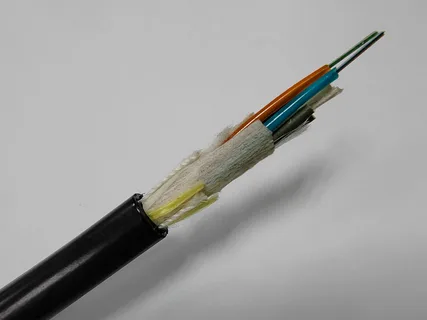
As businesses and homes become more dependent on fast and stable internet connections, the importance of reliable networking infrastructure continues to grow. While routers, switches, and networking devices often receive the most attention, the cable connecting these systems plays an equally important role. This is where armoured cables make a significant difference.
In many environments, standard networking cables simply cannot provide the durability needed for long-term performance. Outdoor installations, industrial facilities, warehouses, construction sites, and security systems expose cables to harsh conditions that can quickly damage ordinary wiring.
Designed with additional protective layers, these cables offer enhanced durability, superior protection, and consistent data transmission. As a result, they have become a preferred choice for professional networking projects in 2026.
Growing Need for Stronger Networking Solutions
Today’s networks must support increasing amounts of data while maintaining uninterrupted connectivity. Businesses rely on stable internet connections for communication, cloud services, surveillance systems, and daily operations. Likewise, homeowners expect seamless connectivity for streaming, gaming, remote work, and smart home devices.
However, environmental factors can easily disrupt network performance. Moisture, extreme temperatures, physical impact, rodents, and sunlight often damage conventional cables. Frequent repairs and replacements not only increase costs but also cause network downtime.
To address these challenges, organizations increasingly invest in armoured cables that provide long-term protection and dependable performance.
What Makes Armoured Cables Different?
Unlike standard networking cables, armoured cable include an additional protective layer surrounding the internal conductors. This layer shields the cable from external damage while maintaining excellent signal quality.
The reinforced construction helps protect against:
- Physical impact
- Crushing pressure
- Rodent attacks
- Water exposure
- Abrasion
- Environmental wear
- Accidental cable cuts
Because of this extra protection, armoured cables perform exceptionally well in demanding environments where traditional cables may fail.
Perfect for Outdoor Installations
Outdoor networking presents unique challenges. Rain, humidity, temperature fluctuations, dust, and direct sunlight constantly threaten cable performance. An armoured cable is specifically designed to handle these conditions. Its rugged structure allows it to maintain stable connectivity even when exposed to harsh weather for extended periods.
Many organizations use outdoor armoured cables for:
- Security camera systems
- Outdoor Wi-Fi networks
- Campus networking
- Factory connections
- Warehouse communications
- Industrial monitoring systems
By choosing a cable designed for outdoor use, businesses can significantly reduce maintenance requirements while ensuring reliable network performance.

Enhanced Protection Against Physical Damage
One of the biggest advantages of armoured cable is their ability to withstand physical stress. In industrial environments, cables often run through areas with heavy equipment, vehicle traffic, and constant movement. Without adequate protection, cables can become damaged, resulting in costly repairs and network interruptions.
Armoured cables help prevent these issues by providing a strong protective barrier. This additional durability allows them to perform reliably in environments where ordinary networking cables would quickly deteriorate. Consequently, businesses can minimize downtime and improve overall operational efficiency.
Reduced Signal Interference
Network performance depends on more than physical protection. Signal quality also plays a critical role in maintaining stable connections. Electrical equipment, industrial machinery, and power systems can generate electromagnetic interference that disrupts network signals. This interference often causes slower speeds, data loss, and connection instability.
Many armoured networking cables include shielding technology that helps block unwanted interference. Shielded designs maintain cleaner signal transmission and improve overall network reliability. As a result, organizations operating in electrically noisy environments can benefit from more consistent and dependable connectivity.
Importance of Pure Copper Conductors
While cable protection is essential, conductor quality remains equally important. High-quality networking cables typically use pure copper conductors because copper provides excellent electrical conductivity. Compared to lower-grade alternatives, copper supports faster data transmission and more efficient power delivery.
Pure copper conductors offer several advantages:
- Improved signal quality
- Faster network speeds
- Reduced energy loss
- Better heat management
- Longer cable lifespan
For businesses seeking reliable networking infrastructure, pure copper armoured cables represent an excellent long-term investment.
Supporting High-Speed Networking Requirements
These cables are commonly used in:
- Corporate offices
- Educational institutions
- Manufacturing facilities
- Smart homes
- Data-intensive environments
By combining speed and durability, armoured networking cables provide the performance required for today’s increasingly connected world.
UV Resistance Extends Cable Lifespan
Sunlight can cause serious damage to standard networking cables over time. Prolonged exposure to ultraviolet radiation often weakens cable jackets, leading to cracks and performance issues. UV-resistant armoured cables address this problem by incorporating materials specifically designed to withstand sunlight exposure.
These cables are ideal for:
- Rooftop installations
- Outdoor surveillance systems
- Solar energy networks
- Building-to-building connections
- Industrial outdoor environments
Because they resist environmental degradation, UV-protected cables maintain their integrity and performance for much longer periods.
Ideal for Industrial and Commercial Applications
Industrial facilities require networking solutions that can perform under challenging conditions. Heavy machinery, electrical equipment, moisture, and constant movement create an environment where ordinary cables struggle to survive.
Armoured networking cables provide the durability necessary for these demanding applications. Their reinforced construction helps maintain network stability while protecting critical communications infrastructure.
Commercial environments also benefit from armoured cable installations. Retail centers, office complexes, warehouses, and educational campuses often require dependable networking systems that can support long-term growth without frequent maintenance.
Cost Savings Through Long-Term Reliability
Although armoured cables may have a higher initial cost than standard alternatives, they often provide significant long-term savings.
Their durable construction reduces the likelihood of damage, minimizing repair expenses and replacement costs. Additionally, fewer network interruptions help improve productivity and operational efficiency.
When businesses evaluate total ownership costs rather than initial purchase prices alone, armoured cables frequently prove to be the more economical choice.
Conclusion
As networking demands continue to grow, selecting the right cable has become more important than ever. Armoured cables offer the durability, protection, and performance required for modern networking applications in both residential and commercial environments.
Their ability to withstand harsh weather, physical impact, electromagnetic interference, and environmental challenges makes them a reliable solution for outdoor and industrial installations. Furthermore, features such as pure copper conductors, shielding technology, and UV resistance enhance overall network performance and longevity.
Whether supporting security systems, outdoor Wi-Fi networks, industrial communications, or high-speed business infrastructure, armoured networking cables deliver dependable connectivity while reducing maintenance concerns.
For organizations and individuals seeking stable, long-lasting network performance in 2026 and beyond, investing in high-quality armoured cables remains one of the smartest decisions they can make.
Author



White Label Services: A Smart Way for Agencies to Scale Faster

Visa Cost Calculator: Your Travel Budget with Accurate Visa Fee

Kaftan Sets for Women: Effortless Luxury Fashion for Modern Style

Endmill Tool Storage & Maintenance: Practices for CNC Machining

Baseball History: Era Gaps Matter More Than Numbers

Private Limited Company Compliance: OPC, LLP, AIF & Taxation

Micro needling: RF, PRP, Exosomes, and Custom Treatments

SAP Consulting: Digital Transformation for Modern Enterprises

Percentage to CGPA Calculator: Guide to Converting Grades

PC Bottleneck: Complete Guide to Optimizing System Performance

Cybersecurity Consulting Company SequelNet Provides Critical IT Support Services to Medical Billing Firm, Medical Optimum

Team Communication Software Transforms Operations at Finance Innovate

Project Management Tool Transforms Long Island Business

How Alleviate Poverty Utilized IPPBX’s All-in-One Solution to Transform Lives in New York City

Breast Cancer: The Imperative Role of Mammograms in Screening and Early Detection

Unstoppable Collaboration: D.C.’s Citi Open and Silicon Valley Classic Unite to Propel Women’s Tennis to New Heights

Embracing Renewal: Sizdabedar Celebrations Unite Iranians in New York’s Eisenhower Park

The Benefits of Starting a Side Hustle for Financial Freedom

New Blood Donation Screening Questions What You Need to Know

Stylishly Timeless: The 5 Types of Sandals You Need in Your Closet
-

 Business3 years ago
Cybersecurity Consulting Company SequelNet Provides Critical IT Support Services to Medical Billing Firm, Medical Optimum
-
Business3 years ago
Team Communication Software Transforms Operations at Finance Innovate
-
Business3 years ago
Project Management Tool Transforms Long Island Business
-
Business3 years ago
How Alleviate Poverty Utilized IPPBX’s All-in-One Solution to Transform Lives in New York City
-
health3 years ago
Breast Cancer: The Imperative Role of Mammograms in Screening and Early Detection
-
Sports3 years ago
Unstoppable Collaboration: D.C.’s Citi Open and Silicon Valley Classic Unite to Propel Women’s Tennis to New Heights
-
Art /Entertainment3 years ago
Embracing Renewal: Sizdabedar Celebrations Unite Iranians in New York’s Eisenhower Park
-
Finance3 years ago
The Benefits of Starting a Side Hustle for Financial Freedom







