
Technology Explained
IFA 2023: The Best New EV Products Worth Checking Out

IFA 2023: The Best New EV Products Worth Checking Out
When you think of the IFA trade fair in Berlin, you probably associate it with the latest consumer electronics innovations. However, this year, the event took an unexpected turn, becoming a platform for the unveiling of groundbreaking electric vehicle (EV) charging and power solutions. This shift indicates the gradual integration of EVs into the mainstream market, as non-automotive tech companies showcased their commitment to the electric future. In this article, we’ll explore the most notable EV-related revelations from IFA 2023, focusing on Baseus and MSI’s impressive EV chargers.
EV Charging Goes Mainstream: IFA 2023 Highlights
IFA 2023 brought forth a significant revelation – power bank companies are entering the EV charging solution market, a clear sign of EVs’ growing presence in our daily lives. Among the standout releases were Baseus and MSI’s remarkable EV chargers, both designed to make electric vehicle ownership more convenient and accessible.
Baseus EV Charger: The Nebula Series Green GaN
Baseus, renowned for its chargers and power banks for handheld devices, surprised the IFA 2023 audience by introducing its first-ever EV charger, the Nebula Series Green GaN. Despite its pedigree in mobile technology, Baseus’ entry into the EV charging realm is anything but ordinary.
Key Features of the Baseus EV Charger:
| Feature | Description |
|---|---|
| Low Idle Consumption | Efficient energy use even during downtime |
| Water-Resistance | An IP55 rating ensures durability |
| Remote Connectivity | Control your charger from anywhere |
| 5G Capability | Stay connected with lightning-fast 5G |
| Maximum Charging Speed | 3.3 kW for quick and convenient home charging |
The Nebula Series Green GaN EV Charger is not just efficient; it’s designed for the future. With a maximum charging speed of 3.3 kW, it qualifies as a Level 2 charger suitable for installation in your garage. Baseus ensures that your EV will be in good hands, with features like low idle consumption, robust heat dissipation, and IP55 water resistance.


Image by https://www.makeuseof.com/
MSI EV Charger: Smart and Speedy
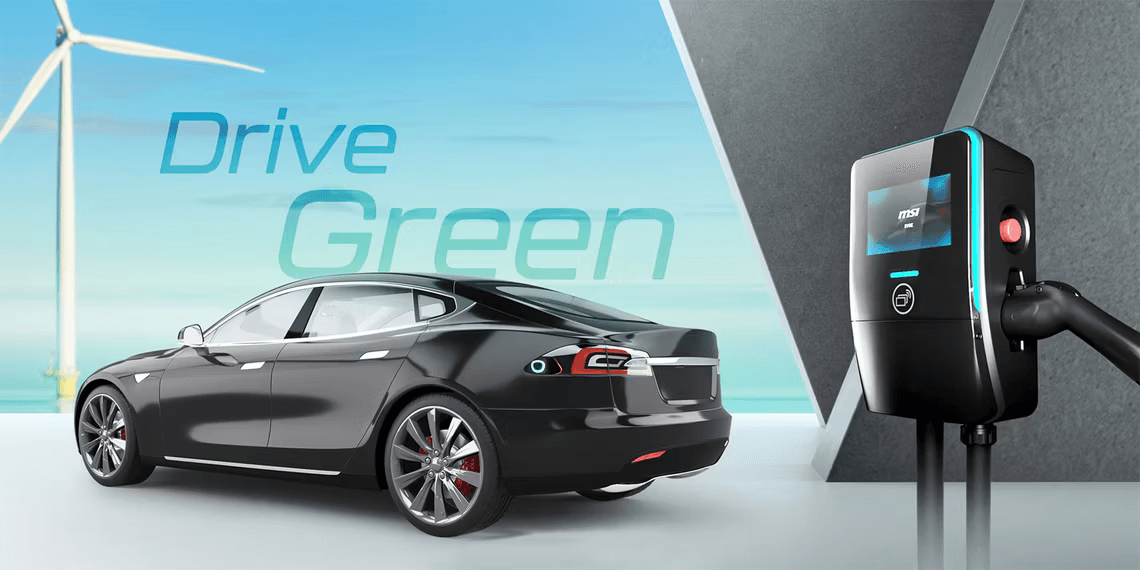
MSI, a household name in computer components, showcased its commitment to the electric revolution with the MSI Smart EV Charger. First unveiled at CES 2023 and now making its European debut at IFA 2023, this charger offers impressive capabilities for EV owners.
Key Features of the MSI EV Charger:
| Feature | Description |
|---|---|
| Maximum Charging Power | 14.4 kW at 60 amps for rapid charging |
| Compatibility | Works with Type 1 and Type 2 plugs |
| User-Friendly Interface | A 7-inch screen provides charging information |
| AI-Powered License Reader | Integrated into the accompanying mobile app |
| Durability | Dust- and water-resistant with IP55 rating |
MSI’s Smart EV Charger is designed to impress. With a maximum charging power of 14.4 kW, it can add up to 62 miles (100 kilometers) of range to your EV in just one hour. It supports both Type 1 and Type 2 plugs, and its user-friendly interface, including a 7-inch screen, allows for convenient control and monitoring. Plus, its AI-powered license plate reader adds an extra layer of security and functionality to your charging experience.
Anker Solix F3800: A Portable Power Solution
Anker, a well-known provider of power banks, took a unique approach at IFA 2023 by introducing a portable power solution for EVs. The Anker Solix F3800 is not your typical garage charger; it’s designed for on-the-go convenience.
Key Features of the Anker Solix F3800:
| Feature | Description |
|---|---|
| Affordability | Priced at $999 for accessibility |
| Battery Capacity | Equipped with a 3.84 kWh battery |
| Charging Versatility | Compatible with grid or solar panel charging |
| Portability | Ideal for emergency EV charging away from home |
Anker’s Solix F3800 offers a versatile and cost-effective solution for EV owners. With a 3.84 kWh battery, it can be charged from the grid or solar panels, making it a reliable power source for your EV wherever you go. Whether you’re close to home or in need of a rescue from a low battery, this portable unit has got you covered.
Powering the Future: The Rise of EV-Compatible Solutions
As the electric vehicle market continues to expand, the demand for efficient charging solutions grows in tandem. It’s no surprise that companies experienced in providing power solutions are eager to enter the EV charging arena. The future of EV readiness is looking promising, with a diverse range of products available, ensuring you’ll find the perfect fit for your needs.
In conclusion, IFA 2023 has proven that the electric vehicle revolution is gaining momentum, with tech giants like Baseus, MSI, and Anker stepping up to meet the charging demands of the future. As more EVs hit the road, these innovative solutions will play a vital role in keeping them charged and ready to go.
About the Author: Andrei Nedelea
Andrei Nedelea is an automotive enthusiast and tech aficionado with a passion for all things electric. With years of experience in the industry, he’s dedicated to providing insights into the latest innovations in the world of EVs and beyond.
Readers like you help support MUO. When you make a purchase using links on our site, we may earn an affiliate commission. Read More.
In this article, we’ve delved into the exciting world of EV charging solutions presented at IFA 2023. The future of EV readiness is brighter than ever, with Baseus, MSI, and Anker leading the way. These innovative products are reshaping the EV landscape, offering convenience, efficiency, and affordability to electric vehicle owners. As the electric vehicle revolution continues, stay tuned for more groundbreaking developments in the world of EV technology.
Author


In today’s highly competitive digital world, businesses are constantly searching for smarter ways to reach potential customers quickly and effectively. Email marketing remains one of the most powerful channels for direct communication, offering high ROI and measurable results. If your business is looking to expand into the Baltic region, a Latvia Email List can be the perfect solution to connect with the right audience and grow your customer base.
Latvia, known for its fast-growing economy, strong tech sector, and strategic location in Northern Europe, offers excellent opportunities for international businesses. With the help of a verified Latvia email database, companies can reach decision-makers, professionals, entrepreneurs, and consumers in this thriving market. This article explores what a Latvia Email List is, its benefits, how businesses can use it, and why it is essential for successful marketing campaigns.
What is a Latvia Email List?
A Latvia Email List is a database containing email addresses and contact details of individuals and businesses located in Latvia. These lists are often categorized by industry, profession, location, or business type, making it easier for marketers to target the right group.
A high-quality Latvia email list may include:
-
Business email addresses
-
Consumer email contacts
-
Company names
-
Contact person names
-
Job titles (CEO, Manager, Director, etc.)
-
Phone numbers
-
Industry classifications
-
Geographic segmentation (Riga, Daugavpils, Liepaja, etc.)
With such detailed information, businesses can run highly targeted marketing campaigns and improve lead conversion rates.
Why Latvia is a Growing
Latvia has become an attractive destination for international trade and investment. It is part of the European Union, making it a gateway for businesses wanting access to EU markets.
Key industries in Latvia include:
-
Information Technology
-
Manufacturing
-
Logistics and Transportation
-
Finance and Banking
-
Retail and E-commerce
-
Tourism and Hospitality
The country’s strong digital infrastructure and business-friendly environment make it ideal for companies looking to expand in Europe.
Using a Latvia Email List allows businesses to tap directly into these industries and connect with potential clients.
Benefits of Using a Latvia
1. Targeted Marketing Campaigns
A Latvia email database helps you reach the exact audience you want. Whether you’re selling software, financial services, or consumer products, you can target contacts based on industry or job role.
This improves engagement and ensures your marketing message reaches the right inbox.
2. High ROI and Cost-Effective Outreach
Email marketing is far more affordable than traditional advertising methods like TV, print, or billboards. With a verified Latvia email list, businesses can run campaigns at a low cost while generating strong returns.
3. Faster Lead Generation
Instead of spending months building contacts from scratch, purchasing or accessing a Latvia email list provides immediate access to thousands of potential leads. This accelerates the sales procedure and boosts revenue possibilities.
4. Increased Brand Awareness in Latvia
Expanding into a new market requires strong visibility. Regular email campaigns help your business build recognition and trust among Latvian consumers and businesses.
5. Better Business Networking
A Latvia business email list is valuable not only for marketing but also for partnerships, collaborations, and B2B networking. You can connect with suppliers, distributors, or corporate clients efficiently.
Who Can Benefit from a Latvia?
A Latvia email list is useful for a wide range of industries and business types, including:
-
Digital marketing agencies
-
E-commerce businesses
-
Software and IT service providers
-
Real estate companies
-
Travel and tourism agencies
-
Financial institutions
-
Export and import companies
-
Event organizers
-
Educational institutions
Whether you are a startup or a multinational corporation, having access to Latvia-based contacts can help you scale faster.
How to Use a Latvia Effectively
Segment Your Audience
Don’t send the same email to everyone. Divide your list into smaller segments such as:
-
Industry type
-
Company size
-
Location
-
Job title
-
Consumer vs. business contacts
Segmentation increases open rates and conversions.
Create Personalized Email Campaigns
Personalization is key. Use the recipient’s name, company, or industry in your email content. Personalized emails feel more relevant and drive stronger engagement.
Promote the Right Offers
A Latvia email list can be used for:
-
Product launches
-
Business promotions
-
Newsletters
-
Event invitations
-
Special discounts
-
Service updates
-
B2B proposals
Make sure your offer matches the audience’s needs.
Ensure Compliance with GDPR
Latvia, as an EU member, follows GDPR regulations. Always ensure that your email campaigns comply with privacy laws, including opt-out options and ethical marketing practices.
Features of a High-Quality Latvia Email List
Not all email lists provide the same value. A reliable and effective Latvia email list should be:
-
Verified and accurate
-
Updated regularly
-
Free from duplicate emails
-
Segmented by niche or industry
-
GDPR-compliant
-
Containing real decision-maker contacts
Choosing a trusted provider ensures better campaign success and protects your brand reputation.
Choose a Verified Latvia Business Email
Using an outdated or unverified email list can lead to high bounce rates, spam complaints, and wasted marketing budget. A verified Latvia email database ensures:
-
Higher deliverability
-
Better response rates
-
Stronger lead quality
-
Improved campaign performance
Businesses that invest in quality data achieve faster growth and better marketing results.
Conclusion
A Latvia Email List is an essential tool for businesses looking to expand into the Latvian market and connect with targeted customers or corporate decision-makers. With Latvia’s growing economy and strategic role in the European Union, the demand for direct and effective marketing channels is increasing.
By using a verified and well-segmented Latvia email database, businesses can generate leads faster, boost sales, improve brand visibility, and build long-term relationships in one of Europe’s most promising markets. If you want to maximize your marketing success, investing in a high-quality Latvia email list can be a game-changer for your business growth.
Author


Author


Slow Load Times on Mobile Devices
Ohio State’s primary website loads in just 2.3 seconds on a mobile device. Conversely, Columbus State’s website loads in 8.7 seconds. Given that 73% of prospective students use smartphones to browse, that’s not just slow, it’s a death sentence for admissions.
The Solution: Any reputable web design company in Columbus will tell you that mobile-first design is no longer up for discussion. Pages should be designed to load in 3 seconds or less, forms should be usable with a thumb, and navigation should be designed to be thumb-friendly. CCAD (Columbus College of Art and Design) just redesigned their web site using all of these principal’s and their applications started increasing 34% since the redesign.
Invisible in local search results
If you enter “colleges around Columbus” on a search engine (Google), you will see Ohio State as the only college that shows up. However, when searching for community colleges and other specialised institutions, you will find these institutions ranking around page 3 or lower for their named programs.
The problem: No GMB (Google My Business) optimization. Franklin University even fails to fully claim their GMB listing. Their address is commonly listed as “temporarily closed.”
The Solution: Create and then optimize all campus addresses through both Google and business directory listings. Include photographs, create labels to respond to people reviewing your school, and post recent updates relating to the available enrollment periods. You want colleges to be able to locate you locally first when a prospective student types in “nursing programs Columbus” and you are visible in the map section.
Content That Converts Students
Most institutions write their college websites in an academic style. They use high-density paragraphs about “excellence of the institution” and “a transformative learning experience.” When students are looking for information, they are looking for answers to questions such as how long it will take to complete the program, how much it will cost, and will there be any job opportunities upon completion.
For example, Otterbein University’s nursing website includes 847 words of content; however, it does not include the starting salary for a graduate until paragraph six. A competing institution’s website leads with, “96% job placement rate with an average starting salary of $65,000.”
Solution: answer the money questions up front and create program pages that convert:
- Job placement rates (with 3rd party sources).
- Graduate’s average starting salaries.
- Total program cost (not just tuition).
- Time to complete the program.
- Prerequisite information listed in plain English
Technical SEO Disasters
Most of the Columbus, Ohio college websites fail to meet the industry’s minimum criteria for Search Engine Optimization (SEO), which lead to decreased rankings in all search engines.
The common issues we found include:
1. Broken internal links.
2. Missing alt tags on images.
3. Duplicate content across program pages (Capital University has 23 pages with the same meta description).
Some additional key technical issues that hamper the rankings on all college websites include:
1. No schema markup for either program or location.
2. Slow server response times.
3. Missing SSL certificate on multiple application forms.
4. Broken mobile navigation for multiple programs.
5. No local business structured data to support citation and rankings.
These common technical issues are far more than technical; they are also killing your rankings. Google cannot recommend college’s websites to its visitors if those sites are not accessible to Google through its crawler or can be understood once crawled.
The Death of Enrollment Forms
67% of potential students who fill out inquiry forms at Columbus colleges are lost at the inquiry stage. Why does this happen? Schools are using inquiry forms that require up to 15 fields when 4 would suffice, not having mobile-optimized inquiries, and having broken “Submit” buttons. Delaware County Community College cut their inquiry form from 12 fields down to only 3 fields, resulting in an 89% increase in inquiries over 2 months.
Successful Examples of Results
Columbus State Community College worked with an SEO Services Columbus that specializes in local search engine optimization and experienced the benefits:
- 156% more traffic through organic search
- 43% additional program inquiries
- Increased performance in local search results for targeted programs
Their formula for success: a mobile-first redesign, aggressive optimization of their Google My Business profile across their campuses, and totally answering students’ questions using quality content.
To sum it up
Ohio colleges have to compete against Arizona and Florida Colleges’ web-based programs with better web pages and better collegiate leads search engine optimization, so there’s no longer a local marketplace for Columbus schools to get their students from.
It’s really easy to fix the problem. You’ll need to work with a web design company who understands education marketing, and to do that, you need to optimize the site for local search and generate content that gets visitors to apply. Your competitors are already doing this, and if you wait to make decisions about how many more students you will lose to your competitors.
If you are ready to improve your school’s web presence, do a technical audit, make your mobile experience priority, and claim local search results. In a competitive educational environment, your website is more than marketing, it’s your enrollment engine!
Author



AI Workflow Automation: Smarter Processes for Businesses

Same Day Dentist Appointment Near Me: Emergency Dentistry

Professional Courier Service Tracking: Visibility You Can Trust

Living Room Window Curtains: Smart, Sustainable, and Stylish

Bus Rental for Party: Is It Worth the Cost? A Complete Breakdown

Cloud Infrastructure Management: How to Stop Downtime Cold

Marty Supreme Yellow & White Varsity Jacket: Iconic Style

Price Capital Group: Florida Commercial Real Estate Investment

Comme des Garcons Japan: Fashion and Timeless Design

Shop for Sale in Bahria Town Lahore: Commercial Investment

Cybersecurity Consulting Company SequelNet Provides Critical IT Support Services to Medical Billing Firm, Medical Optimum

Meet the Megalodon: The Shark Star of ‘Meg 2’

Reduce Video Game Lag: Level Up Your Gaming Performance

Balancing India’s Entertainment: Cricket vs. Bollywood

Jetsetter’s Secrets: Unveiling Our Favorite Travel Hacks for a Seamless Adventure

The 5 Best Live Sports Streaming Sites: Legal and Exciting!

Hollywood Labor Unrest: The Impact of ‘What About Us?’ Strikes

Unveiling the Magic of Dream Fulfillment at the Late NBA Draft

Illuminate Your Skin: Dr. Axe Unveils Natural Remedies for Lightening Knees and Elbows

Bright Choices: Navigating the Pros and Cons of Skin Whitening Creams with Dr. Axe
-

 Business3 years ago
Cybersecurity Consulting Company SequelNet Provides Critical IT Support Services to Medical Billing Firm, Medical Optimum
-
Entertainment3 years ago
Meet the Megalodon: The Shark Star of ‘Meg 2’
-
Entertainment3 years ago
Reduce Video Game Lag: Level Up Your Gaming Performance
-
 Sports3 years ago
Balancing India’s Entertainment: Cricket vs. Bollywood
-
Entertainment3 years ago
Jetsetter’s Secrets: Unveiling Our Favorite Travel Hacks for a Seamless Adventure
-
Productivity3 years ago
The 5 Best Live Sports Streaming Sites: Legal and Exciting!
-
Art /Entertainment3 years ago
Hollywood Labor Unrest: The Impact of ‘What About Us?’ Strikes
-
Sports3 years ago
Unveiling the Magic of Dream Fulfillment at the Late NBA Draft






