Connect with us

Technology

Reliance beats profit estimates thanks to energy and retail gains

Published

on

Reliance Industries Limited, a conglomerate based in Mumbai, India, has reported better-than-expected profits for the first quarter of the 2021-2022 financial year. The company, which is headed by India’s richest man, Mukesh Ambani, has attributed the earnings to gains in its energy and retail divisions.

According to a statement released by the company, Reliance’s net profit for the quarter ending June 30, 2021, was INR 12,273 crore ($1.6 billion), up 7.2% from the same period last year. The company’s revenue rose by 58% year-on-year to INR 1.44 lakh crore ($19.3 billion), while its earnings before interest, taxes, depreciation, and amortization (EBITDA) increased by 26.8% to INR 26,661 crore ($3.5 billion).

Reliance’s energy business, which includes oil refining and petrochemicals, saw a significant increase in profits due to higher product prices and strong demand. The segment’s EBITDA rose by 42.6% year-on-year to INR 8,436 crore ($1.1 billion). The company’s retail division, which operates over 12,000 stores across India, also performed well, with its EBITDA increasing by 123.6% year-on-year to INR 3,617 crore ($480 million).

The company’s digital services arm, Jio Platforms, also contributed to its profits, with its EBITDA rising by 45.6% year-on-year to INR 8,892 crore ($1.2 billion). Jio Platforms, which includes the mobile network operator Jio and several digital apps, has seen strong growth in recent years and has attracted significant investment from companies like Facebook and Google.

Reliance’s performance in the first quarter of the financial year is particularly notable given the challenges posed by the COVID-19 pandemic. India, like many other countries, has seen significant disruptions to its economy and businesses, with lockdowns and social distancing measures impacting operations.

Advertisement

However, Reliance has been able to weather the storm and even thrive in some areas, thanks in part to its diversified portfolio of businesses. The company has also been proactive in adapting to the changing environment, for example, by expanding its online offerings and launching new products and services.

Reliance’s success is also a reflection of its founder’s vision and leadership. Mukesh Ambani, who took over the reins of the company from his father, has been instrumental in its transformation from a textile manufacturer to a diversified conglomerate. Ambani has been particularly focused on digital and retail, investing heavily in these areas to position Reliance for long-term growth.

However, challenges remain for Reliance and other companies in India. The country is still grappling with the COVID-19 pandemic, and the outlook for the economy is uncertain. There are also concerns about rising inflation and the impact of rising oil prices on Reliance’s energy business.

Nevertheless, Reliance’s strong performance in the first quarter of the financial year is an encouraging sign for the company and its investors. The conglomerate’s diversified portfolio and focus on digital and retail could position it well for the future, even as it faces obstacles in the present.

Author

Continue Reading
Advertisement

Productivity

Commercial Ice Cream Machine for Sale: Boost Dessert Sales

Published

on

Commercial Ice Cream Machine

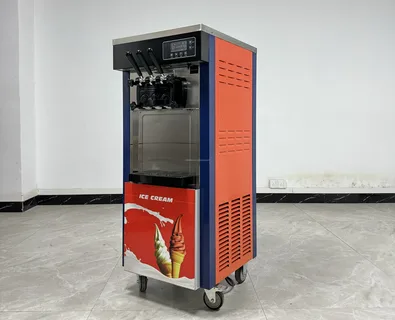
The frozen dessert industry continues to grow rapidly as more customers look for refreshing and delicious treats throughout the year. Owning a café, restaurant, food truck, catering service, or dessert shop means that purchasing a top-notch ice cream machine for sale can greatly enhance your business efficiency and profits. A commercial ice cream machine allows you to serve fresh, creamy soft serve ice cream efficiently while attracting more customers and increasing repeat business.

Choosing the right machine is essential because it directly impacts product quality, customer satisfaction, and operational efficiency. Modern commercial ice cream machines are designed for high performance, durability, and ease of use, making them a valuable addition to any food service business.

Commercial Ice Cream Machine

Adding ice cream to your menu is one of the easiest ways to boost profits. Frozen desserts are popular among customers of all ages, and soft serve ice cream has become a staple product in many restaurants and cafés. A commercial ice cream maker available for purchase enables businesses to create uniform, premium desserts while minimizing preparation time and labor expenses.

Commercial ice cream machines are specifically built to handle high customer demand. Unlike domestic models, they can operate continuously during busy periods while maintaining smooth texture and flavor consistency. This makes them ideal for businesses that serve large numbers of customers daily.

Another advantage of investing in a commercial machine is the ability to expand your menu. You can offer classic soft serve cones, sundaes, milkshakes, frozen yogurt, and specialty desserts. This variety helps attract more customers and increases overall sales opportunities.

Advertisement

Features to Look for in an Ice Cream Machine

Before purchasing a Commercial Ice Cream Machine, it is important to understand which features will best suit your business needs. Different models offer different capabilities, so choosing the right one can improve efficiency and long-term value.

High Production Capacity

Production capacity is one of the most important factors when selecting a machine. Businesses with high customer traffic require machines capable of producing large quantities of ice cream quickly and consistently. A high-capacity machine helps reduce waiting times and improves customer satisfaction during busy periods.

Multiple Flavor Options

Many modern ice cream machines come with dual or triple flavor systems. This allows businesses to offer customers more variety, including mixed flavor combinations. Offering multiple flavors can increase sales because customers enjoy having more choices.

Durable Construction

Commercial kitchen equipment must withstand constant use. A high-quality ice cream machine for sale is usually made from durable stainless steel components that are easy to clean and maintain. Strong construction ensures the machine performs reliably for years.

Energy Efficiency

Energy-efficient machines help reduce electricity consumption while maintaining excellent performance. This is especially important for businesses aiming to lower operational costs without compromising productivity.

Advertisement

Easy Cleaning and Maintenance

Hygiene is essential in any food business. Machines with user-friendly cleaning systems save time and ensure proper sanitation. Easy maintenance also reduces downtime and extends the lifespan of the equipment.

Commercial Ice Cream Machine

Businesses That Benefit

Commercial ice cream machines are versatile and can benefit many different types of businesses. Restaurants can add profitable dessert options to their menus, while cafés can attract more customers during warmer seasons. Dessert shops can specialize in frozen treats, and catering businesses can provide unique dessert experiences at events and functions.

Food trucks and mobile vendors also benefit from soft serve machines because frozen desserts are highly popular at festivals, outdoor events, and tourist attractions. Even entertainment venues and family centers use ice cream machines to increase food sales and improve customer experiences.

A reliable ice cream machine for sale can help businesses create additional revenue streams while enhancing their brand image.

The Growing Demand for Soft Serve Ice Cream

Soft serve ice cream remains one of the most profitable dessert products worldwide. Customers appreciate its creamy texture, refreshing taste, and affordability. Businesses benefit because soft serve has relatively low ingredient costs while delivering high profit margins.

Seasonal demand for frozen desserts often increases during warmer months, but many businesses successfully sell ice cream throughout the year. Customers frequently purchase desserts alongside meals, making soft serve an excellent upselling opportunity.

Advertisement

Modern consumers also enjoy customization options such as toppings, syrups, and flavor combinations. With the right machine, businesses can create unique dessert offerings that stand out from competitors.

Tips for Choosing the Right Supplier

When purchasing commercial equipment, choosing a trusted supplier is just as important as selecting the machine itself. Reliable suppliers provide quality products, warranties, customer support, and maintenance assistance. Before buying, consider the supplier’s reputation, product quality, and after-sales service.

A professional supplier will help you select the best machine based on your business size, expected demand, and operational requirements. Investing in quality equipment from a trusted source reduces the risk of breakdowns and ensures long-term performance.

Final Thoughts

Investing in a high-quality ice cream machine for sale is a smart decision for businesses looking to expand their menu, increase profits, and improve customer satisfaction. Commercial ice cream machines provide fast, reliable, and efficient production while allowing businesses to serve delicious frozen desserts consistently.

Whether you run a restaurant, café, dessert shop, or catering company, the right machine can help you grow your business and stand out in a competitive market. By choosing durable, energy-efficient, and easy-to-maintain equipment, you can ensure long-term success while delivering exceptional desserts your customers will love.

Advertisement

Author

Continue Reading

Technology

Protect PDF Online Free: Secure PDF Files Easily

Published

on

Protect PDF Online Free

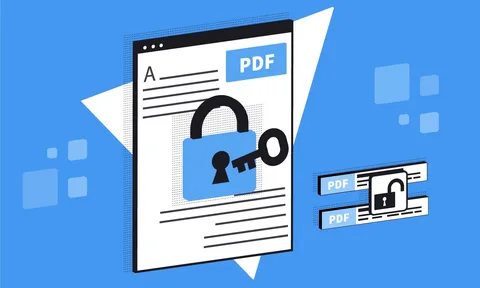
Whether you’re sharing a contract, a business proposal, or a personal document, knowing how to protect PDF online free is one of the smartest digital habits you can build. PDF protection keeps your content safe from unauthorized editing, copying, and distribution all without spending a single cent when you use the right tools. It also ensures document integrity, enhances privacy, and allows users to securely share files across different platforms while maintaining full control over access and permissions.

Understanding PDF Protection Basics

What does it mean to protect a PDF file?

Protecting a PDF means applying security restrictions to the document so that only authorized users can open, edit, copy, or print it. There are two primary Protect PDF Online Free layers: password protection, which locks the file entirely, and permission restrictions, which allow viewing but block specific actions like copying text or printing pages.

Open password and a Permissions password

An open password (also called a user password) prevents anyone from viewing the file without entering the correct credentials. A permissions password (or owner password) allows the file to be opened freely but restricts what viewers can do with it, such as editing content, extracting images, or printing at high resolution.

Protect PDF online using web-based tools

The majority of trustworthy online tools handle your file in a safe, encrypted setting and remove it from their servers soon after the conversion is complete. That said, for highly sensitive documents  such as legal agreements or medical records  you may want to use a trusted desktop application or verify the platform’s privacy policy before uploading.

Add Password Protection to a PDF

Add a password to a PDF 

You can protect PDF online free using tools available directly in your browser  no installation required. Simply visit a reliable online PDF tool, upload your file, set your desired password, and download the secured version. The entire process typically takes under a minute.

Can I protect a PDF on my phone or tablet?

Yes, most browser-based PDF protection tools are mobile-friendly and work seamlessly on smartphones and tablets. As long as you have a stable internet connection and a modern browser, you can secure a PDF from any device without needing to install an app.

Advertisement

What password strength should I use for a protected PDF?

A strong PDF password should be at least 8–12 characters long and combine uppercase and lowercase letters, numbers, and symbols. Avoid using birthdays, names, or common words, as these are easily guessed. The stronger your password, the harder it is for unauthorized users to break the encryption.

Protect PDF Online Free

PDF Permission Restrictions and Encryption

What permissions can I restrict when I protect a PDF?

When you protect PDF online free, most tools let you restrict a range of actions, including printing, copying text, editing content, adding annotations, and filling in forms. You can apply all restrictions at once or selectively allow certain actions while blocking others, giving you granular control over how recipients interact with your document.

What encryption level is used to protect PDFs?

Modern PDF protection tools typically use 128-bit or 256-bit AES (Advanced Encryption Standard) encryption. Financial institutions and government agencies use the 256-bit AES standard to protect sensitive data, and experts consider it highly secure.

Is it possible to lift PDF restrictions if I’ve lost the password

If you set the protection yourself and remember your password, you can remove restrictions by re-opening the file and using an online tool to decrypt it. However, if you genuinely lose the password, recovery is extremely difficult by design  which is exactly why strong PDF encryption works so effectively as a security measure.

Choosing the Right Online PDF Protection Tool

What should I look for in a free online PDF protection tool?

Look for a tool that supports strong AES encryption, processes files over a secure HTTPS connection, and has a clear data retention policy that states files are deleted after processing. Tools that don’t require account registration are also preferable when handling sensitive documents, since they minimize the digital footprint of your file.

Are there any limitations to using free online PDF protection tools?

Free tools often have file size limits typically ranging from 5 MB to 100 MB per upload and may restrict the number of files you can process per day. For occasional use, these limits are rarely a problem. If you regularly work with large or numerous files, a premium plan or a dedicated desktop tool may better suit your needs.

Advertisement

Conclusion

Taking a few moments to protect PDF online free is a simple yet powerful way to keep your documents out of the wrong hands. Whether you’re locking down a single file or building a habit of securing every document you share, the tools available today make PDF protection fast, accessible, and completely free. Head over to multiconverters.net to protect your PDFs instantly no downloads, no fuss, just reliable security at your fingertips.

Author

Continue Reading

Technology

Roadrunner Authentication Error in Email Apps

Published

on

Roadrunner Authentication Error

Managing email in today’s digital world can feel like a constant balancing act, especially when you rely on legacy services like Roadrunner email. Many users who connect Roadrunner accounts through apps like Mail bird, Outlook, or mobile email clients often run into a frustrating issue: the Roadrunner authentication error.

When authentication fails, your emails stop syncing, passwords get rejected repeatedly, or the app simply refuses to connect. In most cases, this is not a “broken account,” but a mismatch between updated security standards and older login methods. If you need quick help during troubleshooting, Roadrunner support is often reachable at(toll-free).

This guide breaks down why the issue happens and how to fix it step by step.

The “Digital Handshake”

Authentication is like a digital handshake between your email app and Roadrunner’s servers. Your email client says, “I’m authorized to access this inbox,” and the server decides whether to allow or deny access.

Roadrunner (now part of Spectrum’s email infrastructure) increasingly relies on secure authentication methods. Older setups that rely only on a username and password often trigger a Roadrunner Authentication Error because the server now expects secure encrypted login methods. If your settings haven’t been updated in a while, this mismatch is one of the most common causes of login fail.

Advertisement

If you get stuck at any stage, you can contact support for guided assistance.

Common Causes of Roadrunner Authentication Errors

Before fixing the issue, it helps to understand what’s causing it:

Outdated Email Settings: Old IMAP/SMTP configurations may no longer work with updated servers.

Incorrect Password or Username: Even a small typo can block access entirely.

Security Blocking: Suspicious login attempts or VPN usage may trigger Roadrunner’s security filters.

Advertisement

Two-Factor or Account Changes: Any recent security update may require re-verification.

Server Sync Issues: Temporary outages or cache conflicts can break authentication.

Roadrunner Authentication Error

Step 1: Reconnect Using Updated Settings

The first and most effective fix is reconfiguring your account with the correct modern settings.

Remove your Roadrunner account from your email app and add it again as a new account. Avoid manual setup unless necessary.

Use updated configuration details such as:

Incoming Mail (IMAP):

Advertisement
  • Server: typically mail.twc.com or Spectrum-supported IMAP server
  • Port: 993
  • Encryption: SSL/TLS

Outgoing Mail (SMTP):

  • Server: mail.twc.com
  • Port: 587
  • Encryption: STARTTLS

Once re-added, the app should automatically re-establish a secure connection.

If problems persist, you may need assistance from (toll-free Roadrunner support line).

Step 2: Fix Password and Security Conflicts

One of the most common reasons for authentication failure is an outdated or mismatched password.

Reset your Roadrunner password through the Spectrum account portal. After resetting, update it in your email app immediately.

If you are using a manual setup, ensure the new password is entered correctly in both incoming and outgoing server fields.

For persistent login loops, contacting support can help verify whether your account is locked or flagged.

Advertisement

Step 3: Verify Server Settings Carefully

Even small errors in configuration can break email authentication completely.

Double-check the following:

  • IMAP and SMTP server addresses
  • Port numbers (993 and 587 are standard)
  • SSL/TLS encryption enabled

If even one setting is incorrect, the server will reject the connection immediately. Correcting these details often resolves the issue instantly.

Step 4: Clear Cache and Stored Credentials

Sometimes the issue is not the server but your device remembering outdated login data.

Close your email application completely. Then clear stored credentials or cached login data from your system settings.

Reopen the app and re-enter your credentials fresh. This forces a clean authentication attempt with Roadrunner servers.

Advertisement

If the issue continues, you can escalate troubleshooting.

Step 5: Check for Security Blocks

Roadrunner security systems may block access if they detect unusual activity such as:

  • Logging in from a new location
  • Using a VPN
  • Multiple failed login attempts

Log in to your Roadrunner or Spectrum webmail through a browser and check for security alerts. If you see a blocked login notification, confirm “This was me” to whitelist the device.

If you’re unable to clear the block, support(Roadrunner toll-free help line) can manually assist with verification.

Step 6: Disable Antivirus

In some cases, antivirus software or firewall settings may block email authentication.

Temporarily disable your antivirus or email protection feature and try logging in again. If the issue disappears, add your email application to the trusted list.

Advertisement

Once confirmed, re-enable your security software to keep your system protected.

When to Contact Advanced Support

If none of the steps above resolve the issue, the problem may be account-level or server-side. In such cases, reinstalling your email application or resetting your profile can help.

For deeper account-related issues, Roadrunner support is available (toll-free) for real-time troubleshooting and guided fixes.

Final Thoughts

Roadrunner email authentication errors are usually caused by outdated settings, security changes, or device conflicts—not permanent account failure. By updating server settings, refreshing credentials, and ensuring secure login methods, most users can restore access quickly.

Email systems continue to evolve, and keeping your configuration aligned with modern security standards helps prevent Roadrunner Authentication Error issues and ensures smooth, uninterrupted access. And when things get complicated, Roadrunner support is available to help you get back online without delay.

Advertisement

Author

Continue Reading

Readers like you help support Contrank. When you make a purchase using links on our site, we may earn an affiliate commission. Read More.

Advertisement

Trending

Disclaimer:
This blogging site is operated as part of PAEA Foundation Inc. (www.paeafoundation.org), a registered nonprofit organization. All content published here is contributed voluntarily by a global community of over 1,000 writers and content creators who support our mission to foster open knowledge, creativity, and community learning. The views expressed in each post are those of the respective authors and do not necessarily reflect the views of the PAEA Foundation. We do not accept payment for publishing articles and do not engage in commercial content promotion. Our platform is maintained for educational and nonprofit purposes in line with our mission. For inquiries about our nonprofit status or use of this platform under nonprofit licensing (e.g., WHM), please contact us.
Copyright ©2025. Contrank