
Consumer Services
Fix Mailbird Outlook Authentication Error: Step-by-Step Guide

Managing a modern digital life often feels like a balancing act, and email is usually at the center of that chaos. Mailbird has earned its reputation as a premier choice for users who need to juggle multiple accounts—like Gmail, Yahoo, and Outlook—within a single, streamlined interface. However, even the best software hits a snag occasionally. One of the most persistent frustrations for users is the dreaded Outlook authentication error.
When Mailbird fails to connect with Microsoft’s servers, your workflow stops. You might see constant password prompts, “login failed” notifications, or a complete lack of synchronization. These issues are rarely caused by a “broken” app. Instead, they usually stem from evolving security protocols and the complex way third-party clients communicate with Outlook. This guide provides a deep dive into why these errors happen and offers a human-friendly, step-by-step roadmap to fixing them.
Understanding the “Digital Handshake”
In technical terms, authentication is a digital handshake. Mailbird reaches out to Outlook’s servers and says, “I have the keys to this inbox; please let me in.” If the server doesn’t recognize the key or doesn’t like the way Mailbird is “knocking,” it denies access.
In 2026, Microsoft has moved almost entirely toward Modern Authentication (OAuth2). This means the old method of simply entering a username and password is no longer sufficient for many accounts. If your Mailbird setup is even a year old, it might be using an outdated connection method that Microsoft now considers “insecure.” This is the root cause of most authentication headaches today.
Common Culprits Behind the Connection Failure
Before you can fix the problem, you need to identify the “why.” Several factors typically trigger these errors:

-
Two-Factor Authentication (2FA): If you added extra security to your Microsoft account, a standard password will not work in Mailbird without an “App Password.”
-
Stale Security Tokens: Sometimes, the “handshake” data stored on your computer becomes corrupted or expires, leading to a loop of login prompts.
-
Incorrect Port Settings: If you manually configured your account, a single wrong digit in the IMAP or SMTP settings will block the connection.
-
Security Whitelisting: Microsoft’s “SmartScreen” might flag Mailbird as a suspicious login attempt if you recently changed your location or used a VPN.
Step 1: The “Modern” Reconnect (OAuth2)
The most effective way to solve an Outlook authentication error is to stop using manual passwords altogether. Instead, you should use OAuth2. This method opens a secure Microsoft window where you log in directly, and Microsoft then gives Mailbird a “token” to access your mail.
The Fix: First, remove your Outlook account from Mailbird. Go to Settings, select Accounts, and hit Remove. Now, click Add Account. Do not choose “Manual Setup.” Enter your email and let Mailbird’s automatic detection take over. When the Microsoft login window pops up, sign in there. This creates a modern, encrypted connection that bypasses most traditional authentication errors.
Step 2: Dealing with Two-Factor Authentication (2FA)
If you prefer to keep your account on a manual IMAP setup, or if the automatic setup fails, you must account for 2FA. Microsoft’s standard security now requires an App Password for third-party apps that don’t support the full OAuth2 flow.
The Fix: Log in to your Microsoft Account online and navigate to Security. Select Advanced Security Options and look for the section labeled App Passwords. Generate a new code. This is a unique, 16-character string. Go back to Mailbird and paste this code into the password field instead of your usual Outlook password. This tells Microsoft that you have explicitly authorized Mailbird to access your data.
Step 3: Verifying Your Server “Plumbing”
Sometimes the issue is simply a typo in the server settings. If Mailbird is trying to “talk” to the wrong server, the authentication will fail immediately. Ensure your settings match these industry standards:
Incoming Mail (IMAP):
-
Server: imap-mail.outlook.com
-
Port: 993
-
Encryption: SSL/TLS
Outgoing Mail (SMTP):
-
Server: smtp-mail.outlook.com
-
Port: 587
-
Encryption: STARTTLS
If your settings differ from these, update them and restart Mailbird. Even a small change in the encryption type can cause a total sync failure.
Step 4: Clearing the Local Cache
Software can be “forgetful” or, worse, it can remember the wrong things. If Mailbird is stuck in a loop asking for your password, it might be holding onto a “stale” or corrupted cache file.
The Fix: Close Mailbird completely. You may even want to check your Task Manager to ensure no background processes are running. Navigate to your local AppData folder—usually found at C:\Users\[YourName]\AppData\Local\Mailbird. Look for the “Offline” or “Cache” folders and clear their contents. When you restart the app, it will be forced to ask the Outlook server for a fresh, clean connection.
Step 5: Checking for “Silent” Blocks
Microsoft’s security algorithms are aggressive. If you log in to Mailbird while connected to a public Wi-Fi or a VPN in a different country, Microsoft might assume your account is being hacked.
The Fix: Check your phone or your backup email for security alerts. You can also log in to Outlook.com via a web browser and check the “Recent Activity” log. If you see a blocked sign-in attempt that corresponds with your Mailbird app, click the button that says “This was me.” This whitelists your current device and location, allowing Mailbird to pass through the security gate.
Step 6: Antivirus and Firewall Interference
In rare cases, your computer’s security software is the villain. Many antivirus programs include a “Mail Shield” that scans incoming and outgoing traffic. This shield acts as a “middleman” that can sometimes break the encrypted connection between Mailbird and Outlook.
The Fix: Temporarily disable your antivirus or firewall for five minutes. Try to sync your Mailbird account again. If the emails start flowing, you know the antivirus is the problem. You will need to go into your security software settings and add Mailbird as a “Trusted Application” or an “Exception.”
When to Seek Advanced Help
If you have tried every step above and your inbox is still a ghost town, it might be time for a fresh start. Uninstall Mailbird entirely, download the latest version from the official website, and reinstall it. This clears any deep-seated software glitches that might be lingering in your system registry.
For those facing complex enterprise issues—such as Outlook accounts managed by a corporate IT department—you may need to contact your administrator. Some companies disable third-party app access entirely as part of their security policy.
Final Thoughts
Email is the lifeblood of professional and personal communication. When Mailbird and Outlook stop talking to each other, it can feel like a major setback. However, by moving away from old “Basic Authentication” and embracing OAuth2 and App Passwords, you can solve 95% of these issues.
Remember, technology is always evolving. Keeping your software updated and your security settings aligned with modern standards ensures that your “digital handshake” remains firm and secure. With a little patience and the right settings, you can get back to what matters most—communicating clearly and efficiently.
Author



Moving to a new apartment is an exciting milestone, but it can also be one of the most demanding experiences. From packing household belongings to transporting furniture safely, every step requires careful planning and execution. If you’re relocating within Dubai, hiring Professional Apartment Movers in Business Bay can make the entire process faster, safer, and more convenient.
Business Bay is one of Dubai’s most sought-after residential and commercial communities. With its modern apartment towers, busy streets, and strict building regulations, moving in this area requires experience and proper coordination. Professional movers understand these challenges and provide efficient relocation services designed to simplify your move.
Why Hire Professional Apartment Movers?
Apartment moving involves much more than transporting boxes from one location to another. Professional movers handle every stage of the relocation process, reducing stress while protecting your belongings.
Some of the key benefits include:
- Safe packing of fragile and valuable items
- Professional furniture dismantling and reassembly
- Efficient loading and unloading
- Secure transportation
- Time-saving moving solutions
- Reduced risk of property damage
Instead of worrying about heavy lifting or damaged furniture, you can focus on settling into your new apartment.
Challenges of Moving in Business Bay
Business Bay is known for its luxury residential towers and vibrant business environment. While it offers an excellent lifestyle, relocating within the area presents several logistical challenges.
High-Rise Apartment Buildings
Many buildings require advance booking of service elevators and have specific moving hours. Professional movers coordinate with building management to ensure the relocation proceeds without delays.
Limited Parking Access
Finding parking for moving vehicles can be difficult in busy areas. Experienced movers understand local parking regulations and plan accordingly.
Heavy Traffic
Traffic congestion during peak hours can delay transportation. Professional moving companies schedule relocations strategically to minimize travel time.
Building Rules
Every residential tower may have different policies regarding moving permits, elevator reservations, and loading zones. Local movers are familiar with these procedures and help ensure compliance.
Services Offered by Professional Apartment Movers
Professional moving companies provide complete relocation solutions that cover every aspect of the moving process.
Packing Services
- Bubble wrap
- Strong moving boxes
- Stretch film
- Furniture blankets
- Packing paper
- Protective covers
These materials help prevent scratches, dents, and breakage during transit.
Furniture Disassembly and Assembly
Large furniture pieces often need to be dismantled before transportation. Professional movers carefully disassemble beds, wardrobes, dining tables, and office furniture before reassembling them at the destination.
Loading and Transportation
Heavy lifting requires proper equipment and trained professionals. Movers load items securely into specialized moving trucks to prevent shifting during transport.
Unloading and Placement
Upon arrival, the moving team unloads your belongings carefully and places furniture in the desired rooms, making the unpacking process much easier.
How Professional Movers Protect Your Belongings
Safety is one of the primary reasons people hire professional movers. Experienced teams follow proven handling techniques that reduce the risk of damage throughout the relocation.
Fragile items such as mirrors, televisions, artwork, glassware, and electronics receive extra protective wrapping before transportation. Furniture is covered with blankets and secured inside moving vehicles to prevent scratches and movement while traveling.

Choosing the Right Moving Company
Selecting a reliable moving company is essential for a successful relocation. Consider these factors before making your decision.
Experience
Choose movers with extensive experience handling apartment relocations in Business Bay. Local knowledge helps prevent unnecessary delays.
Transparent Pricing
A trustworthy moving company provides clear quotations without hidden charges. Always inquire about which services are part of the quoted price.
Professional Equipment
Modern moving trucks, quality packing materials, and lifting equipment indicate a well-established moving company.
Customer Reviews
Licensed Movers
Working with a licensed moving company offers greater confidence that your belongings will be handled responsibly.
Tips for a Smooth Apartment Move
Even when hiring professionals, preparing in advance makes the moving process easier.
- Declutter unnecessary items before packing.
- Label boxes according to their contents.
- Keep important documents with you.
- Pack personal valuables separately.
- Notify utility providers of your address change.
- Reserve building elevators in advance.
- Prepare an essentials bag for the first day.
These simple steps save time during unpacking and help you settle into your new apartment more quickly.
Why Local Expertise Matters
Hiring movers familiar with Business Bay offers significant advantages. Local professionals understand traffic conditions, building access requirements, and residential community regulations.
Their knowledge allows them to complete relocations more efficiently while minimizing delays caused by parking restrictions or elevator scheduling. This local experience becomes especially valuable when moving within busy residential towers.
What Affects Moving Costs?
Several factors influence the total cost of apartment relocation services.
These include:
- Apartment size
- Number of furniture items
- Packing requirements
- Moving distance
- Floor level
- Elevator availability
- Number of movers required
- Special handling for fragile or oversized items
Requesting a detailed estimate before moving helps you understand the overall cost and avoid unexpected expenses.
Why Choose Mehbob Mover Packer?
From packing and furniture dismantling to transportation and reassembly, every stage of the relocation is handled with professionalism and attention to detail. Their familiarity with Business Bay allows them to manage local regulations efficiently while completing moves on schedule.
Reliable Professional Apartment Movers in Business Bay
Choosing experienced Professional Apartment Movers in Business Bay ensures your relocation is completed with minimal stress and maximum efficiency. Professional movers understand the unique challenges of apartment relocations, including high-rise access, elevator scheduling, and secure transportation of valuable household items.
Whether you’re moving into a studio apartment, a family residence, or a luxury high-rise, working with trained professionals helps protect your belongings while saving valuable time and effort.
Final Thoughts
Relocating to a new apartment doesn’t have to be overwhelming. Hiring Professional Apartment Movers in Business Bay provides the expertise, equipment, and organization needed for a successful move. Professional movers handle packing, transportation, furniture assembly, and unloading while ensuring your belongings remain safe throughout the process.
By choosing experienced professionals like Mehbob Mover Packer, you can enjoy a smooth relocation experience without the physical strain and logistical challenges often associated with moving. Careful planning, professional handling, and local expertise make apartment moving in Business Bay faster, safer, and far more convenient.
Author


Hair loss affects people of different ages and can have a significant impact on confidence and self-image. As awareness about modern hair restoration continues to grow, more individuals are exploring advanced solutions. Many people are now considering Hair Transplant in Islamabad because of the availability of modern techniques and improved treatment outcomes. However, despite its increasing popularity, there are still many misconceptions surrounding the procedure. These myths often discourage people from making informed decisions or seeking professional advice. Understanding the truth behind these common beliefs is the first step toward choosing the right solution for long-term hair restoration.
Why Hair Transplants Are Often Misunderstood
Hair transplantation has evolved tremendously over the past decade. Unfortunately, outdated information and misleading online content continue to shape public opinion. Many myths originated years ago when techniques were less advanced, but today’s procedures are far more refined, natural-looking, and patient-focused. Separating facts from fiction allows individuals to make decisions based on accurate information instead of fear or misinformation.
Myth: Hair Transplants Always Look Fake
One of the most common misconceptions is that every hair transplant creates an unnatural appearance.
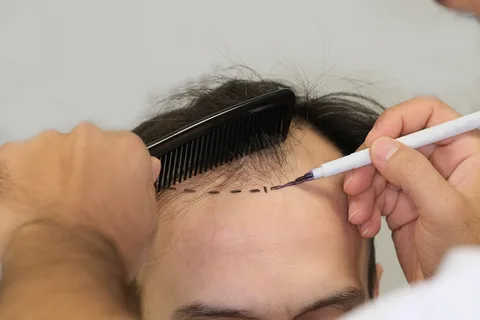
Modern hair transplantation focuses on creating a natural hairline that complements facial features and existing hair growth patterns. Skilled planning ensures that transplanted follicles blend seamlessly with surrounding hair. The goal is not simply to restore hair but to recreate a balanced and realistic appearance that is difficult for others to detect.
Myth: Hair Transplants Are Only for Older People
Hair loss is not limited to aging individuals. Genetics, hormonal changes, stress, medical conditions, and lifestyle factors can contribute to hair thinning at various stages of life.
Many younger adults begin exploring hair restoration after noticing progressive hair loss. Eligibility depends more on the pattern and stability of hair loss than on age alone. Each individual should be evaluated based on personal circumstances rather than assumptions related to age.
Myth: The Results Are Immediate
Some people expect to walk out with a full head of permanent hair overnight.
Hair restoration is a gradual process. After transplantation, the treated hairs usually shed before new growth begins. Fresh hair develops naturally over several months, and final results continue improving with time. Patience is essential because healthy hair growth follows the body’s natural cycle.
Myth: Hair Transplants Are Extremely Painful
Many individuals avoid treatment because they believe the procedure is unbearable. Modern techniques are designed with patient comfort in mind. Local anesthesia minimizes discomfort during the procedure, while most people describe recovery as manageable. Temporary soreness or mild sensitivity may occur, but severe pain is generally not part of the normal recovery experience.
Myth: Only Men Can Get Hair Transplants
Hair loss affects both men and women. Women experiencing thinning hair due to genetic factors or other conditions may also benefit from hair restoration, depending on the cause and pattern of hair loss. A personalized assessment helps determine whether the procedure is appropriate for each individual.
Myth: Transplanted Hair Requires Special Maintenance Forever
Another widespread misconception is that transplanted hair demands complicated maintenance. Once the transplanted follicles establish themselves, they behave much like natural hair. They can usually be washed, trimmed, and styled just like the rest of the hair. Maintaining a healthy lifestyle and following aftercare recommendations can help support long-term results.
Myth: Hair Transplants Leave Large Scars
Older techniques sometimes resulted in more noticeable scarring, which contributed to this belief. Today’s advanced methods focus on minimizing visible scarring while promoting faster healing. In many cases, tiny extraction points become difficult to notice once healing is complete. Proper aftercare also plays an important role in achieving the best cosmetic outcome.
Myth: Every Person with Hair Loss Is a Suitable Candidate
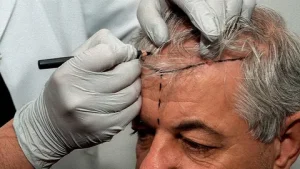
Although hair transplantation is highly effective, it is not suitable for everyone. Factors such as hair density, donor hair quality, overall health, and the cause of hair loss all influence eligibility. A proper evaluation helps determine whether transplantation or another treatment approach is more appropriate.
Myth: Hair Transplants Stop Future Hair Loss
A hair transplant restores hair in treated areas but does not prevent ongoing hair loss in untreated regions. Some individuals may require additional treatments or long-term hair care strategies to maintain overall appearance as natural hair changes over time. Understanding this distinction helps create realistic expectations.
Myth: The Procedure Looks the Same for Everyone
Every individual has unique facial proportions, hair texture, density, and growth patterns. Successful hair restoration is customized to suit each person’s appearance rather than following a one-size-fits-all approach. Personalized planning contributes significantly to natural-looking outcomes.
How to Avoid Hair Transplant Misinformation
The internet contains a mixture of reliable information and misleading claims.
To make informed decisions:
- Research evidence-based information.
- Understand modern treatment techniques.
- Learn about the complete recovery timeline.
- Set realistic expectations.
- Seek personalized professional guidance before making decisions.
Reliable information always provides a stronger foundation than online myths or outdated opinions.
The Importance of Realistic Expectations
Hair transplantation is designed to improve hair density and appearance, not create unrealistic perfection. People who understand the healing process, growth timeline, and expected outcomes are generally more satisfied with their results. Knowing what the procedure can realistically achieve helps reduce unnecessary anxiety and disappointment.
Final Thoughts
Believing outdated myths can prevent people from exploring effective solutions for hair restoration. Modern advancements have transformed the procedure into a reliable option for many individuals seeking natural-looking results. Taking time to separate myths from facts allows you to make confident decisions based on accurate information instead of misconceptions. If you are considering Hair Transplant in Islamabad, understanding the realities behind the procedure can help you approach the journey with realistic expectations, greater confidence, and a clearer understanding of what modern hair restoration can truly achieve.
Author


Author



Haffele Kitchen Dealer in Thrissur: Upgrade Your Home in Style

Project Capri Clothing: Hoodies, Jorts & Modern Streetwear 2026

Why Continuous Learning Matters for Business Leaders

Accurate As-Built Drawings Are the Foundation of Successful Commercial

The Best Asset Management System in UAE

Kentucky Bourbon Trail Tours What Is Included and How to Plan a Trip

Point Cloud to BIM for Renovation Projects: From 3D Scanning

Cash Only A Modern Approach to Everyday Streetwear

Balance With Dedicated Oversight From the Best Virtual Psychiatrist

Malware Protection Solutions for Business Data Security

Cybersecurity Consulting Company SequelNet Provides Critical IT Support Services to Medical Billing Firm, Medical Optimum

Meet the Megalodon: The Shark Star of ‘Meg 2’

Reduce Video Game Lag: Level Up Your Gaming Performance

Balancing India’s Entertainment: Cricket vs. Bollywood

Jetsetter’s Secrets: Unveiling Our Favorite Travel Hacks for a Seamless Adventure

The 5 Best Live Sports Streaming Sites: Legal and Exciting!

Hollywood Labor Unrest: The Impact of ‘What About Us?’ Strikes

Unveiling the Magic of Dream Fulfillment at the Late NBA Draft

Illuminate Your Skin: Dr. Axe Unveils Natural Remedies for Lightening Knees and Elbows

Bright Choices: Navigating the Pros and Cons of Skin Whitening Creams with Dr. Axe
-

 Business3 years ago
Cybersecurity Consulting Company SequelNet Provides Critical IT Support Services to Medical Billing Firm, Medical Optimum
-
Entertainment3 years ago
Meet the Megalodon: The Shark Star of ‘Meg 2’
-
Entertainment3 years ago
Reduce Video Game Lag: Level Up Your Gaming Performance
-
 Sports3 years ago
Balancing India’s Entertainment: Cricket vs. Bollywood
-
Entertainment3 years ago
Jetsetter’s Secrets: Unveiling Our Favorite Travel Hacks for a Seamless Adventure
-
Productivity3 years ago
The 5 Best Live Sports Streaming Sites: Legal and Exciting!
-
Art /Entertainment3 years ago
Hollywood Labor Unrest: The Impact of ‘What About Us?’ Strikes
-
Sports3 years ago
Unveiling the Magic of Dream Fulfillment at the Late NBA Draft






