
Repair
Gaming Headset Problems: Common Issues and Easy Fixes


Gaming headsets are an essential part of any modern gaming setup. Whether you are a competitive PC gamer, a console enthusiast, or someone who enjoys online multiplayer games, a reliable headset improves communication, immersion, and overall performance. In Pakistan, as interest in gaming gear and PC accessories continues to grow, more gamers are investing in quality audio equipment. However, even the best gaming headsets in Pakistan can develop problems over time. Issues like distorted sound, microphone failure, connection drops, or discomfort are common and can ruin the gaming experience if not handled properly. This guide covers the most common gaming headset problems and explains how to fix them, helping gamers get the most out of their equipment.
No Sound or Audio Cutting Out
One of the most common gaming headset problems is no sound or audio cutting in and out. This issue can occur on both PC and consoles and is often related to connection or settings rather than hardware failure.
Possible Causes
Loose cables, damaged connectors, incorrect audio output settings, or outdated audio drivers can cause sound issues.
How to Fix It
First, check all physical connections. Make sure the headset is firmly plugged into the correct audio port. If you are using a USB headset, try a different USB port. On PC, open your sound settings and confirm that your gaming headset is selected as the default playback device. Update your audio drivers from the manufacturer’s website. For consoles, check audio settings to ensure the headset output is enabled.
Microphone Not Working or Poor Voice Quality
A non-working microphone is a frustrating issue, especially in multiplayer games where communication is critical. Many gamers searching for the best gaming headsets in Pakistan prioritize microphone quality, but even good headsets can face mic problems.

Possible Causes
Muted microphones, incorrect input settings, driver issues, or physical damage to the mic cable are common reasons.
How to Fix It
Check if the microphone is muted using inline controls or software settings. On PC, go to sound settings and ensure the correct microphone input is selected. Increase microphone volume and disable unnecessary enhancements that may distort sound.
For detachable microphones, remove and reattach them securely. If using a console, check in-game chat settings and system audio preferences. Testing the microphone in a voice recording app or communication software can help identify whether the issue is hardware or software related.

Distorted or Low-Quality Sound
Distorted audio, crackling sounds, or very low volume can affect immersion and competitive performance. This issue is common among gamers using budget headsets or incorrect audio configurations.
Possible Causes
Incorrect equalizer settings, damaged cables, interference, or low-quality audio sources can lead to distortion.
How to Fix It
Reset audio settings to default and disable excessive equalizer boosts. If your headset comes with software, use recommended presets for gaming. Inspect the cable for bends or damage. Try using the headset on a different device or audio port. For wireless headsets, ensure there is no signal interference from other wireless devices nearby. Using high-quality audio sources and keeping volume levels moderate can also reduce distortion.
Headset Not Detected by PC or Console
Sometimes a gaming headset is not detected at all by the system, making it unusable. This problem is common with USB and wireless headsets.
Possible Causes
Outdated drivers, faulty ports, compatibility issues, or firmware problems may prevent detection.
How to Fix It
Restart your system and reconnect the headset. Try a different USB port or cable. Update audio drivers and headset firmware if available. For wireless headsets, ensure the receiver is properly connected and paired. Some headsets require specific drivers or software installation to function correctly. Check compatibility with your device, especially when using consoles, as not all headsets support every platform.
Wireless Connection Drops or Lag
Wireless gaming headsets are popular in Pakistan for their convenience, but connection drops or audio lag can be a major issue during gaming sessions.
Possible Causes
Low battery, wireless interference, outdated firmware, or long distance from the receiver can cause connectivity problems.
How to Fix It
Charge the headset fully before use. Keep the wireless receiver close to the headset and avoid placing it near routers or other wireless devices. Update the headset firmware using the manufacturer’s software. Reducing the number of active wireless devices nearby can also improve stability. If lag persists, switching to a wired connection for competitive gaming may be a better option.
Uncomfortable Fit or Ear Fatigue
Comfort issues are common, especially during long gaming sessions. Even some of the best gaming headsets in Pakistan may feel uncomfortable if not adjusted properly.
Possible Causes
Tight headbands, stiff ear cushions, heavy design, or poor ventilation can lead to discomfort.
How to Fix It
Adjust the headband to reduce pressure. Take short breaks during long gaming sessions to relieve ear fatigue. Replacing ear pads with softer or breathable alternatives can significantly improve comfort. Choosing lightweight headsets with memory foam cushions is ideal for extended use. Proper comfort ensures better focus and performance during gaming.
Echo or Feedback During Voice Chat
Echo or feedback issues can disrupt team communication and are often reported in online games.
Possible Causes
High microphone sensitivity, sound leakage, or incorrect audio settings can cause echo.
How to Fix It
Lower microphone sensitivity in system or game settings. Enable echo cancellation and noise reduction options if available. Ensure that headset audio is not leaking into the microphone. Using closed-back headsets helps reduce sound leakage. Proper mic positioning also plays a key role in preventing feedback.
Final Thoughts
Gaming headset problems are common, but most can be fixed with simple troubleshooting. Understanding these issues helps gamers maintain their equipment and enjoy uninterrupted gameplay. For gamers searching for the best gaming headsets in Pakistan, knowing how to fix common problems adds long-term value to their investment. A well-maintained gaming headset ensures clear communication, immersive sound, and reliable performance for both casual and competitive gaming.
A gaming headset is more than just an accessory. It is a critical part of the gaming experience, and taking care of it ensures better performance and enjoyment for years to come.
Author


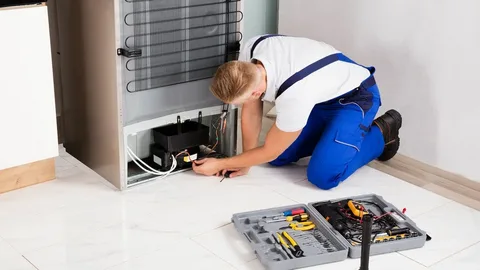
A refrigerator that stops cooling can quickly turn into a major inconvenience. Fresh food may spoil, drinks may lose their chill, and frozen items may begin to thaw. Before you assume the worst, remember that many cooling problems have simple causes. In many cases, you can solve the issue without replacing the appliance. However, if the problem continues, refrigerator repair in Sharjah can help restore your appliance before the damage becomes more serious.
Check the Temperature Settings
Start by checking the temperature settings. Sometimes, someone changes the controls by mistake while cleaning or organizing food. Most refrigerators work best between 3°C and 5°C. After adjusting the settings, close the door and wait several hours. Avoid placing hot food inside during this time because it can raise the internal temperature. If the refrigerator still does not cool properly, you may need refrigerator repair in Sharjah to identify the real problem.
Inspect the Door Seal
Next, inspect the refrigerator door. A door that does not close completely allows warm air to enter. As a result, the appliance works harder while cooling less effectively. Check whether food containers, shelves, or drawers prevent the door from closing. Also, clean the rubber gasket with mild soapy water. Look for cracks, loose sections, or worn areas. A damaged seal often causes cooling issues and increases energy consumption. If replacing the seal does not solve the problem, professional refrigerator repair in Sharjah may be the next step.
Keep Air Vents Clear
Airflow plays an important role in keeping food cold. Chilly air circulates through openings between the refrigerator and freezer sections. When food blocks these vents, cold air cannot circulate properly. Therefore, keep space around the rear vents, fan covers, and air channels. In addition, avoid overpacking the shelves. Leave enough room between food items so air can move freely. Good airflow helps the refrigerator maintain a stable temperature throughout the compartment.
Clean the Condenser Coils
Another common issue involves the condenser coils. These coils release heat from the cooling system. Over time, they collect dust and dirt, which reduces their efficiency. Consequently, the refrigerator may run longer while providing less cooling. Before cleaning the coils, unplug the appliance for safety. Then use a soft brush or a vacuum attachment to remove dust. Never bend the coils or disconnect any components. If cleaning does not improve performance, consider scheduling refrigerator repair in Sharjah for a complete inspection.
Listen for Fan Problems
The internal fan also deserves attention. This fan moves cold air from the freezer into the refrigerator section. When it stops working, the freezer may stay cold while the refrigerator becomes warm. Listen for unusual sounds such as grinding, buzzing, or scraping. These noises often indicate a faulty fan motor or ice buildup around the blades. Never force tools through the fan cover because you could damage important parts. A trained technician offering refrigerator repair in Sharjah can safely inspect and replace the fan if necessary.

Check for Heavy Frost
Heavy frost inside the freezer can also reduce cooling performance. Thick ice blocks airflow and prevents cold air from reaching the refrigerator compartment. This problem often points to a faulty defrost system, a damaged sensor, or a poor door seal. If your manufacturer’s instructions allow it, unplug the appliance and let the ice melt naturally. Move your food to another cold location first. Never use sharp objects to remove ice because they can damage the cooling system. If frost returns quickly, you should arrange refrigerator repair in Sharjah to correct the underlying fault.
Inspect the Compressor
You should also pay attention to the compressor. This component circulates refrigerant throughout the cooling system. Normally, it produces a soft humming sound while operating. However, repeated clicking, constant running, or excessive heat may indicate a problem. In some cases, the issue comes from the start relay instead of the compressor itself.
Since these components require electrical testing, avoid attempting repairs without proper knowledge. A qualified technician can determine whether the compressor, relay, or another part has failed.
Test the Thermostat and Temperature Sensors
Temperature sensors and thermostats also affect cooling performance. These components tell the refrigerator when to start and stop cooling. When they provide incorrect readings, the appliance may become too warm, too cold, or cycle at the wrong times. Modern refrigerators often use several electronic sensors instead of a single mechanical thermostat. Accurate testing requires specialized equipment. Therefore, professional diagnosis usually provides the quickest solution.
Check for Refrigerant Leaks
Refrigerant leaks present another possible cause. Refrigerant removes heat from inside the refrigerator and releases it outside. Under normal conditions, the system does not require refilling. Therefore, low refrigerant usually means a leak exists. Common signs include weak cooling, uneven temperatures, and frost forming in only one area. Simply adding more refrigerant will not solve the issue because the leak remains. Reliable refrigerator repair in Sharjah includes locating and repairing the leak before recharging the system.
Perform Basic Troubleshooting
Before calling a technician, perform a few simple checks.
- Confirm the temperature settings.
- Make sure the door closes properly.
- Remove anything blocking the vents.
- Clean the condenser coils.
- Inspect the door gasket.
- Listen for the fan and compressor.
- Check for heavy frost inside the freezer.
These simple steps often solve minor cooling problems and help you avoid unnecessary repair costs.
When to Call a Professional
If your refrigerator still cannot maintain a safe temperature, professional help becomes necessary. Contact a technician if the compressor clicks repeatedly, the fan makes unusual noises, frost returns after defrosting, or food continues to spoil. Choosing experienced refrigerator repair in Sharjah ensures accurate fault diagnosis and reliable repairs. Skilled technicians can inspect the compressor, thermostat, sensors, fans, wiring, and refrigerant system to identify the exact cause.
Final Thoughts
A refrigerator may stop cooling because of blocked vents, dirty condenser coils, damaged door seals, faulty fans, heavy frost, thermostat issues, or refrigerant leaks. Start with the simplest checks before assuming the appliance has failed completely. Regular maintenance also helps prevent many common problems.
When basic troubleshooting does not restore proper cooling, trusted refrigerator repair in Sharjah provides the safest and most effective solution. Timely repairs protect your food, improve energy efficiency, and extend the life of your refrigerator.
Author



Operating a heavy-duty truck repair shop involves much more than just fixing engines, swapping out broken parts, or conducting regular maintenance. Shop owners manage multiple responsibilities every day. They must coordinate technicians, handle repair orders, maintain parts inventory, communicate with customers, schedule maintenance, and ensure every vehicle gets back on the road as quickly as possible. However, many repair businesses still rely on spreadsheets, paperwork, or separate systems to manage these operations. These outdated methods often create unnecessary problems. Lost repair records, delayed services, inventory mistakes, and billing errors can reduce efficiency and affect profits.
To overcome these challenges, many commercial truck repair businesses are adopting heavy-duty truck shop management software. This advanced solution brings every important process together in one centralized platform. As a result, repair shops can improve workflow, increase productivity, reduce costs, and provide a better customer experience.
Whether you operate a small diesel repair facility or manage multiple service locations, the right software can help your business run more smoothly.
What Is Truck Shop Software?
Heavy-duty truck shop management software is a complete business management system designed specifically for commercial vehicle repair facilities. It helps repair shops manage daily operations related to trucks, diesel engines, trailers, fleets, and heavy equipment. Unlike traditional auto repair software, these platforms are built to handle the unique requirements of heavy-duty service providers. They support businesses that work with:
- Class 7 and Class 8 trucks
- Semi-trucks
- Commercial fleets
- Construction equipment
- Utility vehicles
- Agricultural machinery
- Municipal vehicles
The software combines several essential functions into one system. These include repair order management, technician scheduling, inventory tracking, customer relationship management, billing, reporting, and preventive maintenance planning.
Why Truck Shops Need Software
As a repair shop grows, managing daily operations manually becomes increasingly difficult. Paper-based systems and disconnected tools often create communication gaps and slow down the repair process. Common challenges include:
- Missing repair information
- Poor technician coordination
- Parts shortages
- Incorrect invoices
- Delayed customer updates
- Missed maintenance schedules
- Difficulty tracking labor hours
- Limited visibility into business performance
Heavy-duty truck shop management software solves these problems by automating repetitive tasks and creating a more organized workflow. Instead of spending hours managing paperwork, teams can focus on completing repairs efficiently.
Key Features of Truck Shop Software
Digital Work Order Management
Paper repair orders can easily become misplaced or outdated. Digital work order management removes this issue by allowing service advisors to create and update repair orders instantly. Technicians receive real-time information about assigned jobs. Managers can also track repair progress at every stage. Key benefits include:
- Faster repair order creation
- Complete service history
- Digital approvals
- Real-time job updates
- Secure document storage
This creates a smoother process from vehicle check-in to final delivery.
Preventive Maintenance Scheduling
Fleet owners depend on regular maintenance to avoid unexpected breakdowns. A missed inspection or delayed service can lead to expensive repairs and vehicle downtime. Heavy-duty truck software automatically tracks important maintenance tasks such as:
- Oil changes
- Brake inspections
- DOT inspections
- Tire services
- Engine diagnostics
- Cooling system checks
- Transmission maintenance
Automatic reminders help repair shops and fleet customers stay ahead of upcoming services.
Technician Scheduling and Management
Managing technicians manually can lead to scheduling conflicts and wasted time. Shop management software provides a clear view of technician availability, skills, and workload. Managers can assign repairs based on technician expertise, monitor job progress, and improve labor efficiency. This helps reduce downtime and ensures every technician stays productive.

Inventory Management
Parts availability directly affects repair speed. Running out of essential components can delay jobs and disappoint customers. Modern software helps shops manage inventory by allowing them to:
- Track parts in real time
- Monitor stock levels
- Create reorder alerts
- Manage suppliers
- Track purchase orders
- Reduce unnecessary inventory costs
Better inventory control helps repair businesses complete jobs faster while avoiding waste.
Customer Relationship Management
Customer satisfaction plays a major role in long-term business success. A built-in CRM system helps shops maintain stronger relationships with customers. Repair teams can store customer information, review vehicle history, schedule future services, and send maintenance reminders. Clear communication builds trust and encourages customers to return for future repairs.
Vehicle History and VIN Tracking
Commercial vehicles require accurate service records. Heavy-duty truck management software stores detailed vehicle information using VIN tracking. Technicians can quickly access previous repairs, warranty details, and recurring issues. This improves diagnostic accuracy and saves valuable time during inspections.
Estimates and Invoicing
Creating estimates and invoices manually takes time and increases the chance of mistakes. Software simplifies the billing process by allowing shops to generate professional estimates, receive digital approvals, and create accurate invoices.
This speeds up payments and improves financial management.
Benefits of Truck Shop Software
Higher Productivity
Automation reduces administrative tasks and allows technicians to spend more time repairing vehicles. Employees can complete jobs faster because they have immediate access to the information they need.
Faster Repair Turnaround
Digital workflows reduce delays between inspection, approval, parts ordering, and completion. Vehicles spend less time waiting in the shop, which improves customer satisfaction.
Improved Technician Performance
Managers can track important performance information, including labor hours, job completion times, and technician efficiency. These findings assist companies in managing workloads and enhancing operations.
Lower Operating Costs
Better inventory management, accurate labor tracking, and organized workflows help reduce unnecessary expenses. These savings can directly increase profitability.
Better Customer Experience
Customers expect quick updates and transparent service. Software allows shops to provide accurate estimates, digital approvals, repair updates, and electronic invoices. A better customer experience often leads to repeat business and referrals.
Features to Consider Before Choosing Software
Before selecting a heavy-duty truck shop management platform, businesses should look for important features such as:
- Repair order management
- Fleet maintenance tracking
- Inventory control
- Labor time tracking
- Reporting tools
- Mobile access
- Accounting integration
- Customer portals
- Data security
The software should also be easy for technicians, managers, and service advisors to use.
Future of Truck Shop Management
Technology continues to change how repair businesses operate. Modern management platforms are becoming more advanced with features such as artificial intelligence, predictive maintenance, digital inspections, remote monitoring, and automated parts ordering. These innovations help repair shops make better decisions, reduce downtime, and improve overall efficiency. Businesses that adopt modern technology can stay competitive and meet the changing expectations of fleet owners and customers.
Conclusion
Heavy-duty truck shop management software has become an essential tool for modern repair businesses. It helps simplify daily operations, improve communication, manage inventory, and increase technician productivity. From digital work orders and maintenance scheduling to customer management and reporting, the right platform creates a more efficient repair environment. As the commercial vehicle industry continues to expand, investing in reliable management software can help repair shops achieve faster service, stronger customer relationships, and long-term business growth.
Author



Some car repairs can find you in the most unexpected situations. You could be waiting for your salary, but you face a car engine glitch that you cannot ignore. Similarly, if your car breaks down in the middle of a highway, you may not necessarily have cash to cover the expenses.
Such situations may create panic. However, you cannot ignore these aspects. Otherwise, attending to the repairs later may cost more. The blog lists common car repair costs you can avoid before they occur.
Is it necessary to ensure a car service every year?
No, experts usually recommend a car service every 12 months or 12000 miles (whichever happens first). It helps you understand minor issues and ensures timely repairs. It helps you save money drastically. It is generally advisable to go for a full service rather than improving the most important aspects. Here are some benefits of improving the car every 12 months:
- Helps ensure a well-maintained and safe car
- Extends the life of a vehicle
- Issues that you spot early cost less to repair
- The new filters on a service may improve the fuel consumption
- A full-service history is ideal when you want to sell the car
However, if you encounter urgent issues like-
- smoke from the engine
- brake issues
- leaking issues
Don’t wait until maintenance is due; instead, check urgent loans. You don’t need to worry if you have a low income or are living on benefits. You may get emergency loans on benefits income. All you need to provide are accurate documents, earnings, a driving license, and residential documents if the loan company enquires.
What does Full-service on a vehicle like a car include?
Full car service on a car includes aspects like refilling engine oil, replacing the oil filter and topping it up with coolant. It involves a complete brake inspection, discs, and lines, along with tyre tread depth and pressure adjustments. It includes testing all exterior lights, wipers, horn, seatbelts, and mirrors. Some car repair experts also check the battery health with a printed result.
| Maintenance / Repair Aspect | Typical UK Cost (2026) |
| Interim service | £90–£150 |
| Full service | £160–£280 |
| Major service | £300–£600 |
| Annual maintenance (average, varies by model) | Varies by vehicle |
| Common repairs (e.g., brakes, suspension, battery, clutch) | Typically £100–£1,000+ depending on repair and model |
| General repair costs | Depend on vehicle type and repair required |
5 strategies to avoid common car repair expenses before they occur
Here are some strategies to avoid common car repair expenses:
Change the car filters on time
Your vehicle’s oil filters may get clogged at times. Thus, it is important to replace these on a regular basis. Thus, one should replace the filters if they face trouble starting the vehicle quickly. Neglecting these could result in poor-quality functionality and may cause irreparable damage to your car’s engine in the long term. You need to consider the 3 main types of car filters. These are:
- Engine Air Filter: You should change the air filter every 12000-15000 miles or once a year. The cleaner the air, the better the engine performs. Try to change it quickly if you drive on uneven surfaces.
- Cabin Filter: You must change the cabin filter every 12-24 months. It keeps your car breathable and infuses fresh air instead of pollutants. You must change it annually if you face or drive in an air-polluted area.
- Oil filter: You generally need to change these filters every 3000-10000 miles. You must replace this filter when you decide to change the oil. It helps you keep your oil fresh and away from contamination.
- Fuel filter: It is generally advisable to change this filter every 2 years or after 3000 miles. It helps prevent rust and dirt from clogging the engine’s fuel injectors.
Keep the air conditioner functional
Although you may not need an air conditioner in the winter months, you should keep it functional. Otherwise, you may have to pay a huge bill for AC repair and re-gassing. You should run for at least 10 minutes a week. It will help pump the oil and keep the system lubricated.
Some ACs lose 10-15% of gas every year. It is the reason most air conditioner providers recommend booking a car air conditioner service every 2 years. It will help you keep your AC in good shape and functional. Check your cabin filter and change it too after 12-24 months. It will help you ensure safe and breathable air. If you must replace it, you can do it by understanding the vehicle handbook.
Check the coolant or brake fluid
It is generally advisable to check fluids weekly before going on long journeys. Check the plastic-see-through reservoir bonnet. The levels should reveal the minimum and the maximum marks. Avoid opening the coolant cap when the engine is hot or burning. Wait for half an hour for the engine to cool in that case. It is generally advisable to change the coolant every 2-5 years.
If the brake fluid is low, the brake pads may become worn out. Over time, it may absorb water from the air. It thus increases the risk for the car drivers as brakes become spongier and riskier. Thus, to avoid that, you must change the brake pads every 2 years.
Check the tyre health frequently
Check the tyre tread and remove the stones and other debris stuck there. Check out any cracks or debris that obstruct functionality and pose a risk. According to the law, your car tyre must have 1.6 mm in a continuous band. It is ideal for light vehicles. You can check the depth of the car tyre by inserting a 20p coin into the car’s grooves. If the band section of the coin is visible, your tyres can pose a high risk.
Thus, do not ignore tyre health and get it inspected before any long trip or journey. Don’t delay it due to the cash crunch. Instead, check emergency car repair loans immediately to get help. You may get cash to support your urgent car improvement needs. Later, you can clear the dues by paying in instalments. It thus helps you avoid panic and ensure a safe drive.
Check car warranties
Most new cars come with warranties that are your shield against unexpected car expenses. It usually covers components for 3-7 years, depending on the car model, years and the brand. Always read the small print to understand what’s covered before checking or claiming warranties.
Bottom line
These are some common car repair costs that you should check and avoid. Analyze the filters and keep the AC in good shape and well-functioning. Check your tyre health frequently and remove any objects stuck in it.
It reduces the chances of facing accidents. Similarly, check your car insurance cover and understand the repairs that you can claim if you have to pay for them. Alternatively, check car repair loans that might help you cover the unavoidable costs.
Author



Cash Only A Modern Approach to Everyday Streetwear

Kentucky Bourbon Trail Tours What Is Included and How to Plan a Trip

Point Cloud to BIM for Renovation Projects: From 3D Scanning

Malware Protection Solutions for Business Data Security

Balance With Dedicated Oversight From the Best Virtual Psychiatrist

Make Gifts Memorable with Custom Shaped Rigid Boxes

Brooklyn Creativity, Streetwear, Art, and Fashion

CAD vs. BIM: Which Workflow Is Right for Your Project?

Top 25 Podcast Marketing Firms Based in the United States

QuickBooks Bank Feeds Not Working: Expert Fix Guide

Cybersecurity Consulting Company SequelNet Provides Critical IT Support Services to Medical Billing Firm, Medical Optimum

Meet the Megalodon: The Shark Star of ‘Meg 2’

Reduce Video Game Lag: Level Up Your Gaming Performance

Balancing India’s Entertainment: Cricket vs. Bollywood

Jetsetter’s Secrets: Unveiling Our Favorite Travel Hacks for a Seamless Adventure

The 5 Best Live Sports Streaming Sites: Legal and Exciting!

Hollywood Labor Unrest: The Impact of ‘What About Us?’ Strikes

Unveiling the Magic of Dream Fulfillment at the Late NBA Draft

Illuminate Your Skin: Dr. Axe Unveils Natural Remedies for Lightening Knees and Elbows

Bright Choices: Navigating the Pros and Cons of Skin Whitening Creams with Dr. Axe
-

 Business3 years ago
Cybersecurity Consulting Company SequelNet Provides Critical IT Support Services to Medical Billing Firm, Medical Optimum
-
Entertainment3 years ago
Meet the Megalodon: The Shark Star of ‘Meg 2’
-
Entertainment3 years ago
Reduce Video Game Lag: Level Up Your Gaming Performance
-
 Sports3 years ago
Balancing India’s Entertainment: Cricket vs. Bollywood
-
Entertainment3 years ago
Jetsetter’s Secrets: Unveiling Our Favorite Travel Hacks for a Seamless Adventure
-
Productivity3 years ago
The 5 Best Live Sports Streaming Sites: Legal and Exciting!
-
Art /Entertainment3 years ago
Hollywood Labor Unrest: The Impact of ‘What About Us?’ Strikes
-
Sports3 years ago
Unveiling the Magic of Dream Fulfillment at the Late NBA Draft






