
Development
Columbus Colleges: Losing Students Due to Poor Website Design


Columbus’s colleges are losing students to other schools simply because their websites are better structured. I found that when I audited 15 local colleges, poor design was running rampant across the board—most are fixable as well.
Slow Load Times on Mobile Devices
Ohio State’s primary website loads in just 2.3 seconds on a mobile device. Conversely, Columbus State’s website loads in 8.7 seconds. Given that 73% of prospective students use smartphones to browse, that’s not just slow, it’s a death sentence for admissions.
The Solution: Any reputable web design company in Columbus will tell you that mobile-first design is no longer up for discussion. Pages should load in 3 seconds or less, forms should be usable with a thumb, and navigation should be thumb-friendly. CCAD (Columbus College of Art and Design) just redesigned its website using these principles, and its applications have increased by 34% since the redesign.
Invisible in local search results
If you enter “colleges around Columbus” on a search engine (Google), you will see Ohio State as the only college that shows up. However, when searching for community colleges and other specialised institutions, you will find these institutions ranking around page 3 or lower for their named programs.
The problem: No GMB (Google My Business) optimisation. Franklin University even fails to fully claim their GMB listing. Their address is commonly listed as “temporarily closed.”

The Solution: Create and then optimize all campus addresses through both Google and business directory listings. Include photographs, create labels to respond to people reviewing your school, and post recent updates relating to the available enrollment periods. You want colleges to be able to locate you locally first when a prospective student types in “nursing programs Columbus” and you are visible in the map section.

Content That Converts Students
The college sites of most institutions are written in an academic style – high-density paragraphs about “excellence of the institution” and “a transformative learning experience.” When students are looking for information, they are looking for answers to questions such as how long it will take to complete the program, how much it will cost, and will there be any job opportunities upon completion.
For example, Otterbein University’s nursing website includes 847 words of content; however, it does not include the starting salary for a graduate until paragraph six. A competing institution’s website leads with, “96% job placement rate with an average starting salary of $65,000.”
Solution: answer the money questions up front and create program pages that convert:
- Job placement rates (with 3rd party sources).
- Graduate’s average starting salaries.
- Total program cost (not just tuition).
- Time to complete the program.
- Prerequisite information listed in plain English
Technical SEO Disasters
Most of the Columbus, Ohio college websites fail to meet the industry’s minimum criteria for Search Engine Optimization (SEO), which lead to decreased rankings in all search engines. The common issues we found include:
1. Broken internal links.
2. Missing alt tags on images.
3. Duplicate content across program pages (Capital University has 23 pages with the same meta description).
Some additional key technical issues that hamper the rankings on all college websites include:
1. No schema markup for either program or location.
2. Slow server response times.
3. Missing SSL certificate on multiple application forms.
4. Broken mobile navigation for multiple programs.
5. No local business structured data to support citation and rankings.
These common technical issues are far more than technical; they are also killing your rankings. Google cannot recommend college’s websites to its visitors if those sites are not accessible to Google through its crawler or can be understood once crawled.
The Death of Enrollment Forms
67% of potential students who fill out inquiry forms at Columbus colleges are lost at the inquiry stage. Why does this happen? Schools are using inquiry forms that require up to 15 fields when 4 would suffice, not having mobile-optimized inquiries, and having broken “Submit” buttons.
Delaware County Community College cut their inquiry form from 12 fields down to only 3 fields, resulting in an 89% increase in inquiries over 2 months.
Successful Examples of Results
Columbus State Community College worked with an SEO Services Columbus that specializes in local search engine optimisation and experienced the benefits:
- 156% more traffic through organic search
- 43% additional program inquiries
- Increased performance in local search results for targeted programs
Their formula for success: a mobile-first redesign, aggressive optimization of their Google My Business profile across their campuses, and totally answering students’ questions using quality content.
To sum it up
Ohio colleges have to compete against Arizona and Florida Colleges’ web-based programs with better web pages and better collegiate leads search engine optimization, so there’s no longer a local marketplace for columbus schools to get their students from.
It’s really easy to fix the problem. You’ll need to work with a web design company who understands education marketing, and to do that, you need to optimize the site for local search and generate content that gets visitors to apply.
Your competitors are already doing this, and if you wait to make decisions about how many more students you will lose to your competitors.
If you are ready to improve your school’s web presence, do a technical audit, make your mobile experience priority, and claim local search results. In a competitive educational environment, your website is more than marketing, it’s your enrollment engine!
Author



The US Intelligent document processing market continues to gain momentum as businesses look for faster and smarter ways to manage large volumes of information. Companies across banking, insurance, healthcare, government, retail, and other industries handle thousands of invoices, contracts, claims, forms, and records every day. Managing these documents manually can consume valuable time and create avoidable errors.
Intelligent document processing, or IDP, helps organizations overcome these challenges. The technology combines artificial intelligence, machine learning, natural language processing, optical character recognition, and computer vision. Together, these tools can capture information, understand document content, extract relevant data, and send it into business workflows.
Market Growth Outlook Through 2035
According to Dimension Market Research, the US market holds a value of USD 2.47 billion in 2026. Analysts expect the market to reach approximately USD 11.86 billion by 2035. This growth represents a projected compound annual growth rate of 19.02% between 2026 and 2035.
Several factors support this expansion. Businesses continue to increase their use of cloud platforms and enterprise automation. At the same time, growing document volumes create pressure to process information more efficiently.
Traditional OCR can recognize printed or scanned text. However, modern IDP platforms go much further. They can identify document types, understand context, extract specific information, validate results, and connect the output with enterprise applications. As a result, organizations increasingly view document processing as part of a broader automation strategy rather than as a simple scanning function.
What Is Driving Market Demand?
Businesses want to reduce repetitive work while improving accuracy and response times. Manual document handling often requires employees to enter information into multiple systems. This approach can slow operations and increase the possibility of mistakes.
IDP addresses this problem by automating several stages of the process. For example, a company can use the technology to capture invoice information, identify important fields, check the extracted data, and send it into an accounting platform.
Furthermore, cloud technology makes these solutions easier to scale. Organizations can expand document processing capacity without building large infrastructure environments. Subscription-based models and prebuilt integrations can also make adoption more practical for smaller and mid-sized businesses.
Another important driver involves artificial intelligence. Newer AI models can understand documents with greater context. Therefore, they can support more complicated workflows involving contracts, claims, correspondence, financial statements, and other business records.
Key Trends Shaping the Market
One major trend involves end-to-end automation. Businesses no longer want technology that simply extracts text. Instead, they want systems that can validate information, identify exceptions, trigger workflows, and transfer results into other applications.
Generative AI also creates new possibilities. It can help organizations interpret complex documents, summarize lengthy content, and identify important information. These capabilities can reduce the time employees spend reviewing large document collections.
Cloud deployment represents another major trend. Cloud platforms provide flexibility and centralized management. They also make it easier for organizations to access newer AI capabilities as vendors continue to improve their platforms.
Meanwhile, industry-specific solutions are gaining attention. A bank may need tools for financial documents and customer onboarding. An insurance company may focus on claims and policy records. Healthcare organizations may prioritize patient documentation and administrative records. This growing specialization gives technology providers opportunities to develop workflows around specific industry requirements.
Emerging Opportunities
Generative AI-based document understanding represents an important opportunity for the US Intelligent document processing market. Conventional OCR works well with straightforward text recognition. However, complex documents often require deeper contextual understanding.
Contracts provide a good example. A contract may contain dates, obligations, conditions, financial terms, and exceptions across multiple sections. Advanced AI can help identify these details and organize them into useful outputs.
Healthcare records, insurance claims, financial statements, and government documents can benefit from similar capabilities.
Mid-sized companies also offer significant growth potential. Cloud delivery, low-code configuration, subscription pricing, and ready-made connectors can lower technical barriers. Consequently, more organizations can adopt document intelligence without creating large internal technology teams.
Market Segmentation
The market covers several important categories. By component, it includes software solutions and services. Software can cover document capture, classification, data extraction, workflow automation, AI models, and related capabilities. Services can include consulting, implementation, managed services, training, and support.
Deployment options include cloud, on-premises, and hybrid environments. Cloud solutions currently lead the deployment segment, accounting for 61.7% of the market in 2026.
Technology categories include OCR, natural language processing, machine learning, computer vision, robotic process automation, deep learning, and generative AI extraction.
Large enterprises represent an important customer group. However, small and medium-sized businesses increasingly have access to these technologies through flexible cloud offerings.
Major end-user industries include banking and financial services, insurance, healthcare and life sciences, government, IT and telecommunications, manufacturing, retail, transportation, logistics, and legal services.

Leading Companies
The competitive landscape includes several established technology providers and specialized IDP companies. Key names include ABBYY, AntWorks, Appian, Automation Anywhere, AWS, Datamatics, Google Cloud, HCLTech, Hypatos, Hyperscience, IBM, Infrrd, Microsoft, Nanonets, OpenText, Rossum, SS&C Blue Prism, Tungsten Automation, UiPath, and WorkFusion.
These companies compete through AI capabilities, automation features, cloud platforms, industry solutions, integrations, security, and ease of deployment.
Recent Market Development
In July 2026, Microsoft expanded its partnership with Mistral and introduced Mistral Document AI with OCR 4 to Microsoft Foundry. The development supports structured document processing and agentic enterprise workflows.
Such developments show how quickly the market continues to evolve. Vendors increasingly combine document intelligence with broader AI and automation platforms.
Key Market Numbers
The market offers several notable figures for 2026. Its estimated value stands at USD 2.47 billion, while analysts project a value of USD 11.86 billion by 2035. The expected CAGR stands at 19.02% during the forecast period.
Software solutions hold a 68.4% share, while cloud-based solutions account for 61.7%. Banking and financial services represent 19.4% of the market. Together, these figures highlight the strong demand for intelligent document technologies across major business sectors.
Future Outlook
The US Intelligent document processing market should continue expanding as organizations connect document automation with wider business processes. Future solutions will likely focus on contextual understanding, validation, summarization, exception management, workflow orchestration, and automated actions.
Generative AI will remain an important area of development. At the same time, businesses will continue to prioritize security, compliance, integration, and governance.
Organizations also want measurable results. Therefore, vendors that can demonstrate lower processing costs, faster turnaround times, better data quality, and improved employee productivity may gain a competitive advantage.
Ultimately, the market is moving beyond basic document digitization. Modern platforms aim to turn unstructured information into useful business intelligence and automated actions.
Conclusion
The US Intelligent document processing market is moving toward a more connected and automated future. Organizations increasingly want to replace repetitive manual tasks with intelligent workflows that deliver faster and more accurate results.
As AI, cloud computing, and automation continue to advance, IDP will likely become an increasingly important part of enterprise technology strategies. Companies that combine intelligent document processing with strong security, reliable integration, and measurable business outcomes can build more efficient operations and respond more effectively to changing market demands.
Author


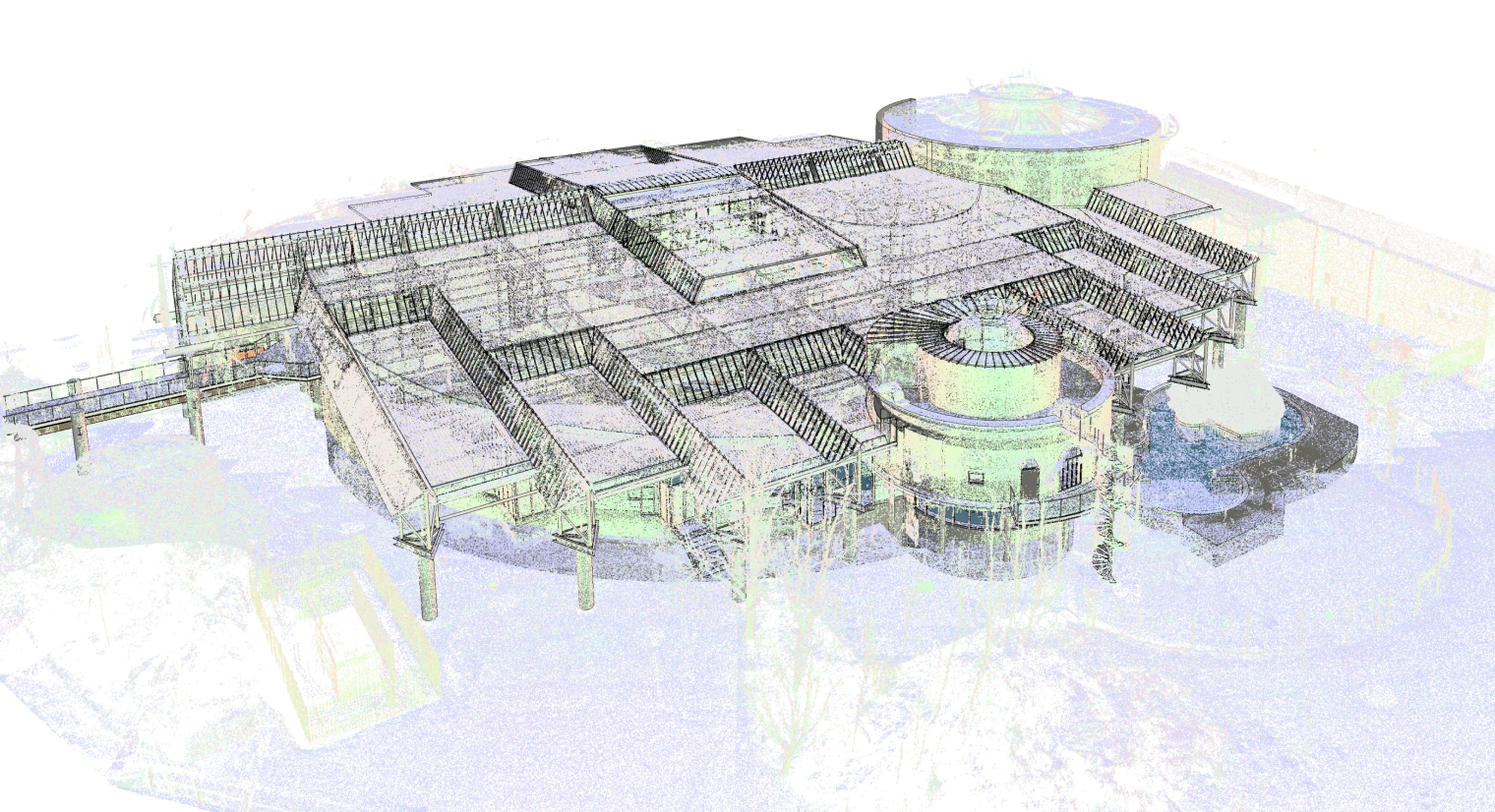
Modern architecture, engineering, and construction projects demand accurate information at every stage. Even a small measurement mistake can create major problems later. A misplaced wall, incorrect ceiling height, or inaccurate equipment location can lead to clashes, delays, and extra costs.
Digital reality capture offers a practical way to reduce these risks. Laser scanners can record thousands or millions of measurements across an existing building. Teams can then use that information to create detailed digital models that closely represent actual site conditions by Point Cloud.
This approach helps architects, engineers, contractors, and property owners make decisions with greater confidence. Instead of relying entirely on manual measurements, project teams can work from reliable spatial information.
Creating a Reliable Digital Site Record
Every successful BIM project starts with dependable information. Traditional surveys still have value, but they can require significant time and repeated site visits. Workers may also miss hidden areas or record measurements incorrectly.
A Cloud workflow provides a more comprehensive starting point. Laser scanning captures the visible environment from multiple positions. Specialized software then combines those scans into a unified digital dataset.
Modeling specialists can use this information to identify walls, floors, ceilings, columns, beams, mechanical equipment, and other building elements. They can then convert the relevant geometry into a structured BIM model. This process creates a useful connection between the physical building and its digital representation.
Reducing Errors During Design
Renovation and retrofit projects often present unexpected challenges. Existing drawings may not reflect later modifications. A wall might sit several inches away from its documented location. Mechanical equipment may also occupy areas that designers expected to remain clear. These differences can create serious coordination problems.
Reality capture gives design teams a clearer understanding of existing conditions. Architects can review accurate dimensions before developing detailed designs. Engineers can also examine structural and mechanical relationships before construction begins.
As a result, teams can identify potential problems earlier. They can adjust designs digitally instead of making expensive changes during construction.
Improving Multidisciplinary Coordination
Construction projects bring several disciplines together. Architects, structural engineers, mechanical engineers, electrical contractors, and plumbing teams all need to coordinate their work.
Even a small conflict between two systems can cause delays. For example, a duct may cross the path of a structural beam. An electrical tray might also occupy the same space as a plumbing line.
BIM coordination helps teams identify these conflicts before workers arrive on site. When teams integrate scan data into Revit or another BIM platform, they can compare proposed systems with actual building conditions. Therefore, designers can resolve clashes earlier. Contractors can also receive clearer information before fabrication and installation by point cloud.
Supporting Renovation and Historic Projects
Older buildings often present unique documentation challenges. Original drawings may no longer exist. Even when they do, previous renovations may have changed the building significantly.
Accurate scanning provides a current record of the structure. Architects can use this information when planning restoration, adaptive reuse, or modernization projects.
The process can capture complex details such as irregular walls, decorative features, structural members, and existing service routes. This information gives designers a dependable reference while they develop new plans. Consequently, teams can preserve important architectural characteristics while introducing modern systems.

Connecting CAD Information With BIM
Many property owners still rely on older CAD drawings. These files can contain valuable information, but they do not always provide the intelligence available in a BIM model.
Converting legacy CAD documentation into BIM creates a more useful digital resource. Teams can associate objects with information about dimensions, materials, systems, and relationships.
Combining CAD conversion with reality capture can make the process even more effective. Designers can compare older documentation with current site conditions. They can then update inaccurate information and create a more dependable digital record. This approach also supports long-term facility management.
Choosing the Right Level of Detail
Not every project requires the same level of modeling detail. A simple planning exercise may only need basic walls, floors, openings, and major equipment. A fabrication project requires much more information. Contractors may need precise dimensions for custom components. Mechanical teams may also need detailed geometry for ducts and pipes.
Therefore, project teams should establish the required Level of Development or Level of Detail before modeling begins. A clear requirement prevents unnecessary work. It also ensures that the finished model contains enough information for its intended purpose.
Making Construction Planning More Efficient
Digital models can support construction planning beyond design coordination. Project managers can connect building geometry with schedules and sequencing information.
This approach allows teams to visualize how construction activities will progress. They can review when specific trades will enter an area. They can also identify potential access problems before work begins.
For example, a large piece of mechanical equipment may require a specific delivery route. A digital model can help teams examine the available space and plan the installation sequence. Consequently, better planning can reduce disruption and improve site efficiency.
Reducing Repeat Site Visits
One of the biggest advantages of detailed reality capture involves information accessibility. A comprehensive scan can preserve a large amount of site information in digital form.
Designers may not need to send someone back to the property every time they need another measurement. Instead, they can review the captured data remotely. This advantage becomes particularly valuable for large facilities. It can also help teams working across different locations.
However, scanning does not eliminate the need for professional judgment. Specialists still need to interpret the data correctly and determine which information matters for the project.
Benefits of Outsourcing BIM Modeling
Some architecture and engineering firms do not maintain large internal BIM teams. Outsourcing can provide access to experienced modelers without requiring companies to hire additional permanent staff.
External specialists can support projects during busy periods. They can also handle specific tasks such as scan-to-BIM modeling, architectural documentation, MEP coordination, and model development.
This flexibility allows internal teams to focus on design, client communication, project management, and other core responsibilities. Before selecting an outsourcing partner, companies should review experience, quality-control processes, software capabilities, communication procedures, and project requirements.
Improving Facility Management
The value of a detailed BIM model does not end when construction finishes. Building owners can continue using digital information throughout the property’s lifecycle.
A well-organized model can help facility teams understand the location of equipment, building components, and service systems. This information can support maintenance, renovation planning, space management, and future upgrades.
When teams update the model after significant changes, it can become a valuable long-term reference. Therefore, reality capture can contribute to both construction efficiency and ongoing building management.
Supporting Better Project Decisions
Accurate information improves decision-making. When project teams understand existing conditions, they can make more informed choices about design, materials, construction methods, and scheduling.
Point Cloud technology supports this process by creating a detailed representation of physical spaces. When teams integrate that information into BIM, they can turn raw measurements into practical project intelligence.
The result goes beyond attractive 3D visuals. A well-developed BIM model can help teams coordinate systems, identify conflicts, plan construction, and manage assets.
Final Thoughts
Modern construction projects need accurate information, strong coordination, and efficient planning. Reality capture and BIM provide a powerful combination for achieving these goals.
A Point Cloud workflow can reduce measurement uncertainty and give project teams a clearer view of existing conditions. When specialists convert captured data into intelligent BIM models, architects, engineers, and contractors gain a stronger foundation for decision-making.
The technology also supports renovation, coordination, construction planning, and facility management. However, successful implementation requires more than scanning equipment. Teams need clear project requirements, skilled modeling professionals, appropriate detail levels, and reliable quality control.
When these elements work together, digital reality capture can reduce rework, improve coordination, and help teams deliver projects with greater confidence.
Author



Choosing a Twitch viewership service can be complicated and, in some cases, even misleading. Providers often highlight different features, including the number of viewers, audience engagement, delivery speed, uptime, chat functions, retention, and package sizes. At first glance, it may seem that the service offering the largest number of viewers is automatically the best option. However, focusing only on viewer volume is rarely a smart approach.
Creators should instead understand what each feature actually means and determine whether it contributes to their broader goals. This is especially important for streamers who want to grow their Twitch channels without creating unrealistic expectations about automated viewers by twitch live viewer.
Start With Retention
Retention is one of the most frequently discussed characteristics of viewer services. From a technical perspective, retention describes how long viewing sessions remain active. A provider may advertise a specific duration or state that viewers can remain present throughout a stream. However, technical retention should not be confused with genuine audience loyalty.
Real viewers who stay for several hours are usually interested in the creator’s content, personality, gameplay, or community. They may participate in chat, follow the channel, share content, or return for future streams. An automated viewing session that remains connected for the same amount of time does not necessarily represent any of these behaviors.
For this reason, creators should treat retention as a technical specification rather than proof of community strength. When comparing providers, it is useful to ask how retention is measured, whether the advertised duration is guaranteed, and what happens if sessions disconnect during a stream.
Stability Is Another Important Technical Metric
Stability generally refers to how consistently a service maintains its selected activity. For example, a service that promises a particular viewer level but repeatedly drops significantly may be frustrating for someone evaluating its technical performance. A consistent automated viewer count, however, should not be interpreted as evidence of a stable human audience.
This distinction is easy to overlook because Twitch’s viewer counter is highly visible. Creators naturally notice changes in the number and may assume that a higher or more consistent figure automatically means stronger channel performance. In reality, audience quality involves much more than the number displayed on the screen.
A smaller audience that actively participates, follows the creator, watches regularly, and returns for future streams can be much more valuable than a larger inactive audience. When comparing stability, creators should therefore consider technical reliability separately from audience engagement.
What About Chat?
Chat is another area where the difference between genuine viewers and automated activity becomes particularly obvious. Real Twitch viewers can respond naturally to what happens during a stream. They may ask questions, react to gameplay, discuss strategies, share opinions, joke with other viewers, or help create the personality of the community. These interactions can make a stream feel more dynamic and encourage another genuine twitch live viewers to participate.
Artificial chatting behavior is different. Any service claiming to provide automated chat activity should be examined carefully. Repetitive or poorly designed messages can appear unnatural and may create a misleading impression of community activity.
There is also a broader policy consideration. Twitch can update its rules and enforcement practices, so creators should not assume that a feature promoted by a third-party service is automatically acceptable. Before using any service that generates artificial interaction, creators should review the platform’s current policies and understand the potential risks.
Don’t Assume Every Service Offers the Same Thing
Viewer services can differ considerably in terms of technology, delivery methods, pricing, support, and additional features. Some services may focus primarily on viewer delivery, while others advertise analytics, management tools, retention options, or other functionality. Because these services can change their features over time, creators should review the provider’s latest documentation rather than relying entirely on general descriptions or old reviews. Important questions to ask include:
- What exactly does the provider offer?
- How long is the service expected to remain active?
- Is delivery immediate or gradual?
- What happens if the activity drops during a stream?
- Does the provider require account access?
- What customer support options are available?
- Is there a refund policy?
- Are there additional software requirements?
- Does the service clearly explain its limitations?
- What information does the provider collect?
These details can be more important than the headline viewer number. A transparent provider that clearly explains its technology and limitations is generally easier to evaluate than one making broad promises without providing meaningful information.

Account Security Should Be Non-Negotiable
A Twitch account can represent years of work. It may contain a growing community, subscriptions, sponsorship relationships, custom branding, clips, channel settings, and other valuable information. That makes account security one of the most important considerations when evaluating any third-party service.
Creators should be cautious about services requesting unnecessary login credentials or asking users to install unfamiliar software. They should use secure authentication methods whenever possible and carefully review the permissions requested by third-party applications.
If an application requests access to information or functionality that is unrelated to the service being provided, that should be treated as a warning sign. Before granting permissions, creators should understand exactly what access is being requested and why it is necessary. Security should never be sacrificed simply because a service promises a larger viewer package or lower price.
Consider Twitch’s Current Policies
Creators should always check Twitch’s latest policies before using third-party services designed to generate artificial viewers, interactions, or other forms of activity.
Platform rules can change, and the wording used by a service provider may not accurately reflect Twitch’s current policies. This is why claims such as “undetectable,” “100% safe,” or “completely risk-free” should be approached with skepticism.
No marketing statement can guarantee how a platform will interpret or enforce its policies in every situation. Creators should rely on current platform documentation rather than promotional claims when making decisions.
Understanding the rules also helps creators distinguish between legitimate growth tools, analytics platforms, promotional services, and activities that may create unnecessary account risk.
What Should Creators Compare?
A useful comparison can be divided into five major areas:
- Delivery: How is the activity delivered, and over what period?
- Retention: How long are viewing sessions expected to remain active?
- Stability: How consistently does the technical system maintain the selected activity?
- Engagement: Does the service provide anything beyond viewing activity, and how should those features be evaluated?
- Security: What information does the provider require, and what permissions or account access are involved?
This framework helps creators avoid making decisions based solely on the largest package advertised.
Don’t Let Viewer Count Become the Goal
The strongest Twitch channels are not successful simply because their viewer counter displays a particular number. They succeed because viewers have a reason to stay.
That reason could be the creator’s personality, expertise, humor, gameplay, storytelling, production quality, or community atmosphere. A service cannot manufacture those qualities.
Creators focused on sustainable growth should dedicate most of their effort to improving the viewer experience. Practical strategies include:
- Making streams easier to discover
- Creating stronger openings
- Giving viewers opportunities to participate
- Developing recurring segments
- Responding naturally to chat
- Collaborating with other creators
- Publishing clips between streams
- Maintaining a consistent streaming schedule
- Improving titles and thumbnails where appropriate
- Reviewing analytics to understand what content performs best
These tactics give genuine viewers a reason to return.
A Better Way to Judge Success
Consider two hypothetical channels. One has 100 viewers, but very few interact, follow, or return for future streams. Another averages only 30 viewers but has active discussions, regular followers, strong retention, and a community that consistently returns. Which channel has the healthier audience?
In many cases, the second channel may have a stronger foundation for long-term growth. This example demonstrates why viewer count should not be considered in isolation.
Other indicators can provide a more meaningful picture of audience health, including returning viewers, chat participation, follows, average watch time, content engagement, and conversion from viewers into regular community members. A single number rarely tells the entire story.
The Right Balance
A viewer service may be worth researching from a technical perspective, but creators should understand exactly what it does before making a decision. Retention, stability, delivery, security, and support are useful factors when evaluating an automated system. They should not, however, be treated as substitutes for genuine audience loyalty. If you are comparing a Twitch live viewer service, look beyond the size of the advertised package. Examine the provider’s retention approach, delivery method, stability, security practices, refund policy, customer support, and transparency.
For example, creators researching providers such as Viewbot.tv should carefully review the service’s current features, policies, delivery methods, and security information rather than assuming that a particular package will automatically improve channel performance.
Ultimately, sustainable Twitch growth comes from combining informed technology decisions with content that provides real value. A higher viewer count may attract attention temporarily, but a loyal audience is built through consistency, interaction, entertainment, and trust.
The most useful question is therefore not simply, “How many viewers can this service provide?” A better question is, “Does this choice support my goals without distracting me from building a real audience?” That mindset can help creators evaluate third-party services more responsibly while keeping genuine community growth at the center of their Twitch strategy.
Final Thoughts
Choosing a Twitch viewership service should involve more than comparing viewer numbers or package sizes. Retention, stability, delivery, engagement, security, transparency, and customer support all deserve careful consideration. Most importantly, automated activity should never be mistaken for genuine audience loyalty.
Creators should also stay informed about Twitch’s current policies and avoid relying on claims such as “undetectable” or “risk-free.” Protecting account security and understanding exactly what a third-party service provides should always come first by twitch live viewer.
Ultimately, sustainable Twitch growth comes from giving real viewers a reason to watch, participate, and return. Automated viewer services may offer certain technical features, but they cannot replace engaging content, authentic interaction, consistency, or community building. The best decision is one that supports a creator’s goals without losing sight of the real objective: building a loyal and active audience.
Author



Cash Only A Modern Approach to Everyday Streetwear

Kentucky Bourbon Trail Tours What Is Included and How to Plan a Trip

Point Cloud to BIM for Renovation Projects: From 3D Scanning

Malware Protection Solutions for Business Data Security

Balance With Dedicated Oversight From the Best Virtual Psychiatrist

Make Gifts Memorable with Custom Shaped Rigid Boxes

Brooklyn Creativity, Streetwear, Art, and Fashion

CAD vs. BIM: Which Workflow Is Right for Your Project?

Top 25 Podcast Marketing Firms Based in the United States

QuickBooks Bank Feeds Not Working: Expert Fix Guide

Cybersecurity Consulting Company SequelNet Provides Critical IT Support Services to Medical Billing Firm, Medical Optimum

Meet the Megalodon: The Shark Star of ‘Meg 2’

Reduce Video Game Lag: Level Up Your Gaming Performance

Balancing India’s Entertainment: Cricket vs. Bollywood

Jetsetter’s Secrets: Unveiling Our Favorite Travel Hacks for a Seamless Adventure

The 5 Best Live Sports Streaming Sites: Legal and Exciting!

Hollywood Labor Unrest: The Impact of ‘What About Us?’ Strikes

Unveiling the Magic of Dream Fulfillment at the Late NBA Draft

Illuminate Your Skin: Dr. Axe Unveils Natural Remedies for Lightening Knees and Elbows

Bright Choices: Navigating the Pros and Cons of Skin Whitening Creams with Dr. Axe
-

 Business3 years ago
Cybersecurity Consulting Company SequelNet Provides Critical IT Support Services to Medical Billing Firm, Medical Optimum
-
Entertainment3 years ago
Meet the Megalodon: The Shark Star of ‘Meg 2’
-
Entertainment3 years ago
Reduce Video Game Lag: Level Up Your Gaming Performance
-
 Sports3 years ago
Balancing India’s Entertainment: Cricket vs. Bollywood
-
Entertainment3 years ago
Jetsetter’s Secrets: Unveiling Our Favorite Travel Hacks for a Seamless Adventure
-
Productivity3 years ago
The 5 Best Live Sports Streaming Sites: Legal and Exciting!
-
Art /Entertainment3 years ago
Hollywood Labor Unrest: The Impact of ‘What About Us?’ Strikes
-
Sports3 years ago
Unveiling the Magic of Dream Fulfillment at the Late NBA Draft






