
Book literature
Apple Books on macOS Ventura: Guide to Books and Audiobooks

By

Reviewed
By Luna Evelyn

Introduction
Apple Books on macOS Ventura opens the door to a world of reading and listening pleasure. Whether you love timeless classics or crave the latest bestsellers, macOS Ventura makes it easy to build a personalized digital library. In this guide, you’ll learn how to find and organize your favorite titles, switch seamlessly between reading and listening, and customize your experience from font size to theme. Ready to transform your Mac into a reading haven? Let’s dive in.
Setting Up Apple Books on macOS Ventura
Before you explore thousands of titles, you need to set up Apple Books:
- Open the Books app: Click the Books icon in your Dock or open it from Launchpad.
- Sign in with your Apple ID: If you’re not already signed in, choose Account > Sign In from the menu bar.
- Explore the Store tab: Browse through categories like Top Charts, Classics, and New Releases.
- Download free samples: Tap Get Sample on any book or audiobook to preview before you buy.
With your account ready, you can start building a library that reflects your tastes.
Building Your Personalized Library
Creating a library that fits your reading habits is simple:
- Search and filter: Use the search bar at the top to find a title, author, or keyword. Filter results by format (ebook or audiobook), price, or rating.
- Add to your library: Click the Buy or Add button next to the title. Purchased items automatically appear under Library.
- Organize with Collections:
- Go to Library.
- Click File > New Collection.
- Name your collection (for example, “Summer Reads” or “History Favorites”).
- Drag and drop titles into each collection to keep your library tidy.
- Use Wish Lists: To save titles for later, click the ••• button next to a book and choose Add to Wish List.
By grouping your books and audiobooks, you can quickly find what you want next.
Enjoying Audiobooks
Listening to an audiobook can make long commutes or chores fly by:
- Browse the Audiobooks section: Click Audiobooks in the sidebar to see bestsellers, editor’s picks, and free titles.
- Control playback: Press Play/Pause or use the progress slider to jump forward or back. Tap the 1× button to adjust playback speed.
- Set a sleep timer: Perfect for bedtime listening. Click the sleep timer icon and choose a duration.
- Download for offline use: Click the download icon next to any audiobook to take it with you, even without internet.
Audiobooks let you multitask while enjoying great stories or learning new topics.
Syncing Across Your Devices
One of the best parts of Apple Books is seamless syncing:

- iCloud Books: Turn on iCloud sync in System Settings > Apple ID > iCloud, then toggle Books on.
- Continue where you left off: Start reading on your Mac, then open the same title on your iPhone or iPad. Apple Books remembers your last page, highlights, and notes.
- Sync your audiobooks too: Playback position and bookmarks also sync, so you can switch devices without losing your place.
With iCloud sync, your library and progress stay up to date everywhere.
Customizing Your Reading Experience
Tailoring Apple Books to your liking makes reading more comfortable:
- Adjust text settings: In any ebook, click the Aa button to change font style, size, and line spacing.
- Switch themes: Choose Light, Dark, or Sepia mode for eye comfort in different lighting.
- Enable spoken content: Use VoiceOver or Speak Selection from System Settings > Accessibility to have text read aloud.
- Highlight and take notes: Drag to select text, then choose a highlight color or Add Note. Revisit them anytime in the Notes panel.
- Use reading goals: Click your profile icon in Books to set daily reading targets and track your progress over time.
Personal touches like these help you read or listen in a way that feels just right.
Tips for Finding Great Content
To keep your library fresh and varied, try these tricks:
- Follow curated lists: Apple Books editors often publish themed lists—look for seasonal reads or staff favorites.
- Read user reviews: Scroll down on any title to see star ratings and reader comments.
- Explore price drops: Under Top Charts, toggle filters to only show free or discounted titles.
- Try samples before you buy: Sampling a few pages can help you decide if a book fits your style.
- Stay updated with newsletters: Sign up for Apple Books’ email newsletters to get alerts about new releases and exclusive deals.
These small steps can help you discover authors and genres you might otherwise miss.
Conclusion
Apple Books on macOS Ventura makes building a personalized digital library effortless. From easy setup and smart organization to rich audiobook features and seamless device syncing, the app adapts to your reading and listening habits. Customize text settings, themes, and accessibility options to suit your style. Whether you’re exploring classic literature or diving into new bestsellers, Apple Books offers a reading experience that’s both powerful and simple. Embrace your next great read—and let Apple Books enhance every page and chapter.
Author



If you have a book idea, personal story, or professional knowledge but struggle to find time to write, hiring a Ghostwriter can offer a practical solution. A skilled writer can turn your ideas into a clear, engaging manuscript while maintaining the voice and message you want to share.
However, cost remains an important consideration. Prices can vary significantly depending on the length of the project, subject matter, research requirements, deadlines, and the writer’s experience. A short eBooks will require a different budget from a detailed memoir or a research-heavy business book.
In 2026, professional book-writing projects can range from a few thousand dollars to well over $100,000. Understanding what influences these prices can help you set a realistic budget.
How Much Does a Ghostwriter Cost?
For a complete book, many professional projects fall between $15,000 and $75,000. More experienced writers and highly demanding projects can reach $100,000 or more. Your final price depends on the work involved. A writer may need to conduct interviews, research your subject, develop an outline, write the manuscript, and complete several rounds of revisions. You should therefore look at the complete service rather than focusing only on the quoted price. A general budget may look like this:
- Short ebook: $2,000–$7,000
Business or nonfiction book: $15,000–$50,000
Memoir or autobiography: $20,000–$80,000
Fiction novel: $15,000–$75,000
Premium thought-leadership book: $25,000–$100,000+
These figures provide general budgeting guidance. Individual quotes can differ considerably.
What Affects Ghostwriting Costs?
Several factors can influence the price of your project. Understanding them can help you compare quotes more effectively. Word Count The length of your manuscript naturally affects the workload. Writing 10,000 words requires less time than developing an 80,000-word book.
However, word count does not tell the whole story. A shorter project can still cost more if it requires extensive research, interviews, or technical knowledge.
Genre and Subject
Different genres require different approaches. A simple fiction project may follow a different process from a business book that requires industry research. Memoirs can also demand significant collaboration because the writer needs to understand your experiences, personality, and personal history. Business, biography, self-help, and memoir projects often require deeper involvement. As a result, they may carry higher fees.
Research Requirements
Research can significantly affect your budget. If you already have detailed notes, source material, and a clear outline, the writer may spend less time preparing the manuscript.
On the other hand, projects involving interviews, historical research, market studies, expert sources, or extensive factchecking require more work. Before signing an agreement, explain how much research you expect. This can help prevent unexpected costs later.
Writer Experience
Experience also affects pricing. Newer writers may offer lower rates, while established professionals with strong publishing backgrounds can charge considerably more.
However, the cheapest option does not always provide the best value. Look for someone with experience in your genre and a writing style that matches your expectations. A writer who understands your audience can often produce a stronger manuscript with fewer revisions.
How Do Ghostwriters Charge?
Hiring a professional Ghost can save you valuable time while turning your ideas into a polished manuscript. A clear agreement and realistic budget can also make the entire writing process smoother. With the right writer, your story or expertise can reach readers in a professional and engaging way.
Per-Word Pricing
Some writers charge according to the number of words they produce. This approach can make costs easier to estimate, particularly for smaller projects. Rates can range from cents per word to several dollars per word. Experience, subject complexity, and project requirements can influence the rate.
Hourly Pricing
Hourly billing tends to work better for smaller assignments, consulting, editing, or coaching. It can become harder to predict the total cost when you are creating an entire book. For that reason, many authors prefer a fixed project price for longer manuscripts.
Flat Project Fees
A fixed fee can cover the complete writing process. Depending on the agreement, it may include research, interviews, outlining, drafting, and revisions. Many writers divide the payment into milestones. This arrangement allows both sides to track progress throughout the project. Always request a written contract. It should explain deadlines, deliverables, revisions, payment stages, confidentiality, and ownership rights.

What Should a Ghostwriting Package Include?
Before hiring a writer, ask exactly what the quoted price covers. A professional package may include:
- Initial consultation
Project planning
Author interviews
Research and factchecking
Book outlining
Manuscript writing
Revisions
Basic editing
Confidentiality arrangements
Copyright and ownership terms
Some writers or agencies also provide additional services. These may include book formatting, cover design, publishing assistance, audiobook production, and marketing. These extras may increase the overall cost, so clarify them before starting.
How to Choose the Right Writer
When you, Hire Professional Ghostwriters Online, avoid making your decision based only on price. Start by reviewing writing samples and previous work. Check whether the writer has experience with your genre. You should also consider communication, project management, revision policies, and contract terms.
Ask questions before signing. For example, find out how the writer handles confidential information and whether they use AI tools during the writing process. You should also clarify who owns the completed manuscript.
A good writer should understand your goals. They should also know how to turn your ideas into a structured story while preserving your personality and intended message.
Are Ghostwriting Services Worth the Investment?
For many authors, professional writing support can provide significant value. A skilled writer does more than create sentences. They can organize scattered ideas, identify gaps, improve structure, maintain consistency, and develop a manuscript that keeps readers engaged.
Think about the time involved in writing a book yourself. A full manuscript can require hundreds of hours. If you run a business or have other professional responsibilities, writing the book may delay other important goals. Hiring a professional can help you move forward while you continue focusing on your work.
Ghostwriting for Different Types of Authors
Professional Ghostwriter services can support many types of projects. Authors may seek help with memoirs, biographies, fiction, business books, self-help titles, romance novels, children’s books, and thought-leadership content. Each project requires a slightly different approach.
For example, a memoir may depend heavily on interviews and personal stories. A business book may require industry research and a clear explanation of complex ideas. Therefore, choose a writer whose previous experience matches your project.
How to Protect Your Investment
A clear agreement can protect both you and the writer. Before work begins, document the project scope, expected word count, payment schedule, deadlines, number of revisions, confidentiality requirements, and ownership terms.
Also, provide as much useful information as possible. Your notes, recordings, research, previous articles, and examples of your writing can help the writer understand your preferred voice. Good communication can reduce revisions and keep the project moving smoothly.
Is a writer Right for Your Project?
Consider your goals before making a decision. If you have strong ideas but lack writing time, professional assistance could make sense. The same applies if you understand your subject well but struggle with structure, storytelling, or turning your knowledge into a complete manuscript.
However, you should have a clear vision before spending a significant amount of money. Know what you want the book to achieve and who you want to reach. This preparation can make the collaboration much more productive.
Final Thoughts
So, how much does a Ghostwriter cost in 2026? A full-length book can commonly cost between $15,000 and $75,000, while complex or premium projects may reach six figures. The right budget depends on your manuscript length, genre, research needs, deadline, and the writer’s experience. Instead of choosing the lowest quote, compare portfolios, services, communication, contracts, and expected results.
If you choose the right professional, you can transform your ideas, experiences, or expertise into a polished manuscript without having to manage every stage of the writing process yourself.
Author



A child who loves stories does not suddenly stop needing them as they grow older. The stories simply change with each stage of life. A toddler may enjoy the same bedtime story about a friendly animal every night, while an older child may become interested in adventures, mysteries, and imaginative worlds. Teenagers often look for stories about friendship, identity, relationships, courage, and discovering their place in the world.
Books give young readers a chance to explore new ideas while finding comfort in familiar experiences. They create personal spaces where children can imagine, learn, and understand different perspectives.
That is why a little library can become such a meaningful part of childhood. It does not need to be a large room filled with hundreds of books. A small shelf beside the bed, a basket in the living room, or a carefully selected collection can create the foundation for a lifelong reading habit.
The collection changes as the child grows. Early picture books can slowly become adventure stories, chapter books, and eventually thoughtful teen stories that explore deeper experiences.
Why Bedtime Stories Matter During Early Childhood
Creating Comfort Through Shared Reading
Think about a young child preparing for sleep. The room becomes quiet, the daily activities slow down, and a parent sits nearby with a familiar book. Even if the child does not understand every word, they recognize pictures, remember parts of the story, and enjoy hearing the same sentences repeatedly.
These simple moments create a positive connection with books. Children begin to associate reading with comfort, attention, and closeness.
Bedtime stories are valuable because they combine learning with emotional connection. The child does not only hear a story. They share an experience with someone they trust.
Over time, this routine can help children view reading as something enjoyable instead of something they must complete for a task.
A Little Library Gives Children Freedom to Choose
Encouraging Personal Reading Preferences
One of the best ways to encourage young readers is by giving them access to their own little library. The collection does not need to contain dozens of books. Even a small selection can make a difference when children can easily see and reach their choices.
When children choose their own books, they begin developing personal interests. One child may enjoy animal stories, while another may prefer fairy tales, space adventures, or funny characters.
These choices make reading feel personal. Instead of thinking that adults are asking them to read, children begin thinking about what they want to discover next.
That feeling of curiosity creates a much stronger foundation for a lasting reading habit.
Growing a Little Library With the Reader
How Books Change Through Different Ages
A little library should never remain the same forever. As children grow, their interests, abilities, and emotional understanding also change.
For younger children, a collection may include:
- Picture books
- Rhyming stories
- Simple animal adventures
- Short bedtime stories
- Books about daily experiences
As children become more confident readers, the collection can expand with:
- Adventure stories
- Fairy tales
- Mystery books
- Early chapter books
- Educational stories
- Longer children’s novels
Eventually, teen stories become an important part of the bookshelf. These books explore more complex themes and help teenagers understand emotions, relationships, challenges, and personal growth.
A growing bookshelf reflects a growing reader. Watching that transformation can become one of the most rewarding experiences for families.
Why Teen Stories Matter
Helping Teenagers Understand Themselves
Teenagers experience a unique stage of life. They are becoming more independent while still discovering who they are.
They think about friendships, family relationships, school, future goals, and personal identity. Teen stories give these experiences a place where young readers can explore different emotions and situations.
A teenager may read about a character who feels different from others and realize they are not alone. Another may discover a story about friendship struggles that helps them think differently about their own relationships.
A good book does not always need to provide direct answers. Sometimes, seeing another person’s experience is enough to help someone understand their own feelings.

Stories Help Young Readers See Different Perspectives
Building Curiosity and Understanding
Reading should not only introduce teenagers to characters who share similar experiences. It should also help them discover lives and viewpoints that differ from their own.
A meaningful story can introduce readers to different cultures, families, communities, and ways of thinking. This encourages curiosity and helps young people become more thoughtful toward others.
Books allow readers to travel without leaving their homes. They can explore unfamiliar places, understand different challenges, and experience emotions through someone else’s perspective.
This ability to see beyond personal experiences is one of the most powerful benefits of reading.
Moving From Bedtime Stories to Independent Reading
Creating a Natural Reading Progression
A child’s reading journey develops gradually. At first, someone else reads the story aloud. Then the child begins recognizing pictures, sounds, and words. Eventually, they start reading simple books independently.
Later, they choose their own stories and spend time completely absorbed in their favorite novels.
Parents do not need to rush this transition. Reading aloud remains valuable even after children become capable readers.
Sharing stories does not have an age limit. Families can continue reading together, discussing books, and enjoying stories at every stage.
Why Reading Aloud Still Benefits Older Children
Keeping Stories as a Family Experience
Older children and teenagers may read independently, but shared reading can still create meaningful connections.
Families can choose a book together, read chapters separately, and discuss what they think about the story.
Simple questions can encourage deeper conversations:
- What did you think about the main character?
- Would you have made the same decision?
- Which part surprised you?
- What do you think will happen next?
- Did the story remind you of something from real life?
These discussions turn books into opportunities for connection rather than just individual activities.
Building Reading Habits Without Pressure
Making Books Enjoyable Instead of Stressful
One common mistake is turning reading into another form of homework. When every book comes with tests, worksheets, or pressure to explain a lesson, children may stop seeing reading as something enjoyable.
Reading for pleasure matters.
Children should have the freedom to enjoy funny stories, mysteries, adventures, and favorite books they want to revisit.
Teenagers should also have space to explore the stories that interest them. They may enjoy different genres, return to familiar books, or stop reading something that does not connect with them.
The goal is not to force a certain number of pages. The goal is to create readers who naturally want to return to books.
Creating a Home That Supports Reading
Simple Ways to Encourage Everyday Reading
A reading-friendly home does not require a perfect library room. Small changes can make books feel like a normal part of daily life.
Keep books where children can easily see them. Place a small shelf near the bed or keep a few books in common family areas.
Children also learn from observing adults. When they see parents enjoying books, they understand that reading has value.
Talk about stories naturally. If you enjoy a book, share why. If your teenager recommends a story, show genuine interest.
Children notice what adults appreciate. When books become part of family life, reading becomes easier to embrace.
Finding the Right Stories for Every Age
Choosing Books That Match Interests and Growth
Choosing books becomes easier when parents consider age, reading ability, interests, and emotional development.
Younger children often enjoy books with:
- Simple language
- Engaging illustrations
- Repetition
- Familiar themes
- Clear stories
Older children may prefer:
- Adventure
- Mystery
- Humor
- Imagination
- Problem-solving stories
Teenagers often connect with stories about:
- Identity
- Independence
- Relationships
- Personal challenges
- Family
- Friendship
- Future goals
The best book is usually the one that creates enough curiosity to make the reader turn the next page.
Building a Personal Little Library With LitsLib
Discovering Stories That Grow With Readers
Finding new books can become one of the most enjoyable parts of creating a family reading collection.
LitsLib focuses on literature, books, reading, education, storytelling, and personal growth. Resources like these help families discover stories that match different stages of a child’s reading journey.
Younger readers can explore stories designed for shared reading and bedtime routines. As children grow, their collections can expand into independent reading and eventually teen stories.
The purpose of a little library is not simply collecting more books. It is helping readers discover stories that connect with their interests, imagination, and experiences.
Final Thoughts: Small Libraries Create Big Possibilities
Bedtime stories, little libraries, and teen stories are all connected parts of a child’s reading journey. A bedtime story introduces the joy of listening. A little library creates independence and choice. Children’s stories develop imagination, while teen stories help young people explore identity and relationships.
You do not need hundreds of books to begin. Start with a small shelf. Choose a story. Read together. Let children ask questions and allow teenagers to explore their own interests. The true value of a little library is not the number of books it contains. It is the number of worlds those books create. Sometimes, one bedtime story is enough to begin a lifelong love of reading.
Author


A child does not need an expensive toy to enjoy an exciting adventure. Sometimes, a comfortable corner, a good book, and a little imagination are enough. A simple story can transport a child to a magical forest, a distant planet, or an unforgettable adventure.
As someone who loves books, I believe reading offers children something that few other activities can provide. Stories allow them to imagine, question, explore, and understand the world from different perspectives. They can also help children develop confidence and communication skills in a natural way. For families who want to make reading part of everyday life, creating a small bedtime stories little library at home can be a wonderful place to begin.
Stories Give Children Space to Imagine
When children hear a story about a talking animal, a mysterious castle, or an exciting journey, their minds start creating their own pictures. They imagine the characters and build the setting in their heads. They also begin wondering what might happen next. This process gives children an active role in the story. They are not simply receiving information. Instead, they are creating part of the experience through their own imagination. That freedom can encourage creativity and curiosity. It can also make reading more enjoyable.
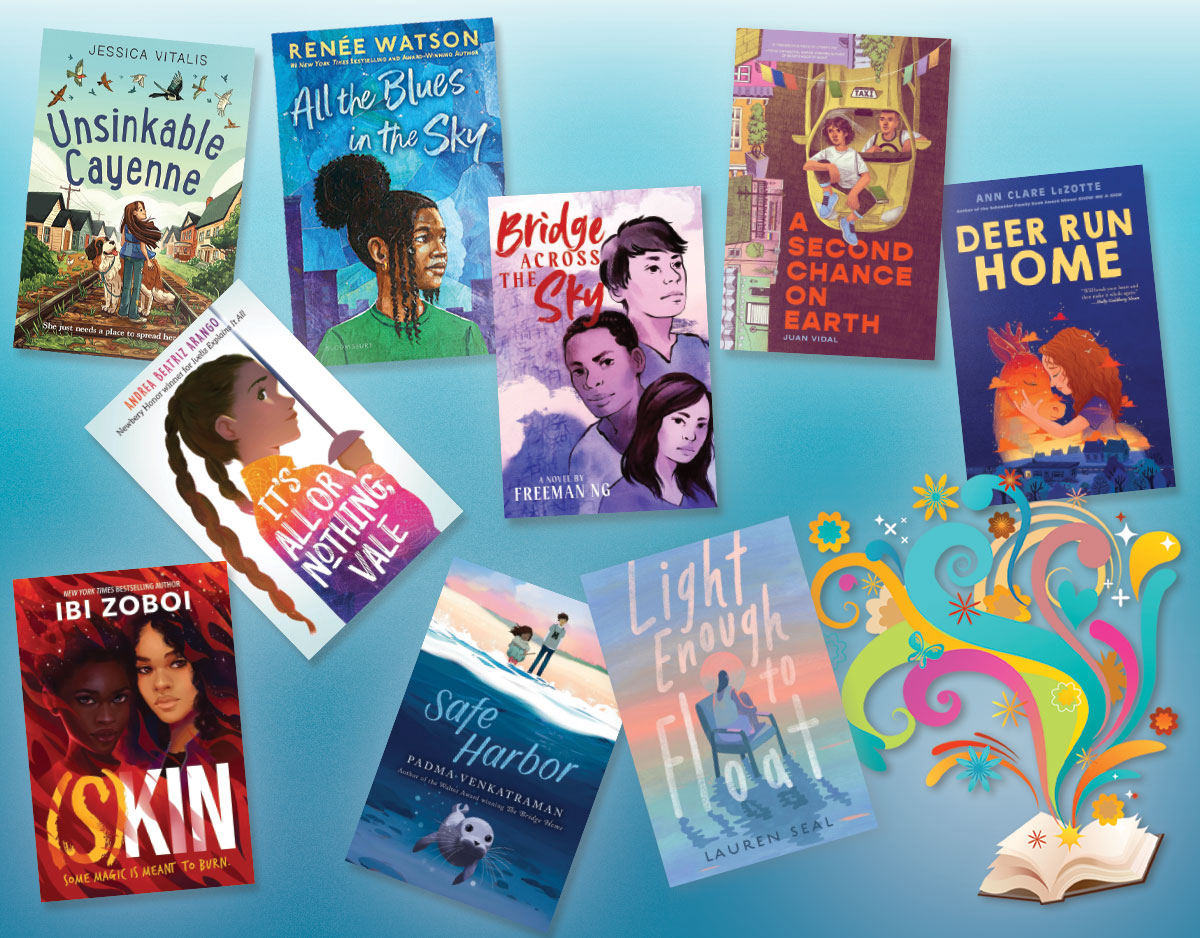
As children grow older, their interests naturally change. Young Readers may start looking for stories that explore friendship, adventure, identity, family, challenges, and independence. Children between 12 and 15, for example, often enjoy stories that reflect some of the experiences they face while growing up. Parents can explore LitsLib stories for ages 12–15 to find reading options that suit this important stage.
Reading Can Strengthen Confidence
Confidence isn’t solely derived from having the correct answer. Sometimes, it develops when children feel comfortable sharing their thoughts. Stories create many opportunities for this. A child might explain why they like a character. They may guess how the story will end or question a character’s decision. Parents can encourage these conversations by listening instead of immediately correcting them.
For Young Readers, this simple interaction can make a real difference. It shows them that their opinions have value. As children become better readers, they may also feel more comfortable reading aloud. They can begin discussing books with family members and friends. Eventually, they may even choose books without needing someone else to select them. Each small achievement can motivate them to take on a more challenging story.
Create a Simple Little Library at Home
You do not need an entire room filled with books to encourage reading. A small shelf, basket, or box can work just as well. Keep a selection of different stories within easy reach. You might include funny tales, animal adventures, fairy tales, picture books, and stories about friendship or kindness. Most importantly, let children make choices. If a child wants to read the same book repeatedly, there is no need to discourage them. Familiar stories can provide comfort. Repeated reading also helps children recognize words, understand sentence patterns, and remember characters. Over time, that small collection can become a familiar part of home life. For Young Readers, having books nearby can make reading feel accessible rather than like a special activity that happens only at school.
Make Bedtime Reading a Daily Habit
Bedtime offers a natural opportunity to introduce children to books. Once they finish brushing their teeth and getting ready for sleep, they can choose a story and settle down with a parent. The routine does not need to last for an hour. Even ten minutes can create a meaningful reading habit.
At first, children may simply enjoy hearing the story. Later, they may start asking questions or choosing their favorite books. Eventually, they may look forward to those few minutes every night.
This routine can also create positive family memories. A child may forget many ordinary details from childhood, but they can remember the feeling of sitting beside a parent while listening to a favorite story. For Young Readers, that emotional connection can make books feel warm, familiar, and enjoyable.
Stories Can Introduce Important Life Lessons
Children’s stories often explore ideas such as honesty, kindness, courage, patience, friendship, and dealing with mistakes. However, good stories do not need to turn these lessons into lectures. Instead, they allow children to watch characters make decisions and experience the consequences. A child might ask, “Why did the character do that?” They may also wonder whether a different choice would have changed the ending.
These questions can lead to meaningful conversations. Parents can use those moments to help children think about situations without telling them exactly what to believe. This approach allows children to develop their own understanding.
Stories can also help Young Readers recognize emotions and experiences that may feel unfamiliar. Seeing a character face fear, disappointment, or loneliness can help children understand that difficult feelings are normal.
Discover More Stories With LitsLib
Finding suitable books can sometimes feel difficult, especially when children have different interests and reading abilities. Having access to a variety of stories can make the process easier. LitsLib offers reading-focused resources covering children’s stories, literature, education, storytelling, and personal growth. Families can explore its collection to discover stories that match different interests and stages of childhood.
Parents can also use these resources to keep their home library interesting. Introducing new stories from time to time can give children something fresh to explore. However, the goal should not be to make children read as much as possible. The better goal is to help them discover stories they genuinely enjoy.
Help Children Become Lifelong Readers
A child who enjoys a story today may develop into an independent reader in the future. However, that journey takes time. Start with short stories. Read together. Keep books where children can easily reach them. Let them choose what interests them. Most importantly, keep the experience enjoyable.
Young Readers need encouragement more than pressure. When children connect books with curiosity, comfort, and family time, reading can become something they choose for themselves. A bedtime story may take only a few minutes, yet those minutes can create lasting memories. A small bookshelf may contain only a few titles, but each book can open the door to countless imaginary worlds.
Stories give children room to dream, question, explore, and express themselves. With the right books and a little encouragement, reading can become more than a childhood activity. It can become a lifelong source of knowledge, creativity, and joy.
Final Thought
Books can spark imagination, build confidence, and create a lasting love for reading. Give Young Readers the freedom to explore stories they enjoy, and every page can become a new adventure. A simple reading routine can also bring families closer together. Whether it is a short bedtime story or a quiet afternoon with a favorite book, these moments can leave lasting memories. Most importantly, let children read with curiosity, not pressure. When reading feels enjoyable, children are more likely to return to books again and again.
Author


Traditional Ayurvedic Herbs and Their Place in Modern Wellness

Why a Good Bassinet Makes Life Easier for NZ Parents

Work Visas, Job Changes, and the Details That Decide NZ Visa

Why take Private tour of Gibbston Valley

Haffele Kitchen Dealer in Thrissur: Upgrade Your Home in Style

Project Capri Clothing: Hoodies, Jorts & Modern Streetwear 2026

Why Continuous Learning Matters for Business Leaders

Accurate As-Built Drawings Are the Foundation of Successful Commercial

The Best Asset Management System in UAE

Kentucky Bourbon Trail Tours What Is Included and How to Plan a Trip

Cybersecurity Consulting Company SequelNet Provides Critical IT Support Services to Medical Billing Firm, Medical Optimum

Meet the Megalodon: The Shark Star of ‘Meg 2’

Reduce Video Game Lag: Level Up Your Gaming Performance

Balancing India’s Entertainment: Cricket vs. Bollywood

Jetsetter’s Secrets: Unveiling Our Favorite Travel Hacks for a Seamless Adventure

The 5 Best Live Sports Streaming Sites: Legal and Exciting!

Hollywood Labor Unrest: The Impact of ‘What About Us?’ Strikes

Unveiling the Magic of Dream Fulfillment at the Late NBA Draft

Illuminate Your Skin: Dr. Axe Unveils Natural Remedies for Lightening Knees and Elbows

Bright Choices: Navigating the Pros and Cons of Skin Whitening Creams with Dr. Axe
-

 Business3 years ago
Cybersecurity Consulting Company SequelNet Provides Critical IT Support Services to Medical Billing Firm, Medical Optimum
-
Entertainment3 years ago
Meet the Megalodon: The Shark Star of ‘Meg 2’
-
Entertainment3 years ago
Reduce Video Game Lag: Level Up Your Gaming Performance
-
 Sports3 years ago
Balancing India’s Entertainment: Cricket vs. Bollywood
-
Entertainment3 years ago
Jetsetter’s Secrets: Unveiling Our Favorite Travel Hacks for a Seamless Adventure
-
Productivity3 years ago
The 5 Best Live Sports Streaming Sites: Legal and Exciting!
-
Art /Entertainment3 years ago
Hollywood Labor Unrest: The Impact of ‘What About Us?’ Strikes
-
Sports3 years ago
Unveiling the Magic of Dream Fulfillment at the Late NBA Draft






