
Finance
Working Capital Loan in India: Meaning, Types & Benefits

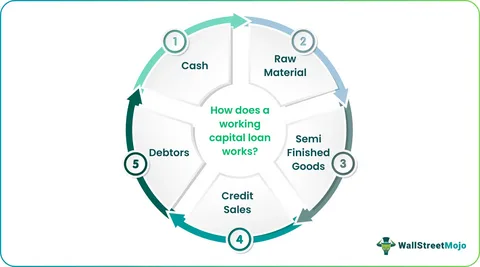
Running a business is not only about making sales. One of the biggest challenges for MSMEs and small business owners is managing day-to-day expenses properly. Salaries, rent, electricity bills, supplier payments, raw materials — all these costs continue even when customer payments get delayed. That’s where a Working Capital Loan becomes useful.
Many businesses in India use working capital finance to handle short-term business needs and maintain smooth operations without disturbing regular cash flow. Regardless of being a manufacturing unit, retailer, exporter, trader, or service-oriented business, working capital assistance enables companies to sustain their operations smoothly. In this blog, let’s explore the meaning of a Working Capital Loan, its operation, the various types, advantages, and the eligibility for applicants.
What Is a Working Capital Loan?
A Working Capital Loan is a short-term loan taken by businesses to manage their daily operational expenses.
Unlike long-term business loans that are used for buying machinery, office space, or expansion, a working capital loan is mainly used for routine expenses like:
- Employee salaries
- Rent and utility bills
- Supplier payments
- Purchasing inventory
- Managing seasonal demand
- Handling temporary cash flow gaps
In simple words, it helps businesses maintain regular operations when incoming cash flow is not enough. For example, if a company has supplied goods to buyers but payment will come after 45 days, the business may still need funds immediately to continue operations. In such situations, working capital finance helps bridge the gap.
Businesses Need Working Capital Loans
Many Indian MSMEs face delayed payments from buyers. At the same time, operational expenses cannot wait.

A Working Capital Loan helps businesses:
- Maintain smooth business operations
- Avoid cash flow shortages
- Continue production or services without interruption
- Handle sudden business expenses
- Manage seasonal sales fluctuations
- Improve business stability
How Does a Working Capital Loan Work?
The process is usually simple.
A lender provides a certain amount of money to the business based on factors like:
- Business turnover
- Revenue
- Credit profile
- Repayment history
- Existing business operations
The business can then use these funds for short-term operational requirements.
The repayment may happen through:
- Monthly EMIs
- Flexible withdrawal and repayment structure
- Invoice settlement
- Auto deductions from sales
The loan tenure is generally shorter compared to regular business loans. It can range from a few months to a few years depending on the loan type.
Types of Working Capital Loans
Different businesses have different funding needs. Because of that, lenders offer multiple types of working capital finance options.
1. Term Loan
This is one of the most common forms of working capital loans. The lender gives a fixed amount to the borrower, and repayment happens through EMIs over a fixed tenure.
Suitable for:
- Short-term operational needs
- Inventory purchase
- Business expansion support
2. Cash Credit Facility
Under this facility, businesses get a borrowing limit from the lender. The firm can take out funds whenever necessary and pay interest solely on the amount utilized.
Suitable for:
- Businesses with fluctuating cash flow
- Regular working capital requirements
3. Overdraft Facility
An overdraft allows businesses to withdraw more money than the available balance in their current account.
Interest is charged only on the utilized amount.
Suitable for:
- Emergency cash requirements
- Temporary liquidity management
4. Invoice Financing
This improves cash flow without waiting for customers to clear payments.
Suitable for:
- MSMEs
- Exporters
- B2B businesses
5. Trade Credit
Suitable for:
- Retailers
- Traders
- Manufacturing businesses

Features of a Working Capital Loan
Here are some common features businesses should know:
Quick Access to Funds
Short-Term Financing
These loans are mainly designed for temporary operational needs.
Flexible Usage
Businesses can use funds for multiple day-to-day requirements.
Secured or Unsecured Options
Some working capital loans require collateral while others are unsecured.
Interest on Utilized Amount
In facilities like cash credit and overdraft, interest applies only on the amount used.
Benefits of Working Capital Loans
Helps Maintain Smooth Operations
Businesses can continue daily operations without worrying about cash shortages.
Better Cash Flow Management
A working capital loan helps businesses manage delayed customer payments effectively.
Supports Business Growth
Companies can accept larger orders, maintain inventory, and expand operations smoothly.
Improves Supplier Relationships
Timely payments help businesses maintain trust with suppliers and vendors.
Handles Seasonal Demand
Businesses with seasonal sales can manage high-demand periods easily.
Who Can Apply for a Loan?
Different lenders may have different eligibility criteria, but generally the following businesses can apply:
- MSMEs
- Startups
- Proprietorship firms
- Partnership firms
- Private limited companies
- Traders and retailers
- Manufacturers
- Service providers
Lenders usually check:
- Business vintage
- Annual turnover
- Bank statements
- GST returns
- Credit history
Documents Required for Loan
The documentation process is usually simple.
Common documents include:
- PAN card
- Aadhaar card
- Business registration proof
- GST registration
- Bank statements
- Income tax returns
- Financial statements
- KYC documents
Some lenders may ask for additional documents depending on the loan amount.
Things Businesses Should Consider
Understand the Loan Cost
Check:
- Interest rates
- Processing fees
- Hidden charges
- Penalties
Borrow Only What Is Needed
Taking excessive debt can create repayment pressure later.
Compare Different Lenders
Always compare loan terms before making a decision.
Check Repayment Capacity
Businesses should ensure stable cash flow for repayment.
Read Terms Carefully
Understand all conditions before signing the agreement.
Can MSMEs Get Loans?
Government initiatives for MSMEs have also improved funding accessibility for small businesses. Still, approval depends on business performance, repayment history, and financial stability.
Final Thoughts
For many businesses, especially MSMEs, managing cash flow is one of the toughest parts of operations. Sales may be growing, but delayed payments and rising expenses can still create pressure.
A Working Capital Loan helps businesses maintain stability during such situations. It supports smooth operations, improves cash flow management, and gives businesses the flexibility to handle short-term financial needs without disrupting daily work.
Before taking any loan, businesses should properly assess their requirements, compare options, and choose a financing solution that matches their repayment capacity and operational needs.
Author







When QuickBooks bank feeds are not working, new transactions may stop downloading, balances may appear outdated, or QuickBooks may display a banking error such as 101, 102, 103, 105, 108, 390, 350, or 1000.
The good news is that a bank-feed problem does not automatically mean your QuickBooks company file is damaged. The issue may be related to your bank’s connection, outdated sign-in information, required bank authorization, browser data, a changed bank connection, or QuickBooks Desktop’s Financial Institutions Directory.
The most efficient approach is to identify the symptom first and then apply the fix that matches the underlying cause.
What to Do When QuickBooks Bank Feeds Stop Working
Start with these checks:
- Run a manual bank update.
- Sign in to your bank’s website directly.
- Check for bank alerts, maintenance, security prompts, or terms requiring acceptance.
- Verify your bank username and password.
- Complete any additional authentication requested by the bank.
- Try QuickBooks in a private or incognito browser window.
- If the connection itself needs rebuilding, review downloaded transactions before disconnecting and reconnecting.
- For QuickBooks Desktop, update the Financial Institutions Directory and verify that your Desktop version is supported.
- If automatic connectivity remains unavailable, manually import eligible transactions while investigating the connection.
QuickBooks states that connected bank accounts normally download new transactions automatically, while a manual update can be used to retrieve the latest available transactions.
Quick Diagnosis: Why Is Your QuickBooks Bank Feed Not Working?
| What You See | Possible Cause | Best First Action |
| Bank feed stopped without an error | Temporary bank or connection issue | Run a manual Update |
| Error 101 | Inactive account or unaccepted bank terms | Check account activity and bank prompts |
| Error 102 or 105 | Bank-side connection or maintenance problem | Update, check bank website, then wait and retry |
| Error 103 | Incorrect bank credentials or third-party access requirement | Verify credentials and bank access |
| Error 108 | Bank notification or message requiring attention | Sign in to bank and clear required prompts |
| Error 350 | Secure bank connection has expired or no longer works | Reconnect the bank connection |
| Error 390 | Bank connection needs to be upgraded | Disconnect and reconnect after reviewing transactions |
| Error 1000 | QuickBooks requires the bank connection to be rebuilt | Review transactions, then reconnect |
| Balance updates but transactions are missing | Posting, download, or bank-data delay | Run Update and check whether transactions are posted |
| “Consent has lapsed” or similar authorization message | Bank authorization needs attention | Follow the bank’s reauthorization process |
| QuickBooks Desktop cannot download transactions | Bank Feed, FiDir, connection, or supported-version issue | Update QuickBooks and refresh FiDir |
The exact message matters because different bank errors have different causes and troubleshooting paths. For example, Intuit currently identifies Error 102/105 with bank-side connection problems, while Error 103 generally relates to bank sign-in information.
Why Are QuickBooks Bank Feeds Not Working?
Bank-feed failures can originate from either side of the connection. Therefore, troubleshooting should begin by determining whether your bank website, QuickBooks account, or connection credentials are responsible.
1. Bank Maintenance or Connection Problems
Sometimes the bank’s online banking service is temporarily unavailable or undergoing maintenance. In that situation, QuickBooks may be unable to retrieve transactions even though your QuickBooks account itself is working correctly.
Error 102 and Error 105 are commonly associated with this type of connection problem.
Start by:
- Running a manual Update.
- Signing in to your bank website.
- Checking for outage or maintenance messages.
- Reviewing alerts and notifications.
- Trying the connection again after the bank resolves the issue.
Current QuickBooks guidance notes that bank-side problems may take 24–48 hours or longer to resolve, depending on the financial institution.
2. Bank Username or Password Changed
If you changed your bank password, username, or other online-banking information, QuickBooks may continue trying to use outdated credentials.
This is a common reason for QuickBooks Error 103.
First, verify that the credentials work directly on the bank’s website. If they do, update the sign-in information stored in QuickBooks and complete any requested authentication.
3. Your Bank Requires Third-Party Access
Some financial institutions require customers to authorize third-party services before an application such as QuickBooks can retrieve banking information.
Therefore, successfully signing in to your bank website does not always mean that third-party access is enabled.
Check the bank’s security or connected-services settings and follow its authorization instructions.
4. Bank Terms, Notifications, or Security Prompts Need Attention
A bank may require you to accept updated terms, acknowledge a security message, verify information, or complete another prompt before transaction data can be shared.
For example, QuickBooks identifies missed bank prompts as one possible cause of Error 101.
Sign in to the bank directly and clear any required notification before trying QuickBooks again.
5. Account Is Inactive
QuickBooks Error 101 can occur when attempting to connect an inactive account. Current QuickBooks guidance describes an account as active when it has an existing balance or transactions within the previous 12 months.
If the account should still be active but QuickBooks cannot connect, verify its status with the financial institution.
6. Browser Cache, Extensions, or Stored Sessions
QuickBooks Online banking connections can also behave differently because of browser extensions, cached authentication information, or an outdated browser session.
A useful diagnostic step is to sign in to QuickBooks using a private or incognito window and retry the bank update. Current QuickBooks guidance specifically recommends private browsing as a way to rule out browser-related connection problems.
How to Fix QuickBooks Bank Feeds Not Working
Step 1: Run a Manual Bank Update
This should normally be your first troubleshooting step.
QuickBooks Online
- Open QuickBooks.
- Go to All apps.
- Select Accounting.
- Open Bank transactions.
- Select Update.
- If QuickBooks requests additional authentication, complete the verification.
- Wait for the update to finish.
QuickBooks normally downloads available transactions automatically, but a manual update lets you request the latest available data instead of waiting for the next scheduled download.
If the update works, review the downloaded transactions before adding or matching them.
Step 2: Sign In to Your Bank Directly
If the update fails, open your bank’s website separately.
Check:
- Can you sign in successfully?
- Is the account active?
- Are there security alerts?
- Is there a new terms-and-conditions notice?
- Does the bank require third-party authorization?
- Is online banking undergoing maintenance?
- Can you see recent posted transactions?
If you cannot sign in to the bank directly, resolve that issue with the bank first.
If you can sign in normally, continue with QuickBooks troubleshooting.
Step 3: Fix QuickBooks Error 103
Error 103 generally indicates incorrect bank sign-in information.
To troubleshoot it:
- Open your bank website in a new or private browser window.
- Confirm the correct user ID.
- Confirm the current password.
- Make sure you are using the correct financial institution.
- Check whether third-party access is required.
- Return to QuickBooks.
- Open the affected bank account.
- Select Edit and then Edit sign-in info, where available.
- Enter the current credentials.
- Complete any requested verification.
- Select Update or Save and connect.
If your browser automatically fills old credentials, clear those fields and enter the current information manually.
Step 4: Troubleshoot Errors 102 and 105
For QuickBooks Error 102 or 105, start with a manual update.
Then:
- Sign in to the bank website.
- Look for maintenance notices.
- Review account alerts.
- Check whether transactions are visible.
- Return to QuickBooks.
- Run another Update.
If the bank is experiencing an outage, repeated QuickBooks changes are unlikely to solve the underlying problem. Give the financial institution time to restore its connection and retry afterward.
Step 5: Do Not Disconnect the Account Too Quickly
Disconnecting and reconnecting can help with certain connection errors, but it should not automatically be your first step.
Before disconnecting:
- Review the For review transactions.
- Check transactions that have already been categorized or matched.
- Note the date of the latest downloaded transaction.
- Confirm the correct QuickBooks account.
- Consider creating a backup where appropriate.
This matters because reconnecting can result in duplicate downloads or leave older transactions unavailable through the normal bank connection.
Current QuickBooks guidance specifically recommends reviewing downloaded transactions before disconnecting and reconnecting an affected account.
Step 6: Disconnect and Reconnect the Bank Feed
If the connection itself needs to be rebuilt:
- Open Bank transactions.
- Select the affected account.
- Review downloaded transactions first.
- Open the account’s Edit options.
- Select the option to disconnect the account.
- Save the change.
- Select Link account.
- Search for the correct financial institution.
- Enter the current banking credentials.
- Complete the bank’s authorization process.
- When QuickBooks asks which existing account should receive the transactions, select the correct account in your Chart of Accounts.
- Review the downloaded transactions carefully.
Errors such as 390 and 1000 may specifically require disconnecting and reconnecting the bank connection.
Step 7: Try QuickBooks in a Private Browser
If the bank works but QuickBooks still cannot update:
- Open an incognito/private browser window.
- Sign in to QuickBooks.
- Open Bank transactions.
- Select the affected account.
- Run Update again.
This helps determine whether cached data, extensions, or an existing browser session is interfering with the banking connection.
If the private window works, clear or review your normal browser’s cached data and extensions.
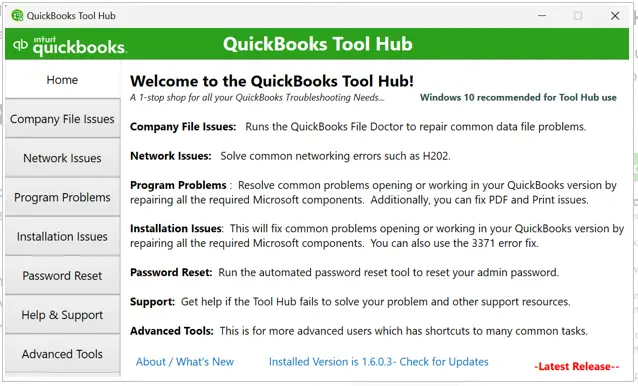
Expert Note: QuickBooks Tool Hub is a practical troubleshooting utility for QuickBooks Desktop that brings several diagnostic tools into one place, helping users address common program, company-file, network, and installation problems through a structured troubleshooting process.
QuickBooks Desktop Bank Feeds Not Working
QuickBooks Desktop uses different bank-feed mechanisms from QuickBooks Online.
Desktop bank connections can use Direct Connect or Web Connect, depending on what your financial institution supports. Web Connect uses a bank-provided .QBO file.
Update the Financial Institutions Directory
If QuickBooks Desktop cannot communicate correctly with your financial institution:
- Back up your company file.
- Update QuickBooks Desktop to the latest available release.
- Open Banking.
- Select Bank Feeds.
- Open Bank Feeds Center.
- Select Refresh account(s) or the appropriate synchronization option.
The Financial Institutions Directory, or FiDir, contains financial-institution information used by QuickBooks Desktop. Intuit provides both automatic and manual methods for updating it.
If the problem continues, test the bank connection in a properly configured test company file. This can help distinguish a company-file problem from a bank-connection problem.
What If QuickBooks Shows the Correct Balance but No Transactions?
This situation can be confusing because it may appear that the bank connection is working.
However, a balance and transaction list do not always update at exactly the same time.
Before changing the connection:
- Run a manual Update.
- Check whether the missing transactions are actually posted.
- Review the bank website.
- Check the transaction date range.
- Review the For review and categorized areas.
- Check whether the transactions are pending.
QuickBooks does not download pending transactions, and some transaction delays can take time to appear.
Alternative Solution: Manually Import Bank Transactions
If the automatic connection cannot be restored immediately, you can keep your accounting records current by importing supported transaction files.
QuickBooks Online currently supports transaction uploads including QBO, QFX, CSV, and certain statement formats.
A typical workflow is:
- Download the transaction file from your bank.
- Open Bank transactions in QuickBooks.
- Choose Upload from file.
- Select the appropriate QuickBooks account.
- Map the transaction columns.
- Review the imported transactions.
- Save the transactions.
- Match and categorize them.
- Reconcile the account when appropriate.
Be careful not to import transactions that are already present in QuickBooks. Otherwise, duplicates can be created.
For QuickBooks Desktop, Web Connect uses .QBO files, so the correct file format depends on the Desktop connection method and financial institution.
Important QuickBooks Bank Feed Errors to Know
Error 101
Usually associated with an inactive bank account or an unaccepted bank requirement. Check account activity and bank prompts.
Error 102
Generally indicates that QuickBooks cannot connect to the bank. Check for bank-side maintenance and run an update.
Error 103
Usually associated with incorrect bank credentials. Verify the login directly with the bank and update the information in QuickBooks.
Error 105
Usually indicates a bank connection problem, often related to the financial institution’s side. Update the connection and check the bank website.
Error 108
Can occur when a bank notification or message requires attention before transactions can download.
Error 350
Indicates that the secure connection between QuickBooks and the bank has expired or is no longer functioning correctly.
Error 390
Indicates that a bank connection needs to be upgraded and may require reconnecting the account.
Error 1000
Can indicate that the bank connection needs to be disconnected and reconnected. Review existing transactions first to reduce duplicate-download risk.
How to Prevent QuickBooks Bank Feed Problems
Good bank-feed maintenance starts before an error appears.
Follow these practices:
- Keep your QuickBooks product and supported components updated.
- Update QuickBooks immediately after changing bank credentials.
- Respond promptly to bank security prompts.
- Check the bank website when transactions suddenly stop.
- Review downloaded transactions regularly.
- Avoid disconnecting a bank account unnecessarily.
- Keep company-file backups when working with QuickBooks Desktop.
- Use the correct financial institution and connection method.
- Monitor unmatched or missing transactions before reconciliation.
- Use manual imports carefully when automatic connectivity is unavailable.
The goal is not simply to make transactions appear again. The goal is to maintain an accurate audit trail and prevent duplicate, missing, or incorrectly categorized transactions.
Frequently Asked Questions
Why are my QuickBooks bank feeds not working?
The cause may be a temporary bank connection problem, incorrect credentials, a required bank authorization, an inactive account, browser issues, or a connection that needs to be refreshed. Start with a manual Update and then check your bank website.
How do I fix QuickBooks Error 103?
Verify your bank username and password directly on the bank’s website. Then update the sign-in information in QuickBooks and complete any third-party authorization or verification required by the bank.
How do I fix QuickBooks Error 101?
Sign in to your bank, verify that the account is active, and look for missed terms or security prompts. Then return to QuickBooks and refresh the connection.
Why are QuickBooks bank transactions delayed?
Transactions may not appear immediately because of bank processing, connection delays, pending status, or download timing. QuickBooks also does not download pending transactions. Run a manual update and compare the results with your bank’s posted transactions.
Should I disconnect and reconnect my bank account?
Not immediately. First review downloaded transactions and determine whether the problem actually requires reconnection. Disconnecting unnecessarily can create duplicate-download risks or affect transactions waiting for review.
Can I use QuickBooks if bank feeds are down?
Yes. You can continue bookkeeping and, when appropriate, manually upload supported transaction files. However, imported transactions should be reviewed, matched, categorized, and reconciled carefully.
When should I get professional help?
Consider professional assistance when the same connection repeatedly fails after you have verified the bank website, credentials, authorization, browser environment, and QuickBooks configuration. Additional help is particularly useful when missing transactions affect reconciliation or when a QuickBooks Desktop company file behaves differently from a test company.
Final Takeaway
QuickBooks bank feeds not working does not necessarily mean your accounting data is damaged. In many situations, the underlying problem is the bank connection, outdated credentials, required authorization, browser session, temporary bank maintenance, or an outdated Desktop financial-institution configuration.
Start with a manual Update, then check the bank website and verify your credentials. Next, investigate authentication prompts and browser issues. Only after those checks should you consider disconnecting and reconnecting the account. For QuickBooks Desktop, also review the Financial Institutions Directory and supported-product requirements.
If automatic banking remains unavailable, manual transaction import can keep your bookkeeping moving while the connection is investigated.
For complex bank-feed, reconciliation, connectivity, or QuickBooks Desktop issues, Data Service Team can provide technical troubleshooting assistance at +1-(888)-718-7888.
Author

Introduction
You finish an invoice in QuickBooks Online, select Send, and expect the message to reach your customer. Instead, QuickBooks displays “Delivery Server Down,” “Unable to send your email,” or a similar email-delivery message.
The problem can interrupt invoice delivery, sales receipts, estimates, statements, and other customer communications. When invoices are waiting to be sent, an email failure can quickly become a business problem because customers may not receive the information they need to make payments.
Despite the wording, “Delivery Server Down” does not by itself prove that the QuickBooks email service is unavailable. The failure can originate from several places, including the email address, invoice or attachment, PDF generation, browser session, account configuration, or an actual service-side interruption.
This guide provides a structured way to identify the cause instead of repeatedly trying unrelated fixes.
What Does QuickBooks Delivery Server Down Mean?
The QuickBooks Delivery Server Down error occurs when QuickBooks cannot complete the process required to deliver an email or customer-facing sales form.
The issue may appear while sending:
- Invoices
- Estimates
- Sales receipts
- Credit memos
- Statements
- Purchase orders
- Other forms or PDF attachments
A message such as “Delivery Server Down” is therefore a delivery failure, not necessarily evidence that your company file or accounting records are damaged.
Quick Summary
| Item | Details |
| Problem type | Email and sales-form delivery failure |
| Common environment | QuickBooks Online |
| Main symptom | Email cannot be sent successfully |
| Possible causes | Email configuration, attachment, PDF, browser, account, network, or service issue |
| Data concern | An email-delivery failure does not itself indicate transaction loss |
| Best first check | Determine whether the problem affects one transaction, one user, or the entire account |
| Troubleshooting level | Usually straightforward, but recurring failures require deeper diagnosis |
Why Does QuickBooks Say “Delivery Server Down”?
There are several possible causes. The most efficient troubleshooting method is to determine where the failure occurs.
1. Invalid or Incorrect Email Address
An incorrectly entered customer or company email address can prevent successful delivery.
Look for:
- Missing @
- Missing domain name
- Extra spaces
- Incorrect punctuation
- Accidental prefixes
- Multiple addresses entered incorrectly
- Typographical errors
For example, an address containing additional text before the actual email address may not be accepted as a valid address.
Check both the customer’s email address and the email information associated with your QuickBooks account.
2. Problem With the Invoice or Attachment
If a message is sent successfully without an attachment but fails when a PDF is included, the attachment becomes an important troubleshooting clue.
Potential problems include:
- Unsupported attachment format
- Oversized attachment
- Damaged PDF
- Unusual filename
- Multiple attachments causing the failure
- A problem generating the sales-form PDF
Instead of changing several account settings at once, test the same transaction with the attachment removed or with a newly generated PDF.
This helps isolate whether the delivery failure is associated with the document itself.
3. PDF Generation or Rendering Problem
QuickBooks needs to generate the document correctly before it can deliver an invoice or other sales form as a PDF.
A PDF-related problem may become apparent when:
- The invoice preview does not render correctly.
- The PDF cannot be downloaded.
- The PDF opens incorrectly.
- Sending without a PDF works but sending with one fails.
- The issue occurs only with a particular custom form.
If the PDF itself cannot be generated correctly, changing the customer’s email address will not solve the underlying problem.
4. Browser Session Problems
QuickBooks Online runs through a web browser, so browser-related problems can interfere with account functions.
Possible contributors include:
- Corrupted cached data
- Outdated browser components
- Browser extensions
- An expired login session
- Cookies or site data causing unexpected behavior
Testing QuickBooks in a private/incognito window is a useful diagnostic step because it temporarily reduces the impact of cached data and many extensions.
5. Email or Account Configuration
QuickBooks may use account-level email settings for customer communications.
Review the email information associated with the company and verify that:
- The address is correct.
- There are no unintended characters.
- The appropriate company/customer-facing information is present.
- Recent changes have been saved.
If only one customer cannot receive an invoice, compare that customer’s record with a customer whose invoice sends successfully.
6. Network or Security Restrictions
A business network can sometimes interfere with browser-based services.
Possible contributors include:
- Corporate firewall policies
- Web filtering
- Security software
- VPN configuration
- Unstable internet connectivity
- Browser security restrictions
If QuickBooks works normally for other functions but email delivery fails consistently on one network, test the account from a different reliable connection.
Do not leave antivirus or firewall protection permanently disabled simply to test an email problem.
7. A Temporary Service-Side Problem
A genuine service interruption is also possible.
That is why the error message should not automatically be interpreted as either a server outage or a local configuration problem.
If multiple users experience the same delivery failure at approximately the same time, while unrelated account functions remain normal, check the current service status before making extensive configuration changes.
This is especially important when the problem begins suddenly without any changes to the account, browser, invoice, or customer records.
Quick Diagnostic Test
Before changing settings, perform this simple test.
Test A: Send another invoice
Send a different invoice to a different customer.
If the second invoice works:
The problem may be specific to the original customer, invoice, attachment, or transaction.
If the second invoice also fails:
Investigate account, browser, network, or service-level causes.
Test B: Remove the attachment
Try sending the transaction without an additional attachment.
Works without attachment:
Investigate the PDF or attachment.
Still fails:
Investigate email configuration, browser, account, network, or service conditions.
Test C: Try another browser
Open QuickBooks in another supported browser or a private browsing session.
Works there:
The original browser’s cache, cookies, extensions, or settings may be involved.
Fails everywhere:
Move the investigation toward the account, transaction, network, or service.
This simple isolation process can prevent unnecessary changes.
How to Fix QuickBooks Delivery Server Down Error
Fix 1: Verify the Customer Email Address
Start with the recipient’s address.
- Open the affected customer record.
- Review the email address carefully.
- Remove accidental spaces or additional text.
- Confirm the domain is spelled correctly.
- Save the customer record.
- Reopen the invoice.
- Try sending it again.
If the same invoice can be sent to another valid customer address, the recipient record is an especially strong suspect.
Fix 2: Check Your Company Email Information
Review the email information associated with your QuickBooks company settings.
Look for:
- Incorrect addresses
- Extra text
- Formatting errors
- Outdated addresses
- Unsaved changes
After making a correction, save the settings and test a new invoice.
Avoid changing several unrelated settings simultaneously. Making one controlled change at a time makes the cause easier to identify.
Fix 3: Test the Invoice Without Additional Attachments
If your invoice contains additional files, remove them temporarily.
Then:
- Open the invoice.
- Remove optional attachments.
- Save the transaction.
- Send the invoice again.
- If it works, add attachments back individually.
This approach identifies whether one particular attachment is responsible for the failure.
Fix 4: Regenerate the PDF
If the problem occurs only when sending a sales form as a PDF, regenerate the document.
- Open the affected transaction.
- Preview the form.
- Confirm that the invoice displays correctly.
- Save or download a fresh PDF if necessary.
- Test the newly generated document.
- Try sending the invoice again.
If one custom invoice template consistently produces the error while another template works, investigate the custom form rather than changing the entire email configuration.
Fix 5: Use a Private/Incognito Browser Window
A private browser session can help identify browser-cache or extension problems.
- Open a private/incognito window.
- Sign in to QuickBooks.
- Open the same invoice.
- Try sending it again.
If the message is sent successfully in private browsing, return to the normal browser and investigate extensions, cached data, cookies, and browser settings.
Fix 6: Clear Browser Cache and Site Data
If private browsing works but the normal session does not, clear the relevant browser cache and site data.
Then:
- Close the browser.
- Reopen it.
- Sign in to QuickBooks again.
- Open the affected transaction.
- Test email delivery.
You may need to sign in again after clearing browser data.
Fix 7: Disable Problematic Browser Extensions for Testing
Some browser extensions modify webpages, downloads, PDFs, privacy controls, or network requests.
If QuickBooks email delivery fails in your normal browser:
- Open the browser’s extension settings.
- Temporarily disable nonessential extensions.
- Sign in to QuickBooks again.
- Test the invoice.
- Re-enable extensions individually after testing.
Do not permanently remove security extensions solely because one test failed.
Fix 8: Check the Internet and Network Environment
Make sure the browser has a stable internet connection.
If you are on a business network:
- Test from another reliable network.
- Temporarily disconnect a VPN if your organization’s policy permits.
- Check whether other users experience the same problem.
- Ask the network administrator whether web filtering is affecting QuickBooks.
If the problem disappears when using another connection, investigate the original network rather than changing invoice data.
Fix 9: Check Whether the Problem Is Account-Wide
Determine the scope of the failure.
Ask:
- Can another user send an invoice?
- Can another customer receive an invoice?
- Can another transaction be emailed?
- Does the problem happen in another browser?
- Does the problem happen on another computer?
If only one transaction fails, investigate that transaction.
If one user fails, investigate the user’s browser/session.
If multiple users and transactions fail, investigate account-level, network, or service-level causes.
This is one of the most valuable diagnostic distinctions for recurring email problems.
What If You Need to Send the Invoice Immediately?
If QuickBooks email delivery is temporarily unavailable, you can use an alternative delivery method.
Depending on the options available in your QuickBooks account, you can:
- Open the invoice.
- Preview or download the invoice as a PDF.
- Save the document securely.
- Send the PDF using your normal business email service.
You can also use an available invoice-sharing option when appropriate.
This does not repair the QuickBooks delivery problem, but it can help prevent an urgent invoice from being delayed while troubleshooting continues.
Real-World Diagnostic Example
Imagine a consulting company reports that every invoice returns “Delivery Server Down.”
Instead of immediately changing browser settings, the technician performs three tests.
First, a different invoice is sent to another customer. It fails.
Second, the same account is tested in a private browser window. It still fails.
Third, another authorized user attempts to send an invoice. That also fails.
Because the failure occurs across multiple transactions, users, and browser sessions, the investigation should move away from one customer’s email address or one invoice.
The next step is to check the account environment, network conditions, and whether there is a current service-side interruption.
This approach is more reliable than assuming every Delivery Server Down message has the same cause.
QuickBooks Delivery Server Down vs. Other Email Problems
Not every QuickBooks email problem is the same.
| Problem | What to investigate |
| Delivery Server Down | Delivery process, account, browser, attachment, network, service |
| Invoice will not email | Customer address, account settings, browser, service |
| PDF will not generate | Form, browser, PDF rendering, transaction |
| Email sends but customer does not receive it | Recipient mailbox, spam filtering, recipient address |
| Only one invoice fails | Transaction, customer, attachment, template |
| All users cannot send | Account, network, service-side condition |
| Only one browser fails | Cache, cookies, extensions, browser configuration |
This distinction matters because the correct solution depends on where the failure occurs.
How to Prevent QuickBooks Email Delivery Problems
A few maintenance practices can reduce recurring issues:
- Keep customer email addresses accurate.
- Review company email information after organizational changes.
- Avoid unnecessary or oversized attachments.
- Keep browsers supported and updated.
- Remove problematic browser extensions.
- Use stable internet connections.
- Keep invoice templates organized and test custom forms after major changes.
- Maintain reliable PDF generation on the computer used for document handling.
- Test a second transaction before assuming the entire QuickBooks account is affected.
- Check service status when multiple users suddenly experience the same failure.
- Keep an alternate invoice-delivery process available for urgent billing.
If you’re experiencing other QuickBooks Desktop application issues, see our guide to QuickBooks Error 6094, 0 troubleshooting for additional diagnostic steps.
Frequently Asked Questions
What does QuickBooks Delivery Server Down mean?
It means QuickBooks could not complete an email or sales-form delivery operation. The message does not, by itself, prove that the QuickBooks service is down. The cause may be local, account-related, transaction-specific, network-related, or service-side.
Will Delivery Server Down delete my invoice?
An email delivery failure does not normally mean that the invoice transaction itself has been deleted. Verify the invoice in QuickBooks before attempting to recreate it to avoid duplicate transactions.
Why can I create an invoice but not email it?
Creating an invoice and delivering an email are separate processes. If the transaction saves successfully but sending fails, investigate the email address, PDF/attachment, browser, account configuration, network, or service environment.
Why does QuickBooks email work for one customer but not another?
The affected customer record may contain an incorrect or improperly formatted email address, or the transaction may contain different attachments or information. Compare a successful transaction with the failed one.
Why does the Delivery Server Down error happen only with attachments?
If invoices send normally without attachments, the attachment or PDF-generation process becomes a strong diagnostic clue. Test the invoice without the additional attachment and then add files individually.
Can browser cache cause QuickBooks email problems?
Yes, browser data or extensions can interfere with web applications. Testing QuickBooks in a private/incognito window is a useful way to determine whether the normal browser session is contributing to the problem.
Is QuickBooks Delivery Server Down always caused by an incorrect email address?
No. An incorrect address is only one possible cause. Attachment problems, browser issues, network restrictions, account configuration, and temporary service interruptions can also affect delivery.
Can I send an invoice without QuickBooks email working?
Yes. If your QuickBooks account allows you to preview or download the invoice, you can save the document as a PDF and use another business email method while troubleshooting the original delivery problem.
Does this error mean my QuickBooks company data is corrupted?
No. A delivery error alone does not establish company-file corruption. If transactions open and save normally but email delivery fails, focus first on the delivery process.
What should I do if every user receives the error?
If multiple users cannot send different transactions, stop treating the problem as an isolated customer-record issue. Check account-level conditions, network restrictions, and current service availability.
When should I get professional help?
Seek technical assistance when the problem persists across multiple browsers and users, affects all customer communications, returns after repeated troubleshooting, or is accompanied by other QuickBooks errors or unexpected transaction behavior.
Final Takeaway
QuickBooks Delivery Server Down is an email-delivery problem, not a diagnosis of company-file damage.
The most effective troubleshooting strategy is to isolate the failure.
Start by checking the recipient’s email address and the affected transaction. If the problem occurs only with attachments, investigate the PDF or file. If it disappears in another browser, examine cache, cookies, and extensions. If multiple users and transactions fail simultaneously, investigate account, network, and service-level conditions before making extensive changes.
Most importantly, do not assume that the phrase “Delivery Server Down” automatically means either a QuickBooks outage or a local configuration problem. Diagnose the scope of the failure first, then apply the appropriate fix.
If your business depends on QuickBooks for timely customer invoicing and email delivery continues to fail, Data Service Team can provide practical troubleshooting assistance for QuickBooks Online email, invoice, PDF, and account-related delivery problems.
For expert assistance, call Data Service Team at +1-(888)-718-7888.
Author
Author


How Trusted Air Duct Cleaners Help Prevent Dangerous Blockages

How to Choose Quality Ayurvedic Herbal Products

Garage Door Repair Las Vegas: Red Flags When Hiring a Contractor

My Simple Snow Ride Turned Into Chaos

Herbal Ingredient Sourcing: From Farm to Formulation

How to Build a Low-Maintenance Balcony Garden

How to Buy Bulk Smoking Accessories for Retail Stores

Amazon Conversion Rate Optimization: 8 Ways to Get More Sales

Top 10 Psychology Conferences 2026 in the USA

Commercial Cabinet Shop Drawings: Key Details for Accurate Fabrication

Cybersecurity Consulting Company SequelNet Provides Critical IT Support Services to Medical Billing Firm, Medical Optimum

Meet the Megalodon: The Shark Star of ‘Meg 2’

Reduce Video Game Lag: Level Up Your Gaming Performance

Balancing India’s Entertainment: Cricket vs. Bollywood

Jetsetter’s Secrets: Unveiling Our Favorite Travel Hacks for a Seamless Adventure

The 5 Best Live Sports Streaming Sites: Legal and Exciting!

Hollywood Labor Unrest: The Impact of ‘What About Us?’ Strikes

Unveiling the Magic of Dream Fulfillment at the Late NBA Draft

Illuminate Your Skin: Dr. Axe Unveils Natural Remedies for Lightening Knees and Elbows

Bright Choices: Navigating the Pros and Cons of Skin Whitening Creams with Dr. Axe
-

 Business3 years ago
Cybersecurity Consulting Company SequelNet Provides Critical IT Support Services to Medical Billing Firm, Medical Optimum
-
Entertainment3 years ago
Meet the Megalodon: The Shark Star of ‘Meg 2’
-
Entertainment3 years ago
Reduce Video Game Lag: Level Up Your Gaming Performance
-
 Sports3 years ago
Balancing India’s Entertainment: Cricket vs. Bollywood
-
Entertainment3 years ago
Jetsetter’s Secrets: Unveiling Our Favorite Travel Hacks for a Seamless Adventure
-
Productivity3 years ago
The 5 Best Live Sports Streaming Sites: Legal and Exciting!
-
Art /Entertainment3 years ago
Hollywood Labor Unrest: The Impact of ‘What About Us?’ Strikes
-
Sports3 years ago
Unveiling the Magic of Dream Fulfillment at the Late NBA Draft






