
Technology Explained
The Best Smart Home Devices for Security in 2024

By

Reviewed
By Jhon Call

The Best Smart Home Devices for Security in 2024
As technology continues to evolve, the ways in which we secure our homes are also advancing. One of the most significant developments in home security is the smart lock. Smart locks offer convenience, enhanced security, and various innovative features that traditional locks cannot provide. This article will explore the top smart locks available on the market, providing a comprehensive analysis and comparison to help you make an informed decision.

Pexels.com
Introduction to Smart Locks
Smart locks are electronic locks that can be controlled remotely through a smartphone app, voice assistants, or other smart home devices. They offer keyless entry, allowing homeowners to unlock their doors with a simple tap on their phone or through automated settings. These locks often come with additional features such as temporary access codes, activity logs, and integration with other smart home systems.
Benefits of Smart Locks
Smart locks offer several advantages over traditional locks:
- Convenience: No need to carry physical keys; access your home with your smartphone or a keypad.
- Enhanced Security: Many smart locks come with advanced encryption and security features to prevent hacking.
- Remote Access: Lock or unlock your door from anywhere, giving you peace of mind and control over who enters your home.
- Integration: Connect with other smart home devices like cameras, alarms, and doorbells for a comprehensive security system.
Top Smart Locks for Home Security
- August Wi-Fi Smart Lock
- Schlage Encode Smart Wi-Fi Deadbolt
- Yale Assure Lock SL
- Ultraloq U-Bolt Pro
- Kwikset Halo Touch
August Wi-Fi Smart Lock
Features:

- Wi-Fi connectivity without the need for an additional bridge
- Auto-lock and auto-unlock functionality
- Compatible with most deadbolts
- Integration with Alexa, Google Assistant, and Apple HomeKit
- Activity feed for tracking who enters and exits
Pros:
- Easy installation
- Sleek design
- Robust app features
Cons:
- Slightly bulky
- Higher price point
Schlage Encode Smart Wi-Fi Deadbolt
Features:
- Built-in Wi-Fi for direct connection to your home network
- Built-in alarm technology
- Fingerprint-resistant, capacitive touchscreen
- Voice control with Alexa
- Up to 100 access codes
Pros:
- No additional hubs required
- Durable and reliable
- Extensive access code management
Cons:
- Higher price range
- Limited integration with other smart home ecosystems
Yale Assure Lock SL
Features:
- Key-free touchscreen deadbolt
- Compatible with Z-Wave Plus for integration with other smart home systems
- Voice control via Alexa, Google Assistant, and Siri
- Auto-lock and one-touch locking
Pros:
- Sleek and modern design
- Keyless entry for enhanced security
- Strong third-party integration
Cons:
- Requires additional hub for some features
- Expensive
Ultraloq U-Bolt Pro
Features:
- 6-in-1 keyless entry system: fingerprint, code, smartphone app, auto-unlock, shake to open, and mechanical key
- Anti-peep keypad
- Dual data encryption for added security
- Compatible with Alexa and Google Assistant
Pros:
- Versatile entry options
- Strong security features
- Affordable
Cons:
- Slightly complex installation
- Limited third-party integrations
Kwikset Halo Touch
Features:
- Fingerprint access
- Wi-Fi enabled
- SmartKey security for rekeying the lock yourself
- Compatible with Alexa and Google Assistant
- SecureScreen technology to prevent code detection
Pros:
- Easy to use
- Strong fingerprint sensor
- No hub required
Cons:
- Fingerprint sensor can be temperamental
- Higher price point
Comparative Analysis
To help you decide which smart lock is best for your home security needs, let’s analyze the features, pros, and cons of these top models.
| Feature/Model | August Wi-Fi Smart Lock | Schlage Encode Smart Wi-Fi Deadbolt | Yale Assure Lock SL | Ultraloq U-Bolt Pro | Kwikset Halo Touch |
| Price | High | High | High | Moderate | High |
| Wi-Fi Connectivity | Yes | Yes | With additional hub | With additional hub | Yes |
| Fingerprint Access | No | No | No | Yes | Yes |
| Voice Control Compatibility | Yes | Yes | Yes | Yes | Yes |
| Auto-Lock/Unlock | Yes | Yes | Yes | Yes | Yes |
| Integration | Excellent | Good | Excellent | Good | Good |
| Ease of Installation | Easy | Moderate | Moderate | Moderate | Easy |
| Security Features | Strong | Strong | Strong | Very Strong | Strong |
Conclusion
When choosing a smart lock, it’s crucial to consider your specific needs, budget, and the ecosystem of your existing smart home devices. Each of the top smart locks reviewed here offers unique features and advantages:
- August Wi-Fi Smart Lock is ideal for those seeking a straightforward, feature-rich smart lock that integrates well with other smart home systems.
- Schlage Encode Smart Wi-Fi Deadbolt is perfect for those wanting a reliable and durable lock with robust security features.
- Yale Assure Lock SL is best for those looking for a sleek design and strong third-party integrations.
- Ultraloq U-Bolt Pro offers versatile entry options and strong security features at a more affordable price.
- Kwikset Halo Touch provides the convenience of fingerprint access and is easy to use without requiring a hub.
Ultimately, the best smart lock for you will depend on your specific security needs, preferences, and how much you are willing to invest in your home security system. Smart locks represent a significant step forward in securing our homes, combining convenience with advanced technology to keep our homes safe and accessible
Author


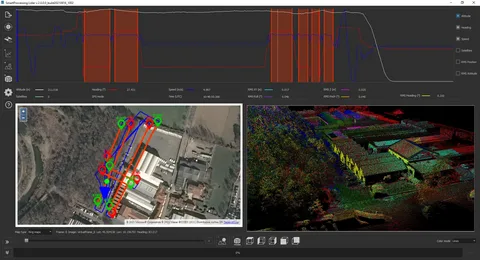

How Do LiDAR Ground Control Targets Work?
LiDAR technology uses laser pulses to scan the ground and capture a wide range of data, including elevation, shape, and distance. However, the data collected by LiDAR sensors needs to be aligned with real-world coordinates to ensure its accuracy. This is where LiDAR ground control targets come in.
Georeferencing LiDAR Data
When LiDAR sensors capture data, they record it as a point cloud, an array of data points representing the Earth’s surface. To make sense of these data points, surveyors need to assign them precise coordinates. Ground control targets provide reference points, allowing surveyors to georeference point cloud data and ensure that LiDAR data aligns with existing maps and models.
By placing LiDAR ground control targets at specific locations on the survey site, surveyors can perform adjustments to correct discrepancies in the data caused by factors such as sensor calibration, flight altitude, or atmospheric conditions.
Why Are LiDAR Ground Control Targets Essential for Accurate Mapping?
LiDAR technology is incredibly powerful, but the accuracy of the data depends largely on the quality of the ground control points used. Here are the key reasons why LiDAR ground control targets are essential for obtaining precise mapping results:
1. Improved Geospatial Accuracy
Without ground control targets, LiDAR data is essentially “floating” in space, meaning its position isn’t aligned with real-world coordinates. This can lead to errors and inaccuracies in the final map or model. By placing LiDAR ground control targets at known geographic coordinates, surveyors can calibrate the LiDAR data and improve its geospatial accuracy.
For large projects or those involving multiple data sources, ensuring that LiDAR data is properly georeferenced is critical. Ground control targets help ensure the survey data integrates seamlessly with other geographic information systems (GIS) or mapping platforms.
2. Reduction of Measurement Errors
LiDAR ground control targets help mitigate errors caused by various factors, such as:
- Sensor misalignment: Minor inaccuracies in the LiDAR sensor’s position or angle can cause discrepancies in the data.
- Aircraft or drone movement can slightly distort the sensor’s collected data.
- Environmental conditions: Weather, temperature, and atmospheric pressure can all affect the LiDAR signal.
By using ground control targets, surveyors can compensate for these errors, leading to more precise and reliable data.
3. Support for Large-Scale Projects
For larger mapping projects, multiple LiDAR scans might be conducted from different flight paths or at different times. Ground control targets serve as common reference points, ensuring that all collected data can be merged into a single coherent model. This is particularly useful for projects involving vast areas like forests, mountain ranges, or large urban developments.
How to Choose the Right LiDAR Ground Control Targets
Choosing the right LiDAR ground control targets depends on several factors, including the project’s size, the terrain, and the required accuracy. Here are some things to consider:
Size and Visibility
The size of the target should be large enough to be easily detectable by the LiDAR sensor from the air. Targets that are too small or poorly placed can lead to inaccurate data or missed targets.
Material and Durability
Ground control targets must have enough durability to withstand weather conditions and remain stable throughout the surveying process. Surveyors often use reflective materials to ensure that the LiDAR sensor can clearly detect the target, even from a distance.
Geospatial Accuracy
For high-accuracy projects, surveyors must place ground control targets at precise, known locations with accurate geospatial coordinates. They should use a GPS or GNSS system to measure and mark the exact position of the targets.
Conclusion
LiDAR ground control targets play a pivotal role in ensuring the accuracy of aerial surveys and LiDAR mapping projects. By providing precise reference points for geo referencing and adjusting LiDAR data, these targets reduce errors and improve the overall quality of the final model. Whether you’re working on a small-scale project or a large-scale survey, integrating ground control targets into your LiDAR workflow is essential for achieving high-precision results.
The right ground control targets, when placed correctly and properly measured, can make the difference between reliable, actionable data and inaccurate measurements that undermine the entire survey.
By understanding the importance of these targets and how they function in the context of LiDAR surveys, you’ll be better prepared to tackle projects that demand accuracy and precision.
Author




Author



Downtime never comes with a warning. It doesn’t care if you’re launching a feature, running a campaign, or sleeping peacefully. It just shows up — and when it does, the damage goes far beyond a broken dashboard.
I’ve seen teams lose users, revenue, and confidence within minutes of an outage. What’s frustrating is this: most downtime isn’t caused by the cloud itself. It’s caused by how the cloud is managed. That’s where cloud downtime infrastructure management stops being a technical checkbox and becomes a business-critical discipline.

Downtime Is a Management Failure, Not a Cloud Failure
AWS, Azure, and Google Cloud are built for resilience. They fail occasionally — yes — but widespread outages usually trace back to internal issues like:
- No proper load balancing or failover
- Systems not designed for traffic spikes
- Manual deployments without rollback plans
- Weak monitoring that reacts too late
- Security gaps that turn into system crashes
The cloud gives you power. Poor infrastructure decisions turn that power into risk.
What “Stopping Downtime Cold” Really Means
It doesn’t mean hoping nothing breaks.
It means expecting failure and designing systems that survive it.
Strong cloud infrastructure management focuses on four core pillars.
1. Architecture Built for Failure
If your system collapses when one service fails, it was never stable to begin with.
High-availability infrastructure includes:
- Load balancers across multiple availability zones
- Auto-scaling that reacts before performance drops
- Redundant services so failures stay isolated
When architecture is done right, failures don’t become incidents — they become background noise.
2. Proactive Monitoring Instead of Panic Alerts
If customers are the first ones to notice downtime, you’re already late.
Modern cloud environments rely on:
- Real-time health monitoring
- Smart alerts that trigger before limits are reached
- Centralized logs for faster root-cause analysis
Cloud providers themselves emphasize observability because visibility is what turns outages into manageable events instead of full-blown crises.
3. Automation That Removes Human Error
Manual processes are one of the biggest causes of downtime.
Teams that prioritize stability automate:
- Infrastructure provisioning
- Scaling rules
- Backups and disaster recovery
- CI/CD deployments with safe rollbacks
Automation doesn’t just save time — it prevents mistakes, especially during high-pressure moments.
4. Security That Protects Stability
Security incidents are downtime.
Unpatched systems, exposed credentials, and poor access controls often end with services being taken offline.
Strong cloud management includes:
- Continuous security monitoring
- Role-based access control
- Encrypted data pipelines
- Automated patching and compliance checks
Security and uptime aren’t separate goals. They depend on each other.
Where Growing Teams Usually Slip
Here’s something I’ve seen far too often. A product starts gaining traction, traffic slowly increases, integrations pile up, and suddenly the infrastructure that once felt “solid” starts showing cracks. Not all at once but in subtle, dangerous ways. Pages load a little slower. Deployments feel riskier. Minor incidents start happening more frequently, yet they’re brushed off as one-off issues. Teams stay focused on shipping features because growth feels urgent, while infrastructure quietly falls behind. The problem is that cloud systems don’t fail dramatically at first — they degrade.
And by the time downtime becomes visible to users, the technical debt has already piled up. Without regular audits, performance optimization, and proactive scaling strategies, even well-designed cloud environments become fragile over time. This is usually the point where teams realize that cloud infrastructure isn’t something you “set and forget.” It’s a living system that needs continuous attention to stay reliable under real-world pressure.
The Hidden Cost of “Mostly Stable” Systems
A lot of companies settle for “good enough.”
99% uptime sounds impressive — until you realize that’s more than three days of downtime per year.
Now add:
- Lost transactions
- User churn
- Support overload
- Engineering burnout
Suddenly, downtime isn’t a technical issue. It’s a growth blocker.
Reliable infrastructure doesn’t just protect systems — it protects momentum.
Where Growing Teams Usually Slip
I’ve noticed this pattern again and again.
Teams invest heavily in:
- Product features
- Design improvements
- Marketing and growth
But infrastructure gets treated as:
“We’ll fix it when it breaks.”
The problem is that cloud environments are not static. Traffic grows, data scales, integrations multiply. Without continuous management, even well-built systems degrade over time.
That’s why many scaling companies eventually move toward structured cloud engineering practices that focus on long-term reliability, not just initial setup.
Stability Feels Boring — And That’s the Goal
The best infrastructure doesn’t get attention.
It feels boring because:
- Deployments don’t cause anxiety
- Traffic spikes don’t break systems
- Incidents resolve quietly or automatically
That calm is the result of intentional decisions, not luck.
Downtime thrives in chaos.
Stability thrives in preparation.
Final Thoughts
Downtime isn’t inevitable. It’s a signal that systems weren’t built — or managed — for reality. Cloud infrastructure management isn’t about keeping servers running. It’s about protecting user trust, revenue, and your team’s sanity. When infrastructure is resilient, everything else moves faster.
Ready to Stop Worrying About Downtime?
If your platform is scaling — or planning to — reliable cloud downtime infrastructure isn’t optional anymore. The right cloud engineering approach doesn’t just reduce outages.
It removes fear from growth. Explore what resilient, production-ready cloud infrastructure looks like here:
Build for failure. Scale with confidence. And make downtime something your users never have to think about.
Author



Trapstar London and On Cloud: The Future of Urban Fashion

Custom Android App Development: Why Business Needs in 2026

Professional Web Development for Your Business Success

7 Advantages of Inclusive Styling Fashion in the Gen AI Era

Elevate Your Brand with a Top Digital Marketing Agency in Guntur

Intrusion Detection Systems: Safeguarding Your Business

Prenatal Multivitamin Gummies: A Guide for Expecting Mothers

Precision Repairs for Comfort: Ensuring Smooth Driving Experience

OVO x NFL Collaboration: Luxury Streetwear Meets Sports Culture

Outdoor Areas with Shade Sails Canopies: Benefits and Installation

Cybersecurity Consulting Company SequelNet Provides Critical IT Support Services to Medical Billing Firm, Medical Optimum

Team Communication Software Transforms Operations at Finance Innovate

Project Management Tool Transforms Long Island Business

How Alleviate Poverty Utilized IPPBX’s All-in-One Solution to Transform Lives in New York City

Breast Cancer: The Imperative Role of Mammograms in Screening and Early Detection

Unstoppable Collaboration: D.C.’s Citi Open and Silicon Valley Classic Unite to Propel Women’s Tennis to New Heights

Embracing Renewal: Sizdabedar Celebrations Unite Iranians in New York’s Eisenhower Park

The Benefits of Starting a Side Hustle for Financial Freedom

New Blood Donation Screening Questions What You Need to Know

Stylishly Timeless: The 5 Types of Sandals You Need in Your Closet
-

 Business3 years ago
Cybersecurity Consulting Company SequelNet Provides Critical IT Support Services to Medical Billing Firm, Medical Optimum
-
Business3 years ago
Team Communication Software Transforms Operations at Finance Innovate
-
Business3 years ago
Project Management Tool Transforms Long Island Business
-
Business2 years ago
How Alleviate Poverty Utilized IPPBX’s All-in-One Solution to Transform Lives in New York City
-
health3 years ago
Breast Cancer: The Imperative Role of Mammograms in Screening and Early Detection
-
Sports3 years ago
Unstoppable Collaboration: D.C.’s Citi Open and Silicon Valley Classic Unite to Propel Women’s Tennis to New Heights
-
Art /Entertainment3 years ago
Embracing Renewal: Sizdabedar Celebrations Unite Iranians in New York’s Eisenhower Park
-
Finance3 years ago
The Benefits of Starting a Side Hustle for Financial Freedom







