
Technology Explained
The Best Smart Alarm Clocks

By

Reviewed
By Jhon Wick
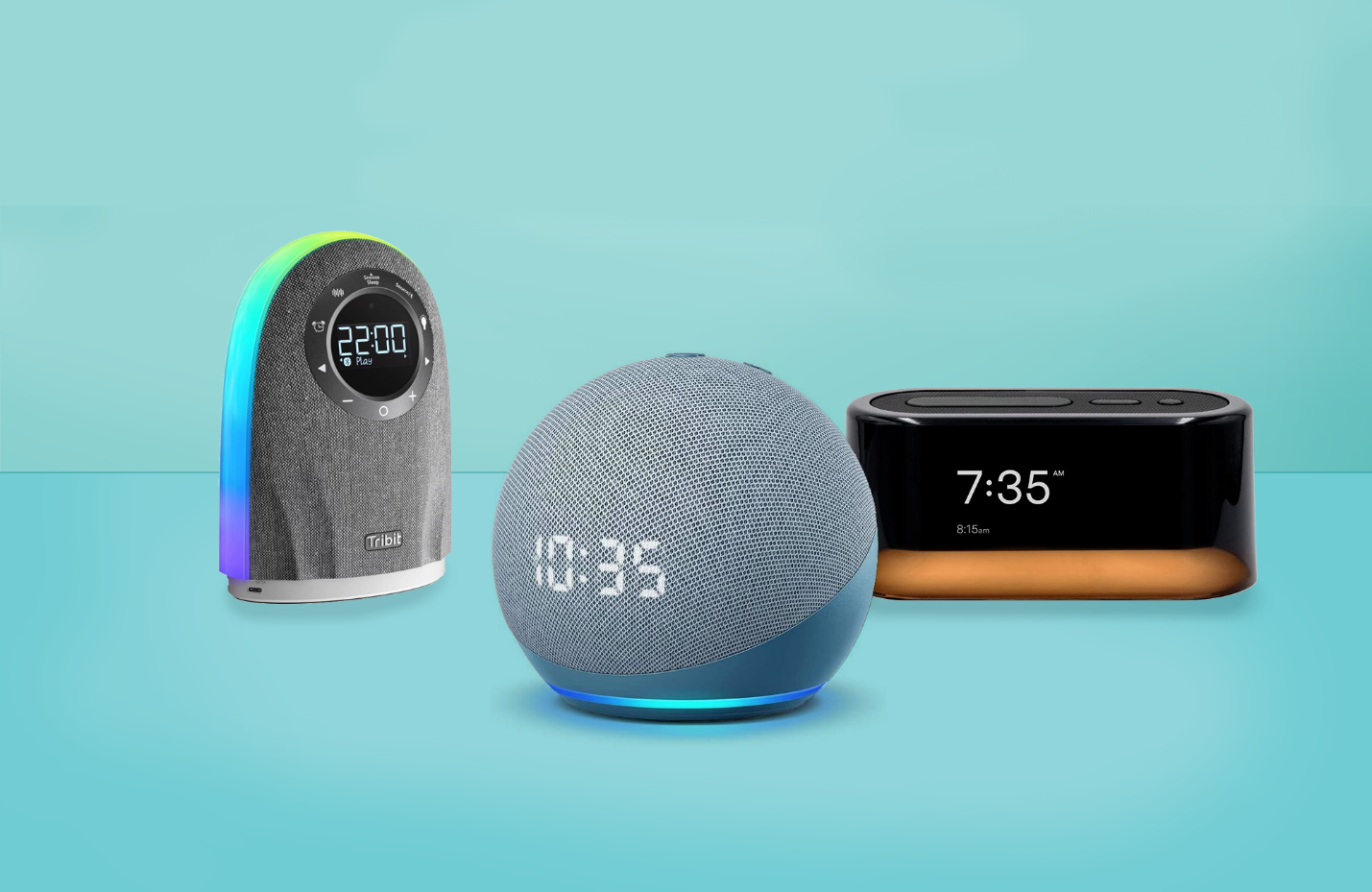
The Best Smart Alarm Clocks
Smart alarm clocks have evolved beyond traditional timekeepers by integrating modern technology to enhance the waking experience. These devices not only wake you up gently but also offer features like smartphone connectivity, voice control, customizable alarms, and even sleep tracking. Whether you’re looking for a sunrise simulation alarm to wake up naturally or a clock that integrates with your smart home ecosystem, smart alarm clocks offer a range of functionalities to suit various preferences and needs. In this article, we’ll review some of the top smart alarm clocks available today, highlighting their unique features, design qualities, connectivity options, and why they stand out in the market.
nytimes.com
Benefits of Smart Alarm Clocks
- Customizable Alarms: Set personalized wake-up routines with options for different sounds, volumes, and wake-up patterns to suit your sleep schedule and preferences.
- Sleep Tracking: Monitor your sleep patterns and receive insights into your sleep quality, helping you make adjustments for better rest.
- Smart Home Integration: Many smart alarm clocks connect with smart home platforms like Alexa or Google Assistant, allowing for voice control and integration with other smart devices.
- Sunrise Simulation: Mimic natural sunrise with gradual light increases to wake you up gently, promoting a more peaceful waking experience.
- Additional Features: Some smart alarm clocks include features like weather updates, Bluetooth speakers, USB charging ports, and even relaxation sounds to aid sleep.
Top Smart Alarm Clocks
Let’s explore some of the best smart alarm clocks available on the market today:
- Philips SmartSleep Wake-Up Light Alarm Clock
The Philips SmartSleep Wake-Up Light combines sunrise simulation with soothing nature sounds to wake you up naturally. It gradually increases light intensity over 30 minutes before your alarm time, simulating a natural sunrise to cue your body to wake up. It also includes FM radio, tap snooze, and customizable sunrise settings via the Philips SleepMapper app. This clock is ideal for those who struggle with dark mornings or want a gentler way to wake up.
- Amazon Echo Spot
The Amazon Echo Spot is a compact smart alarm clock with a built-in Alexa voice assistant. In addition to displaying the time, it can play music, make video calls, control smart home devices, and provide weather updates—all hands-free with voice commands. Its screen displays customizable clock faces and notifications, making it a versatile addition to any smart home setup. The Echo Spot’s small footprint and multifunctionality make it suitable for bedside tables or desks.
- Lenovo Smart Clock Essential
The Lenovo Smart Clock Essential offers a minimalist design with essential smart features. It includes a large LED display that shows time, weather, and temperature at a glance. You can set alarms, listen to music, and control smart home devices using Google Assistant voice commands. Its simplicity and affordability make it an excellent choice for users who prefer basic smart functions without additional complexities.
- Hatch Restore Smart Sleep Assistant
The Hatch Restore combines a smart alarm clock with a customizable sleep routine system. It features a sunrise alarm, wind-down routines with soothing sounds, and a reading light—all designed to help you fall asleep faster and wake up feeling refreshed. You can control it via the Hatch app, set personalized routines, and adjust settings like light intensity and soundscapes to create an optimal sleep environment. The Hatch Restore is ideal for users prioritizing both sleep quality and wake-up experience.
- iHome iBT235 Bluetooth Alarm Clock
The iHome iBT235 offers a blend of traditional alarm clock functionality with modern Bluetooth audio streaming capabilities. It features a dual-alarm system, FM radio, USB charging port, and Bluetooth connectivity to stream music wirelessly from your smartphone or tablet. Its compact design includes a dimmable LED display and programmable sleep timer, making it versatile for both wake-up routines and bedside entertainment.
The Philips SmartSleep Wake-Up Light Alarm Clock stands out for its innovative sunrise simulation technology, which mimics the natural sunrise to gently wake you up. It gradually increases light intensity over a 30-minute period before your set alarm time, signaling your body to wake up naturally. This feature is especially beneficial for those who struggle with dark mornings or find abrupt alarms jarring. The wake-up light is complemented by soothing nature sounds or FM radio, offering a customizable wake-up experience to suit individual preferences. Users can personalize their wake-up routines using the Philips SleepMapper app, adjusting light intensity, sound settings, and alarm times for optimal mornings.
Amazon Echo Spot
The Amazon Echo Spot combines the functionality of a smart speaker with the convenience of a compact alarm clock. Its integrated Alexa voice assistant allows users to set alarms, play music, check the weather, control smart home devices, and even make video calls—all through voice commands.
Competitive Table
| Feature | Philips SmartSleep | Amazon Echo Spot | Lenovo Smart Clock Essential | Hatch Restore | iHome iBT235 |
| Sunrise Simulation | Yes | No | No | Yes | No |
| Voice Assistant | No | Alexa | Google Assistant | No | No |
| Display Type | LED Display | Screen | LED Display | LED Display | LED Display |
| Smart Home Integration | No | Alexa | Google Assistant | No | No |
| Additional Features | Nature Sounds, FM Radio | Video Calls, Music | Weather, Temperature | Sleep Soundscapes | Bluetooth, USB Charging |
Analysis Table

| Criteria | Philips SmartSleep | Amazon Echo Spot | Lenovo Smart Clock Essential | Hatch Restore | iHome iBT235 |
| Best for Sunrise Simulation | ★★★★★ | ★☆☆☆☆ | ★☆☆☆☆ | ★★★★★ | ★☆☆☆☆ |
| Best for Voice Control | ★☆☆☆☆ | ★★★★★ | ★★★★★ | ★☆☆☆☆ | ★☆☆☆☆ |
| Best Display Type | ★★★★☆ | ★★★★☆ | ★★★★☆ | ★★★★☆ | ★★★★☆ |
| Best Smart Home Integration | ★☆☆☆☆ | ★★★★★ | ★★★★★ | ★☆☆☆☆ | ★☆☆☆☆ |
| Best Additional Features | ★★★★☆ | ★★★★☆ | ★★☆☆☆ | ★★★★★ | ★★★★☆ |
Conclusion
Choosing the best smart alarm clock depends on your priorities, whether you prefer sunrise simulation for a natural wake-up, integration with voice assistants like Alexa or Google Assistant, or additional features like music streaming and smart home control. The Philips SmartSleep Wake-Up Light excels with its sunrise simulation and soothing nature sounds, promoting a gentle waking experience. For users seeking a multifunctional device with Alexa integration, the Amazon Echo Spot offers video calls, music streaming, and smart home control capabilities. Meanwhile, the Lenovo Smart Clock Essential provides essential smart features and simplicity at an affordable price point. The Hatch Restore is ideal for users prioritizing sleep quality with customizable sleep routines and soothing sounds. Lastly, the iHome iBT235 combines traditional alarm clock features with modern Bluetooth connectivity for versatile bedside entertainment. Whether enhancing your wake-up routine or integrating with your smart home ecosystem, these top smart alarm clocks offer innovative solutions to suit various lifestyles and preferences.
Author



In today’s competitive digital environment, businesses in Phoenix need more than just a website to succeed—they need visibility. With thousands of companies competing for attention online, standing out in search engine results is essential. This is where Phoenix SEO services come into play. By implementing the right strategies, businesses can improve their rankings, attract qualified traffic, and convert visitors into loyal customers. With expert guidance from Digital Guider, businesses can unlock sustainable growth and long-term success in an increasingly crowded marketplace.
Search Engine Optimization in Phoenix?
Search engine optimization is the process of improving your website so that search engines like Google can easily understand and rank it. With effective search engine optimization Phoenix, your business can appear for relevant searches and connect with customers actively looking for your services. Unlike paid advertising, SEO focuses on organic visibility, which continues to deliver results over time. This makes it one of the most cost-effective digital marketing strategies for businesses aiming for consistent growth.
Phoenix SEO Services Are Essential
Phoenix is one of the fastest-growing business hubs, making competition more intense across industries. Without proper SEO, even well-established businesses can struggle to gain online traction. Professional SEO services Phoenix help businesses appear in front of the right audience at the right time, ensuring higher engagement and better conversion opportunities.
A strong SEO strategy improves visibility, attracts targeted traffic, and enhances overall user experience. It also builds long-term credibility, as users tend to trust businesses that appear on the first page of search results. With Digital Guider, businesses can benefit from tailored SEO strategies that focus on measurable results and sustainable growth.
Keyword Research
Keyword research is one of the most important aspects of search engine optimization Phoenix. It involves identifying the exact terms and phrases potential customers use when searching online. By targeting the right keywords, businesses can attract highly relevant traffic that is more likely to convert.
For example, keywords such as “SEO services Phoenix” and “Phoenix SEO company” help businesses connect with users actively searching for digital marketing solutions. Digital Guider ensures that keyword strategies are carefully planned and implemented to maximize visibility and engagement without overstuffing or compromising content quality.

Content Strategy That Drives Results
Content plays a crucial role in determining how well your website performs in search results. High-quality, informative, and engaging content not only improves rankings but also builds trust with your audience. Businesses that consistently publish valuable content are more likely to establish authority in their industry.
A strong content strategy includes blog posts, service pages, and informational resources that address user intent. Instead of focusing solely on keywords, the goal is to provide meaningful information that answers customer queries. With Digital Guider, content is optimized to align with both user expectations and search engine algorithms, ensuring better performance and higher engagement.
Technical SEO
Behind every successful SEO campaign is a technically optimized website. Technical SEO ensures that your site is fast, secure, and easy for search engines to crawl. A poorly structured website can negatively impact rankings, regardless of how good your content is.
A well-optimized website typically focuses on three key areas:
- Fast loading speed and smooth performance
- Mobile-friendly and responsive design
- Secure and properly indexed pages
By addressing these factors, Digital Guider helps businesses create a strong technical foundation that supports long-term SEO success.
Local SEO in Phoenix
For businesses targeting customers in specific areas, local SEO is extremely important. With SEO services Phoenix, companies can improve their visibility in local searches and attract nearby customers who are ready to take action.
Local SEO involves optimizing business listings, using location-based keywords, and encouraging customer reviews. When done correctly, it helps your business appear in Google Maps and “near me” searches. Digital Guider specializes in local SEO strategies that help businesses dominate their local market and increase foot traffic or inquiries.
Building Authority with Link Building
Link building remains a critical component of SEO. When other reputable websites link back to your content, it signals to search engines that your website is trustworthy and authoritative. This can significantly improve your rankings and overall online presence.
Instead of focusing on quantity, modern SEO emphasizes high-quality backlinks from relevant sources. Digital Guider follows ethical link-building practices that strengthen your website’s authority while maintaining compliance with search engine guidelines.
Benefits of SEO Services Phoenix
Investing in Phoenix SEO services offers long-term advantages that go beyond immediate results. Businesses can experience steady growth in traffic, improved brand recognition, and increased customer trust. Unlike short-term marketing tactics, SEO builds a strong digital foundation that continues to generate results over time.
Another key benefit is improved user experience. A well-optimized website not only ranks better but also keeps visitors engaged, encouraging them to explore your services and take action. With Digital Guider, businesses can achieve a balance between technical performance, content quality, and user satisfaction.
Future of Search Engine Optimization Phoenix
The SEO landscape is constantly evolving, with new technologies and trends shaping how search engines operate. Voice search, artificial intelligence, and mobile-first indexing are becoming increasingly important. Businesses that adapt to these changes are more likely to maintain strong rankings and stay ahead of competitors.
Digital Guider stays updated with the latest trends and algorithm updates, ensuring that your SEO strategy remains effective in a rapidly changing environment. By focusing on innovation and adaptability, businesses can continue to grow and succeed online.
Digital Guider for Phoenix SEO Services?
Choosing the right SEO partner can make a significant difference in your results. Digital Guider offers a strategic and data-driven approach to SEO, ensuring that every aspect of your campaign is optimized for success. From keyword research to technical optimization and content strategy, every step is carefully planned to deliver measurable outcomes.
Businesses that work with Digital Guider benefit from customized solutions, transparent reporting, and a strong focus on long-term growth. Instead of quick fixes, the approach is centered on building a sustainable online presence that continues to deliver value.
Final Thoughts
In a competitive market like Phoenix, investing in Phoenix SEO services is one of the most effective ways to grow your business. With the right search engine optimization Phoenix strategies, you can improve your rankings, attract targeted traffic, and increase conversions.
By partnering with Digital Guider, businesses can build a strong online presence, stay ahead of the competition, and achieve long-term success. If you’re ready to elevate your digital presence and dominate search results, now is the time to invest in smart and strategic SEO services Phoenix that deliver real results.
Author



Hearing loss can quietly affect many parts of daily life. Conversations become harder to follow. Social situations may feel overwhelming. Even simple activities like watching TV or talking on the phone can turn frustrating. Thankfully, modern hearing technology has changed this experience. Today’s devices are smarter, smaller, and far more effective. Among the leading names, Widex and Oticon stand out for their innovation and reliability. If you are considering hearing aids for yourself or someone close to you, understanding these two brands can help you make a confident and informed choice.
Hearing Aids and Why They Matter
Hearing aids, often called ear machines, are designed to amplify sound and improve clarity. However, modern devices do much more than just make sounds louder. They process audio intelligently, reduce background noise, and adapt to different environments.
Over the years, hearing aids have evolved significantly. Older models simply increased volume, which sometimes made noise unbearable. In contrast, today’s devices focus on clarity and balance. They help users understand speech better, even in busy or noisy surroundings.
This is where Widex and Oticon excel. Both brands focus on delivering a more natural listening experience. They use advanced technology to ensure users hear clearly without feeling overwhelmed.
Widex Ear Machines
Widex has built its reputation around one key idea—natural sound. The brand designs its hearing aids to closely match how the human ear processes sound. As a result, users often describe the listening experience as smooth and realistic.
One of Widex’s biggest strengths is its sound processing technology. It reduces distortion and keeps audio clear, even in challenging environments. Whether you are in a quiet room or a crowded space, Widex devices aim to maintain consistent sound quality.
Another advantage is personalization. Widex allows users to adjust their hearing settings based on their surroundings. Through smartphone apps, users can fine-tune sound preferences easily. This level of control makes a big difference in everyday comfort.
Widex also offers rechargeable models. These are convenient and reduce the need for frequent battery changes. Combined with Bluetooth connectivity, users can connect their devices to phones, TVs, and other gadgets without hassle.

Oticon Ear Machines
Oticon takes a slightly different approach. Instead of focusing only on the ear, it focuses on how the brain processes sound. This concept, known as brain hearing, aims to reduce listening effort and fatigue.
Oticon hearing aids use advanced artificial intelligence to analyze sound environments in real time. They automatically adjust settings based on surrounding noise and speech patterns. This means users do not have to manually change modes as often.
One of Oticon’s standout features is its ability to provide a full soundscape. Instead of isolating one voice, it allows users to hear multiple sounds naturally. This creates a more balanced and realistic listening experience.
For example, in a group conversation, Oticon devices help users follow different speakers without constantly shifting focus. This makes social interactions feel smoother and less tiring.
Key Differences Between Widex and Oticon
Although both brands offer excellent performance, they differ in approach. Understanding these differences can help you decide which one suits you better.
Widex focuses on delivering pure and natural sound. It gives users more control over their hearing experience. People who enjoy customizing their settings often prefer this brand.
On the other hand, Oticon emphasizes automation and brain-based processing. Its devices adjust automatically, making them ideal for users who prefer a hands-free experience.
In terms of technology, Oticon often leads with AI-driven features. Meanwhile, Widex stands out for sound clarity and personalization. Both approaches are effective, but they cater to different preferences.
When Choosing a Hearing Aid
Before making a decision, it is important to consider your personal needs. Not all hearing aids work the same for everyone.
Noise reduction plays a major role in improving speech clarity. It helps filter out unwanted background sounds, especially in busy environments.
Rechargeable batteries add convenience. You can simply charge your device overnight instead of replacing batteries frequently.
Bluetooth connectivity allows you to connect your hearing aids to smartphones, TVs, and other devices. This makes streaming audio easier and more enjoyable.
Comfort and fit are also essential. A well-fitted hearing aid ensures long-term usability without discomfort.
Customization options can enhance your experience. Some users prefer manual control, while others want automatic adjustments.
Both Widex and Oticon offer these features. However, the way they deliver them differs slightly.
Choosing the Right Brand for You
The right choice depends on your lifestyle and preferences. If you value natural sound and want to control your settings, Widex may be the better option. Its focus on clarity and customization appeals to users who like a personalized experience.
If you prefer simplicity and automation, Oticon might suit you more. Its AI-powered system handles adjustments automatically, making it easier to use in changing environments.
It is always a good idea to consult an audiologist before making a decision. A professional can assess your hearing condition and recommend suitable models. Trying different devices can also help you understand what feels comfortable.
How Modern Hearing Aids Improve Life
Modern hearing aids do more than improve hearing. They improve overall quality of life. Users can communicate more easily, stay socially active, and feel more confident in daily situations.
These devices also support mental well-being. When people hear better, they engage more with others. This reduces feelings of isolation and improves emotional health.
Author


Columbus’s colleges are losing students to other schools simply because their websites are better structured. I found that when I audited 15 local colleges, poor design was running rampant across the board—most are fixable as well.
Slow Load Times on Mobile Devices
Ohio State’s primary website loads in just 2.3 seconds on a mobile device. Conversely, Columbus State’s website loads in 8.7 seconds. Given that 73% of prospective students use smartphones to browse, that’s not just slow, it’s a death sentence for admissions.
The Solution: Any reputable web design company in Columbus will tell you that mobile-first design is no longer up for discussion. Pages should load in 3 seconds or less, forms should be usable with a thumb, and navigation should be thumb-friendly. CCAD (Columbus College of Art and Design) just redesigned its website using these principles, and its applications have increased by 34% since the redesign.

Invisible in local search results
If you enter “colleges around Columbus” on a search engine (Google), you will see Ohio State as the only college that shows up. However, when searching for community colleges and other specialised institutions, you will find these institutions ranking around page 3 or lower for their named programs.
The problem: No GMB (Google My Business) optimisation. Franklin University even fails to fully claim their GMB listing. Their address is commonly listed as “temporarily closed.”
The Solution: Create and then optimize all campus addresses through both Google and business directory listings. Include photographs, create labels to respond to people reviewing your school, and post recent updates relating to the available enrollment periods. You want colleges to be able to locate you locally first when a prospective student types in “nursing programs Columbus” and you are visible in the map section.
Content That Converts Students
The college sites of most institutions are written in an academic style – high-density paragraphs about “excellence of the institution” and “a transformative learning experience.” When students are looking for information, they are looking for answers to questions such as how long it will take to complete the program, how much it will cost, and will there be any job opportunities upon completion.
For example, Otterbein University’s nursing website includes 847 words of content; however, it does not include the starting salary for a graduate until paragraph six. A competing institution’s website leads with, “96% job placement rate with an average starting salary of $65,000.”
Solution: answer the money questions up front and create program pages that convert:
- Job placement rates (with 3rd party sources).
- Graduate’s average starting salaries.
- Total program cost (not just tuition).
- Time to complete the program.
- Prerequisite information listed in plain English
Technical SEO Disasters
Most of the Columbus, Ohio college websites fail to meet the industry’s minimum criteria for Search Engine Optimization (SEO), which lead to decreased rankings in all search engines. The common issues we found include:
1. Broken internal links.
2. Missing alt tags on images.
3. Duplicate content across program pages (Capital University has 23 pages with the same meta description).
Some additional key technical issues that hamper the rankings on all college websites include:
1. No schema markup for either program or location.
2. Slow server response times.
3. Missing SSL certificate on multiple application forms.
4. Broken mobile navigation for multiple programs.
5. No local business structured data to support citation and rankings.
These common technical issues are far more than technical; they are also killing your rankings. Google cannot recommend college’s websites to its visitors if those sites are not accessible to Google through its crawler or can be understood once crawled.
The Death of Enrollment Forms
67% of potential students who fill out inquiry forms at Columbus colleges are lost at the inquiry stage. Why does this happen? Schools are using inquiry forms that require up to 15 fields when 4 would suffice, not having mobile-optimized inquiries, and having broken “Submit” buttons.
Delaware County Community College cut their inquiry form from 12 fields down to only 3 fields, resulting in an 89% increase in inquiries over 2 months.
Successful Examples of Results
Columbus State Community College worked with an SEO Services Columbus that specializes in local search engine optimisation and experienced the benefits:
- 156% more traffic through organic search
- 43% additional program inquiries
- Increased performance in local search results for targeted programs
Their formula for success: a mobile-first redesign, aggressive optimization of their Google My Business profile across their campuses, and totally answering students’ questions using quality content.
To sum it up
Ohio colleges have to compete against Arizona and Florida Colleges’ web-based programs with better web pages and better collegiate leads search engine optimization, so there’s no longer a local marketplace for columbus schools to get their students from.
It’s really easy to fix the problem. You’ll need to work with a web design company who understands education marketing, and to do that, you need to optimize the site for local search and generate content that gets visitors to apply.
Your competitors are already doing this, and if you wait to make decisions about how many more students you will lose to your competitors.
If you are ready to improve your school’s web presence, do a technical audit, make your mobile experience priority, and claim local search results. In a competitive academic landscape, your website serves not just for promotion, but as your enrollment powerhouse.
Author


Dysport Injections in Dubai & Abu Dhabi for Smooth, Youthful Skin

Tonsil Schmidt Instrument: Precision Tool for ENT Surgery

Empyre Clothing: Modern Streetwear Blending Comfort

Custom Business Card Boxes: Professional Presentation

Male Rhinoplasty Specialists: Expert Nose Reshaping

Mr. Winston Hoodie: Premium Streetwear That Blends Comfort

Shopify Web Development Agency: Building eCommerce Stores

Essential Hoodie: Fit, Proportions & Styling Choices

Water Heater Maintenance: Save Energy & Avoid Repairs

Chrome Hearts Glasses: Luxury Eyewear & Premium Frames

Cybersecurity Consulting Company SequelNet Provides Critical IT Support Services to Medical Billing Firm, Medical Optimum

Team Communication Software Transforms Operations at Finance Innovate

Project Management Tool Transforms Long Island Business

How Alleviate Poverty Utilized IPPBX’s All-in-One Solution to Transform Lives in New York City

Breast Cancer: The Imperative Role of Mammograms in Screening and Early Detection

Unstoppable Collaboration: D.C.’s Citi Open and Silicon Valley Classic Unite to Propel Women’s Tennis to New Heights

Embracing Renewal: Sizdabedar Celebrations Unite Iranians in New York’s Eisenhower Park

The Benefits of Starting a Side Hustle for Financial Freedom

New Blood Donation Screening Questions What You Need to Know

Stylishly Timeless: The 5 Types of Sandals You Need in Your Closet
-

 Business3 years ago
Cybersecurity Consulting Company SequelNet Provides Critical IT Support Services to Medical Billing Firm, Medical Optimum
-
Business3 years ago
Team Communication Software Transforms Operations at Finance Innovate
-
Business3 years ago
Project Management Tool Transforms Long Island Business
-
Business3 years ago
How Alleviate Poverty Utilized IPPBX’s All-in-One Solution to Transform Lives in New York City
-
health3 years ago
Breast Cancer: The Imperative Role of Mammograms in Screening and Early Detection
-
Sports3 years ago
Unstoppable Collaboration: D.C.’s Citi Open and Silicon Valley Classic Unite to Propel Women’s Tennis to New Heights
-
Art /Entertainment3 years ago
Embracing Renewal: Sizdabedar Celebrations Unite Iranians in New York’s Eisenhower Park
-
Finance3 years ago
The Benefits of Starting a Side Hustle for Financial Freedom







