
Technology
Bitcoin Resurgence Sparks New Drive to Launch Leveraged ETFs


Bitcoin, the world’s largest and most popular cryptocurrency, is back on the rise after a sharp drop in May 2021. The price of Bitcoin has rebounded to over $50,000 after plummeting to around $30,000 earlier this year. This has sparked a renewed interest in Bitcoin and other cryptocurrencies from investors, traders, and institutions.
As Bitcoin’s price continues to surge, investors are looking for new ways to invest in the cryptocurrency market. One of the latest trends in the market is the launch of leveraged exchange-traded funds (ETFs) that allow investors to take advantage of Bitcoin’s price movements by amplifying returns.
Leveraged ETFs are a type of exchange-traded product (ETP) that use borrowed money or derivatives to amplify the returns of an underlying asset. These products are designed to provide a leveraged return on an underlying asset, such as stocks, bonds, or commodities.
While there are currently no leveraged ETFs for Bitcoin available in the US, there are several firms working on launching such products. In Canada, there are already several Bitcoin ETFs available, including the Purpose Bitcoin ETF, which launched in February 2021.
The Purpose Bitcoin ETF has been a huge success in Canada, attracting billions of dollars in assets under management in just a few months. The ETF allows investors to gain exposure to Bitcoin without having to buy and hold the cryptocurrency directly. The ETF also offers a more convenient and regulated way for investors to invest in Bitcoin.

In the US, several firms, including ProShares and Direxion, have filed for approval to launch Bitcoin ETFs, but so far, the Securities and Exchange Commission (SEC) has not approved any of these products. The SEC has raised concerns about the potential risks associated with these products, including the lack of regulation in the cryptocurrency market.
While the launch of leveraged ETFs for Bitcoin would undoubtedly attract more investors to the market, there are concerns about the potential risks associated with these products. Critics argue that leveraged ETFs could exacerbate market volatility and lead to significant losses for investors who do not understand the risks.
In addition to the risks associated with leveraged ETFs, there are also concerns about the lack of regulation in the cryptocurrency market. While some countries, such as Canada, have taken steps to regulate the market, many countries have not yet developed comprehensive regulatory frameworks for cryptocurrencies.
Despite these concerns, the demand for leveraged ETFs for Bitcoin is likely to continue to grow as more investors look for new ways to gain exposure to the cryptocurrency market. As the market matures and becomes more regulated, it is likely that more products will become available, providing investors with more choices and greater flexibility.
In conclusion, the resurgence of Bitcoin has sparked a renewed interest in the cryptocurrency market, with investors and institutions looking for new ways to invest in the space. The launch of leveraged ETFs for Bitcoin would be a significant development for the market, but it remains to be seen whether these products will receive regulatory approval and whether they will be widely adopted by investors. Regardless, the cryptocurrency market is here to stay, and it will continue to evolve as new products and services are developed to meet the needs of investors.
Author


When James and Aamir founded their consultancy firm, they shared more than ambition. They shared trust. One brought financial expertise, the other brought industry connections. In the early days, decisions were made over coffee, expenses were tracked in spreadsheets, and profits were divided with a handshake. The business grew quickly. Clients multiplied. Revenue increased. Yet as the numbers became larger, so did the questions. The partnership had momentum, but it lacked structured Partnership Accounting.
- Why did the capital accounts look uneven?
- How were partner drawings affecting overall cash flow?
- Were profits being distributed fairly?
- What were their individual tax liabilities?
What once felt simple became increasingly complex. The absence of clarity began to create hesitation in decision-making. Their story reflects the experience of many partnerships. Growth introduces financial intricacy. Without a solid accounting structure, uncertainty can quietly undermine even the strongest business relationships.
At Lanop Business and Tax Advisors, we believe that effective Partnership Accounting transforms uncertainty into clarity and shared ambition into measurable profit. It is not merely compliance. It is the economic structure that safeguards collaborations, enhances trust, and promotes sustainable development.
The Foundation of Partnership Accounting
Partnership Accounting refers to the structured process of recording, managing, and reporting the financial activities of a business owned by two or more partners. Unlike sole traders or limited companies, partnerships require special attention to equity distribution, profit sharing, capital accounts, and tax obligations.
Each partner may contribute different levels of capital, expertise, and time. Profit-sharing arrangements may vary. Withdrawals may occur throughout the year. Without a defined accounting system, tracking these elements becomes difficult.
The foundation of strong Partnership Accounting includes:
- Accurate recording of capital contributions
- Clear documentation of profit and loss allocation
- Consistent tracking of partner drawings
- Preparation of reliable financial statements
- Compliance with tax regulations
When these elements operate together, the partnership gains financial visibility and operational confidence.
Building Trust Through Transparency
This is the power of structured Partnership Accounting. Transparent reporting reduces disputes. It aligns expectations. It creates a shared understanding of performance. Professional partnership accounting services ensure that transparency becomes standard practice rather than an afterthought. When partners see the same numbers and understand how they are derived, collaboration strengthens.
Capital Accounts and Partner Equity
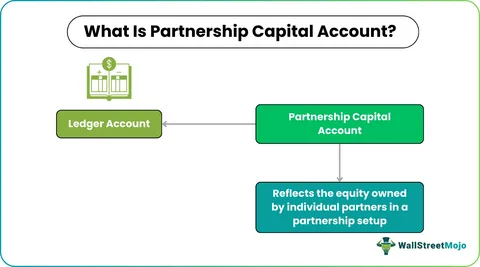
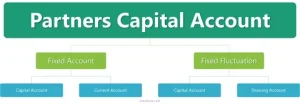
One of the distinguishing features of Partnership Accounting is the management of individual capital accounts. Each partner maintains a capital account reflecting their financial stake in the business.
Capital accounts typically include:
- Initial investment
- Additional contributions
- Allocated profits
- Allocated losses
- Withdrawals
Without careful management, discrepancies can arise. For example, if one partner withdraws more frequently than another, equity balances shift. Inaccurate profit allocation may cause misunderstandings to develop.
Professional partnership bookkeeping records these movements precisely and updates them regularly. This clarity becomes essential during expansion, restructuring, or partner transitions. Capital account accuracy protects both the partnership and the individual partners.
Profit Sharing and Fair Allocation
Profit sharing lies at the heart of partnership relationships. Whether profits are distributed equally or based on agreed ratios, accurate allocation is critical.
Structured Partnership Accounting follows the terms set out in the partnership agreement. This may involve:
- Fixed percentage splits
- Interest on capital contributions
- Salary allowances for active partners
- Performance-related distributions
Errors in profit allocation can have tax consequences and strain relationships. Reliable partnership bookkeeping ensures income and expenses are categorized correctly throughout the financial year, making profit calculation accurate and defensible. When allocation processes are clear and consistent, partners focus on growth rather than disputes.
Role of Partnership Bookkeeping
Behind every strong accounting system lies disciplined daily recording. Partnership bookkeeping forms the operational core of effective financial management. Every invoice issued, every supplier payment, every expense claim, and every partner withdrawal must be recorded accurately. Delayed entries or inconsistent categorization create confusion at year’s end.
Professional partnership bookkeeping provides:
- Real-time tracking of income and expenses
- Accurate reconciliation of bank accounts
- Clear classification of partner drawings
- Reliable data for reporting and analysis
- Reduced risk of costly errors
Consistency in bookkeeping ensures that financial statements reflect reality rather than estimates. At Lanop Business and Tax Advisors, we integrate meticulous partnership bookkeeping within our broader partnership accounting services to provide complete financial oversight.
Tax Responsibilities and Compliance
Partnership taxation requires precision. In many jurisdictions, partnerships operate under pass-through taxation. Profits are allocated to partners who report them individually.
Accurate Partnership Accounting ensures:
- Correct preparation of partnership returns
- Accurate reporting of individual profit shares
- Compliance with regulatory requirements
- Identification of legitimate deductions
- Reduced exposure to penalties
Professional partnership accounting services provide structured support to navigate complex tax rules while maintaining full compliance. Clear documentation protects the partnership during audits and ensures each partner meets their obligations confidently.
Managing Growth and Structural Changes
As partnerships evolve, accounting complexity increases. Growth may require additional capital contributions, financing arrangements, or admission of new partners. Each structural change requires adjustments in capital accounts and profit-sharing ratios. Without organized Partnership Accounting, transitions can become contentious.
Strong partnership financial management ensures smooth integration of new partners, accurate valuation of business interests, and fair settlement of exiting partners. Financial clarity simplifies change management and protects long-term stability.
Why Professional Expertise Matters
While some partnerships attempt internal management, complexity often increases with growth. Regulatory requirements evolve. Tax laws change. Financial risks expand. Engaging experienced advisors ensures that Partnership Accounting remains accurate, compliant, and strategically aligned.
At Lanop Business and Tax Advisors, our approach is comprehensive. We deliver tailored partnership accounting services, structured partnership bookkeeping, and forward-looking partnership financial management designed to protect partner interests and maximize profitability. We understand that each partnership is unique. Our solutions reflect individual goals, industry requirements, and long term ambitions.
Conclusion
Partnerships are built on collaboration, shared responsibility, and collective vision. Yet without structured Partnership Accounting, even strong partnerships may struggle with financial uncertainty. Clear capital accounts, disciplined partnership bookkeeping, transparent profit allocation, and strategic partnership financial management create a stable foundation for growth. When accounting systems are simplified and professionally managed, partners gain clarity, strengthen trust, and unlock sustainable profit.
At Lanop Business and Tax Advisors, we are committed to helping partnerships move from confusion to confidence. Through expert partnership accounting services, we ensure that financial clarity becomes a catalyst for lasting success. Because in every thriving partnership, clarity is not optional. It is essential.
Author




Author



Whether you are a developer handling API payloads or someone embedding images in HTML, knowing how to base64 encode decode online is an essential skill in today’s web-driven world. Base64 is a widely used encoding scheme that converts binary data into a text-safe format, making it easier to transmit across systems that only support plain text. This guide answers the most common questions about Base64, from how it works to the safest tools you can use right now.
Understanding Base64 The Fundamentals
What is Base64 encoding?
Base64 encoding is a method of converting binary data — such as images, files, or raw bytes — into a string of ASCII characters using a set of 64 printable characters (A–Z, a–z, 0–9, +, and /). This transformation ensures that the data remains intact during transfer through systems that might misinterpret raw binary. Every 3 bytes of input are converted into 4 Base64 characters, making the output roughly 33% larger than the original.
What is Base64 decoding?
Base64 decoding is simply the reverse process taking a Base64-encoded string and converting it back into its original binary or text form. When you receive a Base64 string from an API response or email attachment, a decoder reconstructs the original data precisely. Without decoding, the encoded string is unreadable to both humans and most applications.
How does Base64 encoding work internally?
The algorithm groups your input into 3-byte (24-bit) chunks, then splits each chunk into four 6-bit values. Each 6-bit value maps to one of 64 printable characters in the Base64 alphabet. If the input length is not divisible by 3, padding characters (=) are added to complete the final group.
Is Base64 a form of encryption?
Base64 is absolutely not encryption it offers zero security or confidentiality. Anyone who has a Base64-encoded string can instantly decode base64 encode decode online it without any key or password. It is purely an encoding format designed for safe data transport, not for hiding or protecting information.

Practical Use and Applications
Why is Base64 used in web development?
Base64 is used primarily because many communication protocols — such as HTTP, SMTP, and XML are built to handle text, not raw binary data. Encoding binary content into Base64 ensures it passes through these channels without corruption or data loss. It also allows binary data to be embedded directly inside text-based files like JSON, HTML, or CSS.
What are the most common real-world use cases?
The most frequent applications include embedding images directly into HTML or CSS as Data URIs, transmitting binary files through JSON APIs, encoding email attachments in MIME format, and storing small media assets in databases as text strings. Developers also use it to encode authentication credentials in Basic Auth headers for HTTP requests.
What file types can be Base64 encoded?
Virtually any file type can be Base64 encoded images (PNG, JPEG, GIF, SVG), PDFs, audio files, fonts, and even entire binary executables. The encoding process treats all input as raw bytes, so the file format is irrelevant. Keep in mind that very large files will produce very large encoded strings, which can affect performance if embedded directly in web pages.
Using Online Tools for Base64 Conversion
How do I base64 encode decode online quickly?
To base64 encode decode online, simply visit a reliable web tool, paste your text or upload your file, and click the encode or decode button. The outcome is produced immediately in your browser with no need for software installation or technical expertise. Tools like the one available at multiconverters.net make this process seamless for both beginners and experienced developers.
What should I look for in a good online Base64 tool?
A trustworthy Base64 tool should process your data entirely in the browser without sending it to a remote server, support both text and file input, and handle URL-safe Base64 variants (which replace + with – and / with _). It should also provide a clean copy-to-clipboard function and give meaningful error messages when the input is invalid or malformed.
Are online Base64 converters safe to use for sensitive data?
For non-sensitive data, reputable online tools are perfectly safe and convenient. However, if your content contains passwords, private keys, personal user data, or confidential business information, you should use a locally installed tool or a browser-based tool that explicitly processes everything client-side. Always check whether the tool sends data to a server before encoding anything sensitive.
Conclusion
Understanding how to base64 encode decode online is a practical skill that saves time across dozens of everyday developer and web tasks. From embedding images in emails to decoding API responses, Base64 bridges the gap between binary data and text-based systems reliably.
Head over to multiconverters.net to try a fast, free, and browser-based Base64 encoder and decoder — no sign-up required. Whether you’re a developer debugging API responses, a designer embedding image data directly into HTML or CSS, or just someone who needs to quickly decode a string from an email. Or configuration file, this tool is built for you. It processes everything locally in your browser, meaning your sensitive data never leaves your device.
No uploads, no server logs, no privacy concerns. You can convert between text and Base64 instantly, with support for both standard and URL-safe variants. The interface is clean, works on any device, and gives you one-click copy functionality. Skip the complicated software installations and subscription fees. Just paste, click, and get your result in milliseconds — completely free, forever.
Author



Bendigo New Apartments: Heritage, Culture & Modern Living

Joshua Jamal Shorts: Style on a Budget in 2026

TN Patta Chitta: Check Land Records & Pay House Tax Online

Common Projects Sneakers: Design, Style, and Authenticity Tips

Partnership Accounting: Trust, Track Equity, and Maximize Profit

Darwin Apartments: The New Wave of Tropical Urban Living

Darwin’s New Apartment: Tropical Living Meets Urban Growth

On Cloud Shoes: Comfort, Performance, and Everyday Style

P-Shot in Riyadh: Executive Vitality & Regenerative Medicine

QuickBooks Error H202: Causes, Fixes, and Prevention Tips

Cybersecurity Consulting Company SequelNet Provides Critical IT Support Services to Medical Billing Firm, Medical Optimum

Team Communication Software Transforms Operations at Finance Innovate

Project Management Tool Transforms Long Island Business

How Alleviate Poverty Utilized IPPBX’s All-in-One Solution to Transform Lives in New York City

Breast Cancer: The Imperative Role of Mammograms in Screening and Early Detection

Unstoppable Collaboration: D.C.’s Citi Open and Silicon Valley Classic Unite to Propel Women’s Tennis to New Heights

Embracing Renewal: Sizdabedar Celebrations Unite Iranians in New York’s Eisenhower Park

The Benefits of Starting a Side Hustle for Financial Freedom

New Blood Donation Screening Questions What You Need to Know

Stylishly Timeless: The 5 Types of Sandals You Need in Your Closet
-

 Business3 years ago
Cybersecurity Consulting Company SequelNet Provides Critical IT Support Services to Medical Billing Firm, Medical Optimum
-
Business3 years ago
Team Communication Software Transforms Operations at Finance Innovate
-
Business3 years ago
Project Management Tool Transforms Long Island Business
-
Business3 years ago
How Alleviate Poverty Utilized IPPBX’s All-in-One Solution to Transform Lives in New York City
-
health3 years ago
Breast Cancer: The Imperative Role of Mammograms in Screening and Early Detection
-
Sports3 years ago
Unstoppable Collaboration: D.C.’s Citi Open and Silicon Valley Classic Unite to Propel Women’s Tennis to New Heights
-
Art /Entertainment3 years ago
Embracing Renewal: Sizdabedar Celebrations Unite Iranians in New York’s Eisenhower Park
-
Finance3 years ago
The Benefits of Starting a Side Hustle for Financial Freedom







